
iApp - Global Charts & Search
各地域のApp Storeランキングを閲覧し、アプリのバージョン、配信状況、価格を追跡できます。
天从 何 · ユーティリティ · ¥500
iPhone スクリーンショット
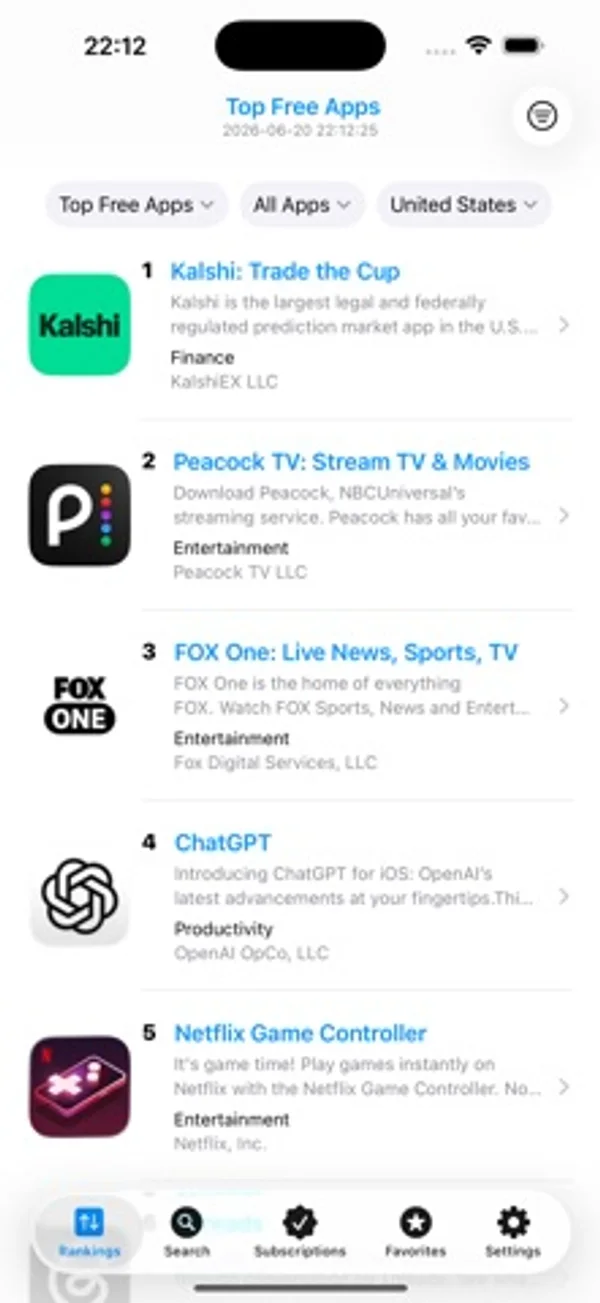
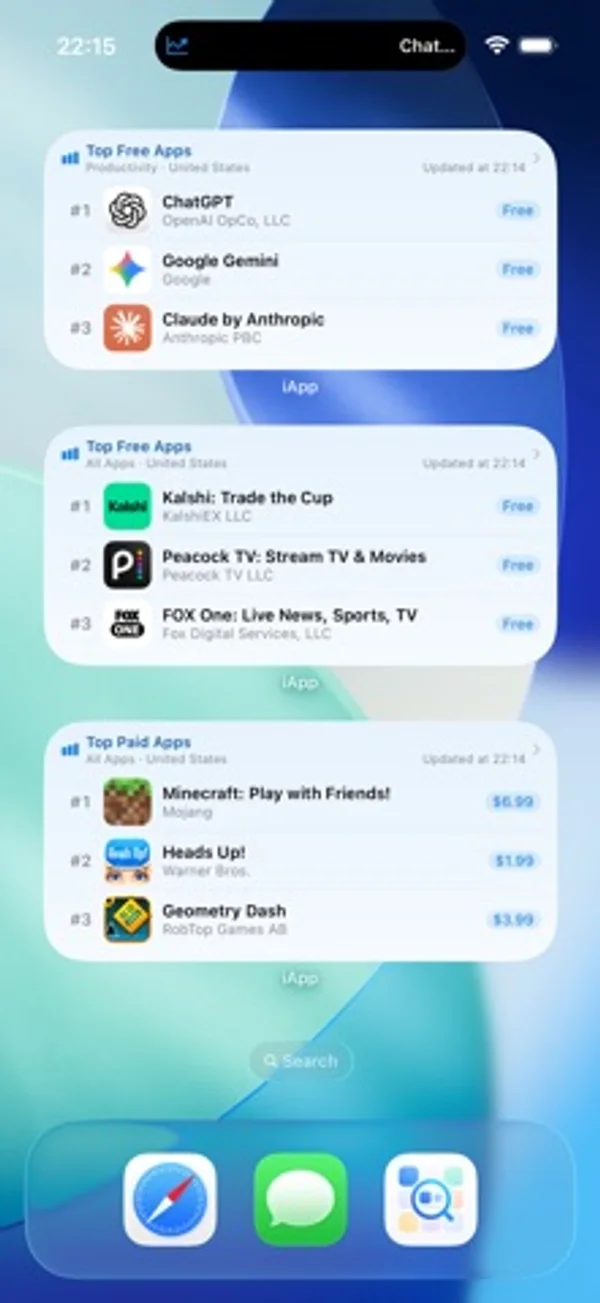
iPhone Duo での活用
展開して横向きにすると、ランキング、詳細、購読一覧が広い内側画面に合わせて並びます。
新機能
バージョン 2.11.0 ·
iApp v2.11.0 major update This version is made for the unfolded iPhone Duo, so charts, details, and subscriptions have room to breathe. 1. Designed for the iPhone Duo inner display. Unfold it, turn to landscape, and charts, search, app details, favorites, subscriptions, and settings spread across the wide canvas. Ranks, prices, and developer names stay easy to read. 2. The Home Screen grows with it. Rank widgets and subscription widgets can sit side by side, so popular charts and the apps you are watching are visible at a glance. 3. Open the system App Store from app details. Open in App Store uses the storefront for the region you are viewing. The in-app preview is still there. 4. The screenshot gallery refits each image when you change quality. Moving from standard to high resolution or original shows the full cover, instead of cropping it with the previous zoom. 5. On iOS 27, lists meet the top of the screen with a soft blur. Charts, search, details, and settings look calmer, and a crash in that edge handling is fixed so scrolling stays steady. Ratings and notes are welcome. Rate iApp on the App Store, or write to us from Settings and Feedback. Every note is read.
開発者はこの内容を日本語化していません。
App Store の説明開発者による説明です。
iApp is a third-party App Charts Store browser for developers, PMs, and app fans. No sign-in or Apple ID switching—browse 170+ storefront charts, search details, and track version, availability, and price drops. Data from Apple’s public iTunes APIs. Not affiliated with Apple Inc. WHY CHOOSE iAPP 1. Cross-region without switching accounts Browse 170+ markets. Keyword region search. Customizable Quick Region chips (shared or separate, unlimited). Switch region on the detail header; All Regions stays available. System region helper reads the storefront and lets you confirm or copy the official jump link. 2. Rich charts, flexible persistent filters 12 live charts: Free, Paid, Grossing, and New for iPhone, iPad, and Mac. 26 categories plus 18 game subgenres. Filters save and scroll to top. Mac/iPad Paid & Grossing use progressive web charts; platform badges. Optional rank history & presets with interactive charts and silent foreground refresh. Share long ranking snapshots. 3. Search & detail in one place Keyword search with region and iPhone/iPad/Mac filters; paste App Store links or App IDs. Search history; dismiss search while keeping results (iOS 15+). Catalog-first screenshots and App Preview video (HLS, copy/save). Reviews with sort, star filter, expand text, load more, developer replies; fallback APIs. Same-developer preview; full developer list with sorts, by-rank, text/CSV/image export. All Regions: availability, price, version, by-rank, content compare. Favorite, share QR cards, or subscribe to version / new listing / delisting / price drop. 4. Subscription monitoring Auto-poll with global/per-item intervals (h/m/s, min 10s). Keyword/platform search for version/delisting; App ID or link for new listings. Track updates, new listings, delistings, and price drops; pause/resume. Optional per-item Live Activity (Lock Screen / Dynamic Island). Optional Preferences iCloud. Subscription Tab can hide. 5. Favorites that stick Star or swipe to favorite by region. Optional Favorites Tab; shortcuts & Deep Links. Pin, groups, notes; multi-select; filter by group, region, category, or ranking. 9 sorts; export text, CSV, or long images. Developer Favorites (optional Tab + independent iCloud). Browse history up to 100 apps. 6. Home & Lock Screen widgets iOS 17+: Ranking widgets (type, category, region, game subgenre) Small–Extra Large + Lock Screen; Favorites sync pin-first. Deep Links; theme-following backgrounds; 18 UI languages. iOS 16.2+: Live Activities for Top 6 rankings and subscription monitors (separate LA toggle). 7. Lists & browsing extras List/grid on rankings (iPhone 2–4 cols, iPad 3–6); Search & Favorites layouts separate. Multi-field rows: summary, rating, size, min OS, dates, version, content rating, languages. Long-press: All Regions, Store page, same developer, homepage, subscribe, favorite developer. APPEARANCE & SETTINGS System / Light / Dark; 18 languages; 9 alternate icons. App Settings: cellular alerts; Subscription / Favorites / Developer Favorites tabs. Preferences iCloud for subscriptions, filter presets, search & quick regions. Up to 4 shortcuts from 15 destinations; Siri & App Intents. HIGHLIGHTS Native SwiftUI; public APIs only; optional iCloud; widgets (iOS 17+); shortcuts & Siri; 12 charts, 18 game subgenres, 170+ regions, reviews with developer replies, Live Activity, multi-field lists, version history, same-developer preview. IMPORTANT Third-party tool—not the official App Store. Data depends on Apple public APIs. Subscription monitoring works in the foreground—not system push. Widgets need iOS 17+; main app needs iOS 15+. Shortcuts: system max 4 among 15 destinations. Live Activity needs iOS 16.2+; no refresh when fully quit. Prefer Wi-Fi for heavy All Regions queries; saving video needs Photos permission.
iPhone Duo での iApp - Global Charts & Search:よくある質問
iApp - Global Charts & Search は iPhone Duo に最適化されていますか?
一部対応しています。iApp - Global Charts & Search は「画面対応済み」で、大きな内側ディスプレイいっぱいに表示されます。ただし折りたたみ専用の機能はありません。2026年11月3日 に確認(開発者の発表)。
iPhone Duo での iApp - Global Charts & Search はどう見えますか?
展開して横向きにすると、ランキング、詳細、購読一覧が広い内側画面に合わせて並びます。
iApp - Global Charts & Search の価格は?
iApp - Global Charts & Search は App Store で ¥500 です。
その他のユーティリティアプリ
すべて見る ›
開閉回数や姿勢ごとの時間を記録し、センサー、推定、手動の記録を区別します。

基本・関数・プログラマー向けの計算と単位変換、履歴の再利用ができます。

端末の開閉に合わせて変わる折りたたみ角度を表示します。

角度をリアルタイムで確認し、目標角度のチャレンジを楽しめます。

解説、練習問題、模擬試験でUnixの権限を学べます。

オフセットやサドルなど、電線管の曲げ加工を計算します。