
iPhone スクリーンショット
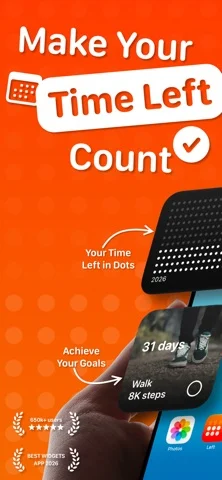
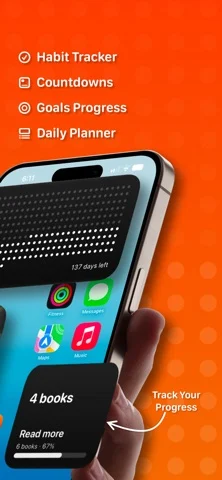
iPhone Duo での活用
Duo support is reported in the linked sources. The specific fold interaction and real-device behavior have not been independently verified.
新機能
バージョン 2026.10.5 ·
READY FOR IPHONE DUO Left is ready for iPhone Duo from day one. It works on both screens, and when you open it up, Left uses the large inner screen to show more at once, with your lists and details side by side. READY FOR IOS 27 Left is ready for iOS 27, with a first Siri AI integration, new Live Activities, extra large portrait widgets for your Home Screen, and more. ALL-NEW PLANNER Your whole day in one beautiful, time-first view: habits, streaks, Ahead dates, calendar events, reminders, weather, sleep, and workouts, together at last. Switch easily between List, Week, Month and Timeline views to see your day the way you like. One calm place to plan your day, and if you have ADHD, one place means nothing gets lost across apps. Two new widgets come with it: a Planner widget and a Calendar widget for your Home Screen. FASTING TOOL A simple (and beautiful) fasting tool to track your fasts with custom modes, sunrise to sunset, overnight and more options. Fasting includes notifications, widgets and an optional Live Activity to help you keep track of each session. ACHIEVE GOALS WITH AIM Aim is a flexible goal tracker for anything you can count, helping you build up or cut down. Stay on track and see your progress every day. You can even challenge your friends to reach the same goal. FASTER AND MORE POLISHED Lots of polish and small improvements across the app to make Left faster, smoother and better every day. Thank you for using Left. Your time is limited: see it, plan it, and make the most of it.
開発者はこの内容を日本語化していません。
このアプリについて
Duo support is reported in the linked sources. The specific fold interaction and real-device behavior have not been independently verified.
英語版の掲載内容を翻訳しています。
App Store の説明開発者による説明です。
Left is a time-awareness app built on one idea: your time is limited, and seeing it changes how you use it. Left turns time into something you can see, then helps you act on it with habits, streaks, countdowns, and a planner for your day. TIME LEFT See where you are in the year, month, week, day, hour, and your life. Each unit is a symbol; the past dims, what remains stays in view. Your life in weeks, year progress, and life progress, made tangible. Choose dots, symbols, colors, and layouts. A quiet, honest way to face limited time without it becoming morbid. HABITS, STREAKS & AIMS Left is a habit tracker for the person you are trying to become. Build habits on any schedule: daily, several times a day, weekly, monthly, or custom. Track streaks and protect them, count the days since anything that matters, and set reminders so nothing slips. And you don't have to do it alone: share a habit or streak with a friend, keep each other accountable, and send kudos, cheers, and encouragement when it counts. With aims, you have a flexible goal tracker for anything you can count, helping you build up or cut down. Stay on track and see your progress every day. AHEAD - COUNTDOWNS & DATES Add the dates that pull you forward: trips, birthdays, holidays, anniversaries, weddings, deadlines, retirement, and personal milestones. Count down to each one, import from Apple Calendar, and track both the days until and the days since. New: every Ahead date now has its own to-do list, so you can plan the small tasks that make the date happen and check them off as it approaches. Share an Ahead date with a friend, follow it side by side, comment, and add to-dos together on joint dates. PLANNER Planner pulls everything that matters into one beautiful, time-first view: your habits, streaks, Ahead dates, Apple Calendar events, Apple Reminders, weather, sleep, and workouts, together at last. Not another calendar, but a clear, calm picture of what the day is actually asking of you. Because everything lives in one place instead of five apps, Planner is a quiet ally for ADHD minds: see the whole day at a glance and miss nothing. Two new widgets come with it: a Planner widget and a Calendar widget for your Home Screen. FASTING TOOL A simple yet beautiful fasting tool inside Left. Pick a fasting window, start it in a tap, and follow every fast live from your Lock Screen, widgets and the Dynamic Island. Your history and stats are all there too. WHY LEFT Other apps give you habits without design, or aesthetics without depth. Left combines both: the widget range, the design quality, and the full set of time tools, in one app made with restraint and taste. Left requires a Premium plan to use its features. Choose a weekly, yearly plan or a one-time lifetime purchase to unlock everything. Terms: https://www.apple.com/legal/internet-services/itunes/dev/stdeula/
iPhone Duo での Left: Widgets for Time Left:よくある質問
Left: Widgets for Time Left は iPhone Duo に最適化されていますか?
開発者またはストアに iPhone Duo 対応の記載があります。
iPhone Duo での Left: Widgets for Time Left はどう見えますか?
Duo support is reported in the linked sources. The specific fold interaction and real-device behavior have not been independently verified.
Left: Widgets for Time Left の価格は?
Left: Widgets for Time Left は App Store で無料でダウンロードできます。
その他の仕事効率化アプリ
すべて見る ›
所要時間でタスクを分ける、落ち着いた ToDo リスト兼ペーパー風プランナー

iPhone Duo の両ディスプレイ向けレイアウトを備えたタスク・プロジェクト管理

展開するとメッセージと受信ボックスを並べて表示できる、Readdle の統合受信ボックス

iPhone Duo のあらゆる姿勢に合わせて形を変える、Cultured Code のタスク管理アプリ

iPhone Duo を開くとノートが開く、手書き風のプライベートノートブック

ブックとテーブルトップの姿勢向けの集中タイマーを備えた、ビジュアルタイムライン式の 1 日プランナー