
iPhone 截图
新功能
版本 2026.10.5 ·
READY FOR IPHONE DUO Left is ready for iPhone Duo from day one. It works on both screens, and when you open it up, Left uses the large inner screen to show more at once, with your lists and details side by side. READY FOR IOS 27 Left is ready for iOS 27, with a first Siri AI integration, new Live Activities, extra large portrait widgets for your Home Screen, and more. ALL-NEW PLANNER Your whole day in one beautiful, time-first view: habits, streaks, Ahead dates, calendar events, reminders, weather, sleep, and workouts, together at last. Switch easily between List, Week, Month and Timeline views to see your day the way you like. One calm place to plan your day, and if you have ADHD, one place means nothing gets lost across apps. Two new widgets come with it: a Planner widget and a Calendar widget for your Home Screen. FASTING TOOL A simple (and beautiful) fasting tool to track your fasts with custom modes, sunrise to sunset, overnight and more options. Fasting includes notifications, widgets and an optional Live Activity to help you keep track of each session. ACHIEVE GOALS WITH AIM Aim is a flexible goal tracker for anything you can count, helping you build up or cut down. Stay on track and see your progress every day. You can even challenge your friends to reach the same goal. FASTER AND MORE POLISHED Lots of polish and small improvements across the app to make Left faster, smoother and better every day. Thank you for using Left. Your time is limited: see it, plan it, and make the most of it.
开发者尚未提供此内容的中文版本。
App Store 简介由开发者撰写。
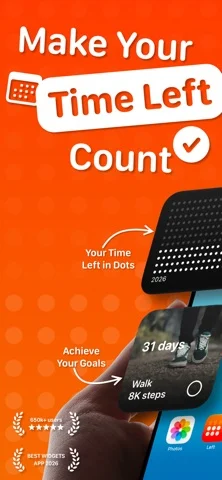
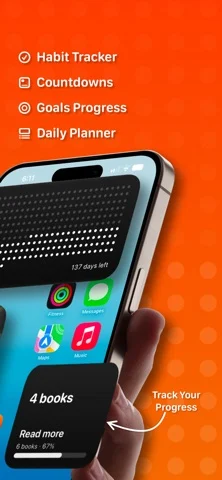
Left is a time-awareness app built on one idea: your time is limited, and seeing it changes how you use it. Left turns time into something you can see, then helps you act on it with habits, streaks, countdowns, and a planner for your day. TIME LEFT See where you are in the year, month, week, day, hour, and your life. Each unit is a symbol; the past dims, what remains stays in view. Your life in weeks, year progress, and life progress, made tangible. Choose dots, symbols, colors, and layouts. A quiet, honest way to face limited time without it becoming morbid. HABITS, STREAKS & AIMS Left is a habit tracker for the person you are trying to become. Build habits on any schedule: daily, several times a day, weekly, monthly, or custom. Track streaks and protect them, count the days since anything that matters, and set reminders so nothing slips. And you don't have to do it alone: share a habit or streak with a friend, keep each other accountable, and send kudos, cheers, and encouragement when it counts. With aims, you have a flexible goal tracker for anything you can count, helping you build up or cut down. Stay on track and see your progress every day. AHEAD - COUNTDOWNS & DATES Add the dates that pull you forward: trips, birthdays, holidays, anniversaries, weddings, deadlines, retirement, and personal milestones. Count down to each one, import from Apple Calendar, and track both the days until and the days since. New: every Ahead date now has its own to-do list, so you can plan the small tasks that make the date happen and check them off as it approaches. Share an Ahead date with a friend, follow it side by side, comment, and add to-dos together on joint dates. PLANNER Planner pulls everything that matters into one beautiful, time-first view: your habits, streaks, Ahead dates, Apple Calendar events, Apple Reminders, weather, sleep, and workouts, together at last. Not another calendar, but a clear, calm picture of what the day is actually asking of you. Because everything lives in one place instead of five apps, Planner is a quiet ally for ADHD minds: see the whole day at a glance and miss nothing. Two new widgets come with it: a Planner widget and a Calendar widget for your Home Screen. FASTING TOOL A simple yet beautiful fasting tool inside Left. Pick a fasting window, start it in a tap, and follow every fast live from your Lock Screen, widgets and the Dynamic Island. Your history and stats are all there too. WHY LEFT Other apps give you habits without design, or aesthetics without depth. Left combines both: the widget range, the design quality, and the full set of time tools, in one app made with restraint and taste. Left requires a Premium plan to use its features. Choose a weekly, yearly plan or a one-time lifetime purchase to unlock everything. Terms: https://www.apple.com/legal/internet-services/itunes/dev/stdeula/
Left: Widgets for Time Left 在 iPhone Duo 上:常见问题
Left: Widgets for Time Left 针对 iPhone Duo 优化了吗?
开发者或商店资料已标明支持 iPhone Duo。
Left: Widgets for Time Left 多少钱?
Left: Widgets for Time Left 可在 App Store 免费下载。
更多效率应用
查看全部 ›
安静的待办清单与纸质风格计划本,按所需时长给任务分类

任务与项目管理,为 iPhone Duo 的两块屏幕分别优化布局

Readdle 的统一收件箱邮件应用,展开后收件箱与邮件并排显示

Cultured Code 的任务管理器,针对 iPhone Duo 每种姿态重新调整布局

展开 iPhone Duo 即可打开的私密手写风格笔记本

可视化时间线日程规划应用,专门为书本和桌面姿态设计了专注计时器