
PodMelody: Podcasts & Music
ポッドキャストとApple Musicを1つのキューにまとめ、速度調整も可能。
Slip Angle Dynamics Pty Ltd · 読書/ニュース · 無料
iPhone スクリーンショット
新機能
バージョン 1.1.6 ·
Made for iPhone Duo. Your mix and its player are right there on the cover screen. Open it out and the player carries on full size; turn it sideways and Music and Podcasts open side by side as one spread. In Editorial, half-fold it and Now Playing splits at the fold, and every page keeps its controls clear of the hinge. System's player is laid out for the Duo too. Two pages, one mix, on iPad. Turn iPad sideways in Editorial and Music and Podcasts sit side by side, so you can pick sources from both at once. Play it now, keep your mix. Tap an episode or a song and it plays straight away, slipped in ahead of Up Next: your mix carries on afterwards, and an interrupted episode picks up where it stopped. Long-press an episode or song for Play Next or Play Last, or long-press a source on Home and choose Play On Its Own to hear just that. Find and order your sources. Music and Podcasts share one search and filter row in both looks: show only what's queued, and set the playback order from the same menu. When Apple Music can't play. If Apple Music won't start a song, PodMelody now says why and what usually fixes it, and your podcasts keep playing. Plus minor fixes and optimizations.
開発者はこの内容を日本語化していません。
App Store の説明開発者による説明です。
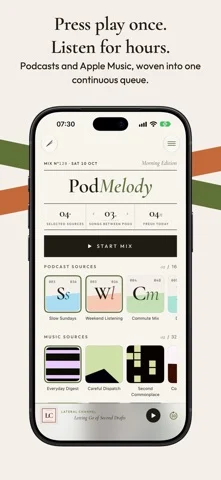
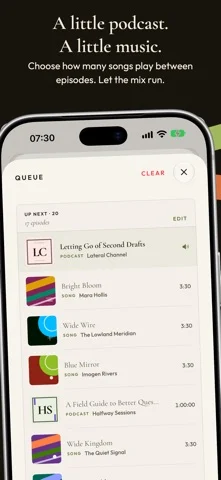
PodMelody turns podcasts and Apple Music into one continuous listening flow - with reusable podcast stations and a queue you control. Choose individual podcast shows or build podcast stations that bring several shows together. Browse your subscriptions and stations in a visual grid that makes larger libraries quick to scan. Add Apple Music playlists or radio stations, decide how many songs should play between episodes, and start a mix. PodMelody builds the queue and keeps it moving across the app, Lock Screen, Control Center, and CarPlay. PodMelody is designed to make faster listening sound natural, not merely quicker. Laughter-aware playback eases off automatically when laughter is detected, giving jokes and reactions room to land before returning to your chosen speed. CarPlay is a complete PodMelody experience, not just a Now Playing screen. Use Mix to choose your podcast stations, shows, and music sources and start listening, Queue to see what is coming and jump around it, or Browse to open a show or playlist. You can also allow or exclude explicit content directly from CarPlay. Artwork, source selections, and playback changes stay in step with your phone. PodMelody is built for people who want podcasts and music together without constantly switching apps or rebuilding queues by hand. Mix your way: - Create reusable podcast stations that combine the shows you choose into one source - Build one continuous queue from individual shows, podcast stations, and Apple Music playlists or radio stations - Set how many songs play between podcast episodes, including zero for a podcast-only mix Explore your podcasts: - Browse podcast subscriptions and stations in a visual grid built for scanning larger libraries - Read transcripts that follow playback, search for a remembered moment, and see standout quotes in the show notes - Import shows from RSS or Apple Podcasts, download episodes for offline listening, and move subscriptions with OPML - Save bookmarks and track played, skipped, and unplayed episodes Listen your way: - Listen from 0.5x to 3.0x with voice-clarity processing that keeps speech easy to follow at high speeds - Keep jokes and reactions natural with laughter-aware playback that eases off automatically when laughter is detected - Level podcast loudness so episodes and music sit at a consistent volume - Compress silences and see how much listening time you have saved - Set a sleep timer for long listening sessions Take it everywhere: - Use the full CarPlay app to choose sources, allow or exclude explicit content, start a mix, browse shows and playlists, and see or jump around the queue - Open iPhone Duo or turn iPad sideways for Music and Podcasts side by side; turn iPhone sideways for a two-pane Now Playing - Resume unfinished episodes across devices with iCloud - Control playback from the Lock Screen, Control Center, and Shortcuts - Ask Siri to play, follow and queue your shows and playlists by name on iOS 27 Make it yours: - Choose PodMelody's signature Editorial interface or the Apple-style System interface - both included free - Pick PodMelody's accent color, in either interface, with PodMelody Plus - Use PodMelody in English or German PodMelody keeps the queue under your control. Music plays through Apple Music itself, so your play counts and listening history stay up to date just as if you were using the Music app. Core listening works for free. PodMelody Plus unlocks extra comfort, audio, download, color, and CarPlay features. An Apple Music subscription is required for Apple Music playback. Podcast availability depends on each podcast feed. Screenshots use representative artwork and sample names; on your device, PodMelody shows your sources' own artwork. Explicit-content filtering relies on songs and podcast episodes being identified as explicit in their source metadata. Terms of Use: https://www.apple.com/legal/internet-services/itunes/dev/stdeula/
iPhone Duo での PodMelody: Podcasts & Music:よくある質問
PodMelody: Podcasts & Music は iPhone Duo に最適化されていますか?
開発者またはストアに iPhone Duo 対応の記載があります。
PodMelody: Podcasts & Music の価格は?
PodMelody: Podcasts & Music は App Store で無料でダウンロードできます。
その他の読書/ニュースアプリ
すべて見る ›
本物の折り紙を再現し、折り線を自由に動かしたり手順に沿って鶴や飛行機、ひよこを折れる。

答えをどこまで見たかでカードの復習時期を決め、難易度は評価しない。

折りたたみに合わせてレイアウトが変わる、要約機能内蔵の RSS リーダー

折りたたみ・展開に合わせてレイアウトが切り替わるRSS/ニュースリーダー

26冊の古典を朗読付きで読め、各ページの横に物語の世界を表示。

図鑑の項目を音声で読み上げ、カメラでおもちゃや絵をスキャンして識別する。