
iPhone スクリーンショット
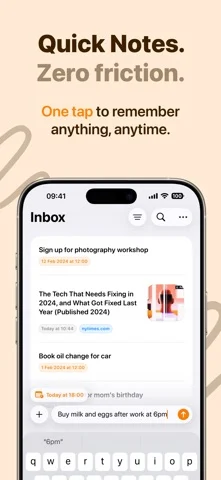
iPhone Duo での活用
Duo support is reported in the linked sources. The specific fold interaction and real-device behavior have not been independently verified.
新機能
バージョン 3.4.2 ·
Capture now supports iPhone Duo. Open it, and your captures sit next to the one you're reading, with room for its photo, link, or note. Closed, everything fits the outer display. Bugfixes: • Addressed an issue where tapping a link preview in your list or grid opened the link instead of the capture. • Addressed issues where removing a date, splitting a capture, or renaming a list was not saved correctly. • Addressed issues where some exports left out links, phone numbers, or attachments. • Addressed an issue where widgets could open the wrong capture or list. • Addressed a crash that could occur after deleting a capture with an image. • Addressed a crash that could occur in the capture list.
開発者はこの内容を日本語化していません。
このアプリについて
Duo support is reported in the linked sources. The specific fold interaction and real-device behavior have not been independently verified.
英語版の掲載内容を翻訳しています。
App Store の説明開発者による説明です。
Capture's intuitive interface and smart features turn your mobile device into a powerful thought organizer, letting you seize, sort, and execute your ideas with unprecedented ease. • Quick Notes: Immediacy is key, and with Capture, the moment inspiration hits, you're ready. Our quick note-taking feature is designed for those who think fast and want to write faster. Notes, lists, and reminders are captured in real-time, ensuring no idea ever slips through the cracks. Brain dump on the go and stay one step ahead of your inspiration. • Export to 20+ apps: Looking to migrate your captures to other platforms like Obsidian, Things 3, Todoist, iA Writer, Craft, Omnifocus 4, Fantastical, UpNote, NotePlan, Reminders or Apple Calendar? Capture's export functionality allows you to move your content with ease. It's all about getting your thoughts out there, wherever 'there' might be, from to-do to calendar apps. In addition, you can run any Siri Shortcut as an export option, enabling all kinds of workflows by using the capture as input. • iCloud Sync: Keep your ideas and tasks in harmony across all your devices with Capture's iCloud Sync. Every note, list, and preference is automatically updated, ensuring you have access to your latest thoughts wherever you go. • Intuitive reminders: With our badge system, subtle yet effective reminders keep you informed of your tasks. These intuitive nudges ensure that important notes don't get lost in the shuffle, keeping you alert and on track. • Automatic date & URL recognition: Organization has never been so effortless. Capture's data recognition identifies your dates and URLs so you don't need to manually insert them. They are also pre-filled with your favorite export option. • Widgets: Access your captures instantly with our widgets right from your home and lock screen. Capture prioritizes convenience, giving you a visual snapshot of your latest thoughts and to-dos without having to open the app. • Share Extension: Add content to Capture with ease using the Share extension — available from any app. • Siri & Shortcuts: Capture thoughts hands-free with Siri voice commands and enhance your workflow with Siri Shortcuts to create, open, and search captures effortlessly. Terms of Use: https://www.apple.com/legal/internet-services/itunes/dev/stdeula/
iPhone Duo での Quick Notes - Capture:よくある質問
Quick Notes - Capture は iPhone Duo に最適化されていますか?
開発者またはストアに iPhone Duo 対応の記載があります。
iPhone Duo での Quick Notes - Capture はどう見えますか?
Duo support is reported in the linked sources. The specific fold interaction and real-device behavior have not been independently verified.
Quick Notes - Capture の価格は?
Quick Notes - Capture は App Store で無料でダウンロードできます。
その他の仕事効率化アプリ
すべて見る ›
所要時間でタスクを分ける、落ち着いた ToDo リスト兼ペーパー風プランナー

iPhone Duo の両ディスプレイ向けレイアウトを備えたタスク・プロジェクト管理

展開するとメッセージと受信ボックスを並べて表示できる、Readdle の統合受信ボックス

iPhone Duo のあらゆる姿勢に合わせて形を変える、Cultured Code のタスク管理アプリ

iPhone Duo を開くとノートが開く、手書き風のプライベートノートブック

ブックとテーブルトップの姿勢向けの集中タイマーを備えた、ビジュアルタイムライン式の 1 日プランナー