
iPhone 截图
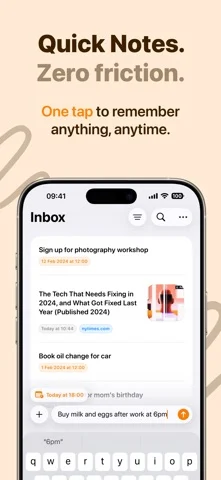
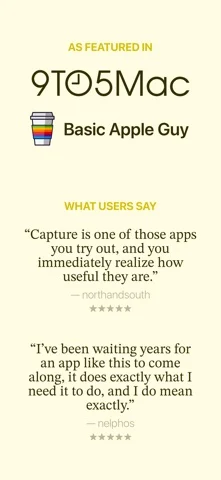
在 iPhone Duo 上的表现
来源中有 Duo 支持声明,具体折叠交互和真机表现尚未独立核验。
新功能
版本 3.4.2 ·
Capture now supports iPhone Duo. Open it, and your captures sit next to the one you're reading, with room for its photo, link, or note. Closed, everything fits the outer display. Bugfixes: • Addressed an issue where tapping a link preview in your list or grid opened the link instead of the capture. • Addressed issues where removing a date, splitting a capture, or renaming a list was not saved correctly. • Addressed issues where some exports left out links, phone numbers, or attachments. • Addressed an issue where widgets could open the wrong capture or list. • Addressed a crash that could occur after deleting a capture with an image. • Addressed a crash that could occur in the capture list.
开发者尚未提供此内容的中文版本。
App Store 简介由开发者撰写。
Capture's intuitive interface and smart features turn your mobile device into a powerful thought organizer, letting you seize, sort, and execute your ideas with unprecedented ease. • Quick Notes: Immediacy is key, and with Capture, the moment inspiration hits, you're ready. Our quick note-taking feature is designed for those who think fast and want to write faster. Notes, lists, and reminders are captured in real-time, ensuring no idea ever slips through the cracks. Brain dump on the go and stay one step ahead of your inspiration. • Export to 20+ apps: Looking to migrate your captures to other platforms like Obsidian, Things 3, Todoist, iA Writer, Craft, Omnifocus 4, Fantastical, UpNote, NotePlan, Reminders or Apple Calendar? Capture's export functionality allows you to move your content with ease. It's all about getting your thoughts out there, wherever 'there' might be, from to-do to calendar apps. In addition, you can run any Siri Shortcut as an export option, enabling all kinds of workflows by using the capture as input. • iCloud Sync: Keep your ideas and tasks in harmony across all your devices with Capture's iCloud Sync. Every note, list, and preference is automatically updated, ensuring you have access to your latest thoughts wherever you go. • Intuitive reminders: With our badge system, subtle yet effective reminders keep you informed of your tasks. These intuitive nudges ensure that important notes don't get lost in the shuffle, keeping you alert and on track. • Automatic date & URL recognition: Organization has never been so effortless. Capture's data recognition identifies your dates and URLs so you don't need to manually insert them. They are also pre-filled with your favorite export option. • Widgets: Access your captures instantly with our widgets right from your home and lock screen. Capture prioritizes convenience, giving you a visual snapshot of your latest thoughts and to-dos without having to open the app. • Share Extension: Add content to Capture with ease using the Share extension — available from any app. • Siri & Shortcuts: Capture thoughts hands-free with Siri voice commands and enhance your workflow with Siri Shortcuts to create, open, and search captures effortlessly. Terms of Use: https://www.apple.com/legal/internet-services/itunes/dev/stdeula/
Quick Notes - Capture 在 iPhone Duo 上:常见问题
Quick Notes - Capture 针对 iPhone Duo 优化了吗?
开发者或商店资料已标明支持 iPhone Duo。
Quick Notes - Capture 在 iPhone Duo 上是什么样子?
来源中有 Duo 支持声明,具体折叠交互和真机表现尚未独立核验。
Quick Notes - Capture 多少钱?
Quick Notes - Capture 可在 App Store 免费下载。
更多效率应用
查看全部 ›
安静的待办清单与纸质风格计划本,按所需时长给任务分类

任务与项目管理,为 iPhone Duo 的两块屏幕分别优化布局

Readdle 的统一收件箱邮件应用,展开后收件箱与邮件并排显示

Cultured Code 的任务管理器,针对 iPhone Duo 每种姿态重新调整布局

展开 iPhone Duo 即可打开的私密手写风格笔记本

可视化时间线日程规划应用,专门为书本和桌面姿态设计了专注计时器