
ReadAloud: Text to Speech PDF
テキストやPDF、Word、EPUB、Kindleファイルを端末内の自然な音声で読み上げる。
ZHENGQIAO JIANG · 仕事効率化 · 無料
iPhone スクリーンショット
新機能
バージョン 1.9.0 ·
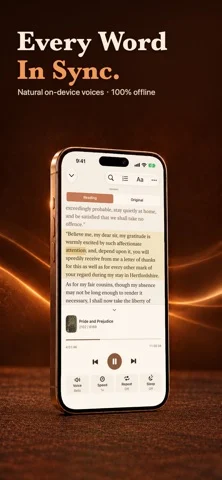
ReadAloud 1.9.0 brings natural voices for Japanese and Korean, and much better pronunciation in French, Italian, Spanish and Portuguese. • Japanese and Korean neural voices: four voices each, running entirely on your device. A voice pack downloads once, on demand. Numbers, dates and counters are spoken the way each language says them. • Much better French, Italian, Spanish and Portuguese: words with nasal vowels are no longer cut short, names such as “Maria” are no longer mispronounced, and the highlighted word follows the voice. • When a document has a better voice available, for example in French or Chinese, ReadAloud offers it and switches to it as soon as the download finishes. • Very long books and big web pages now import much faster. • Web articles read cleaner: the contents list, pronunciation guides and footnote numbers of Wikipedia pages are no longer read aloud. • Fixed: the preview of a long imported web article could be blank on some iPhones. Importing a link now starts with an empty box every time. • A redesigned widget keeps your last document so you can continue with one tap, and the larger sizes show what plays next.
開発者はこの内容を日本語化していません。
App Store の説明開発者による説明です。
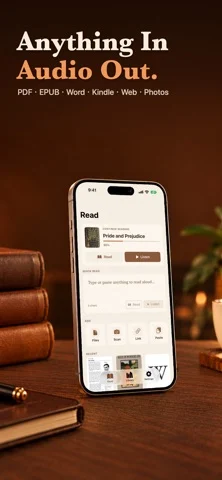
ReadAloud turns any text into natural speech with on-device voices: neural voices for English, Chinese, Japanese, Korean, Spanish, French, German and more, plus Apple's system voices. Listen to PDFs, Word documents, EPUB and Kindle books, articles, photos, and any text in 60+ languages, 100% offline. WHAT YOU CAN DO • LISTEN TO ANYTHING Type or paste text, import a PDF, Word (DOCX), EPUB, or Kindle (MOBI/AZW3, DRM-free) document, scan a photo or a printed page with your camera, or paste a URL to hear the article text. Auto language detection picks the right voice for you. Jump between chapters in EPUB and Word documents, and skip straight to any page in a PDF. Long books, including web novels with thousands of chapters, are supported. • NATURAL VOICES, ON YOUR DEVICE Neural voices run entirely on your iPhone, so there is no internet needed once a voice is downloaded. Japanese and Korean now have four neural voices each. All Apple system voices are included too (Default, Enhanced and Premium), with a voice quality indicator that guides you to the best voice for each language. • LISTEN IN THE CAR WITH CARPLAY Browse your library and folders, pick up where you stopped, see what plays next, and change speed from the Now Playing screen. CarPlay is part of ReadAloud Pro. • PICK UP WHERE YOU LEFT OFF Your place in every document is remembered. Continue from the Lock Screen, AirPods, the widget, Apple Watch or CarPlay. The widget keeps your last document and shows what plays next. Your library syncs between your devices through your own iCloud. • CLEAN, DISTRACTION-FREE READING Reference and footnote numbers are automatically skipped so they never interrupt what you are listening to, and academic two-column PDFs read in the correct order. In any PDF, drag a frame in the Reading Area to choose what is read, so headers, footers and page numbers stay out. • YOUR RULES Teach ReadAloud how to say a word with the Pronunciation Dictionary, and skip anything you do not want read with Skip Rules. • ORGANIZE WITH FOLDERS Sort your Library into folders, so long reading lists stay easy to find. • TAP TO DEFINE Long-press any sentence while listening to look up a word's definition, highlight it, or add a bookmark, without losing your place. • READING THEMES Choose System, Sepia, or Night page themes, adjustable line spacing, and a dyslexia-friendly OpenDyslexic font option. • POWERFUL PLAYBACK Speed control from 0.75x to 2x, drag the progress bar to jump to any point, current sentence highlighted with auto-scroll, skip by sentence, a sleep timer, full Lock Screen and AirPods support, and true background playback so you can listen while doing anything else. While charging, ReadAloud can prepare about an hour of audio ahead for smoother playback. • EXPORT TO MP3 & NOTES Select multiple documents in your Library and export them all to MP3 at once, completely on-device, or export your highlights and bookmarks as a Markdown notes file. Share via AirDrop, Files, or Messages. • SIRI, SHORTCUTS & SHARING Send text, files or web links to ReadAloud from the share sheet in any app, or hand any text to it from Siri and the Shortcuts app. • APPLE WATCH & IPAD See what is reading and control playback from your wrist, and enjoy a layout designed for the bigger iPad screen. PRIVACY FIRST No account, no analytics, no tracking, no third-party SDKs, and we collect no data. Your documents are read and voiced on your device. The network is used only to fetch a web link you paste, to download voices, to sync your library through your own iCloud, and for purchases. Start by importing documents with 10 minutes of real listening included. ReadAloud Pro unlocks unlimited listening, CarPlay, audio export, the Pronunciation Dictionary and Skip Rules. The yearly plan includes an eligible 3-day free trial. Monthly and lifetime options are also available. Terms of Use: https://taxlite.net/read_aloud/terms.html Privacy Policy: https://taxlite.net/read_aloud/pri…
iPhone Duo での ReadAloud: Text to Speech PDF:よくある質問
ReadAloud: Text to Speech PDF は iPhone Duo に最適化されていますか?
開発者またはストアに iPhone Duo 対応の記載があります。
ReadAloud: Text to Speech PDF の価格は?
ReadAloud: Text to Speech PDF は App Store で無料でダウンロードできます。
その他の仕事効率化アプリ
すべて見る ›
所要時間でタスクを分ける、落ち着いた ToDo リスト兼ペーパー風プランナー

iPhone Duo の両ディスプレイ向けレイアウトを備えたタスク・プロジェクト管理

展開するとメッセージと受信ボックスを並べて表示できる、Readdle の統合受信ボックス

iPhone Duo のあらゆる姿勢に合わせて形を変える、Cultured Code のタスク管理アプリ

iPhone Duo を開くとノートが開く、手書き風のプライベートノートブック

ブックとテーブルトップの姿勢向けの集中タイマーを備えた、ビジュアルタイムライン式の 1 日プランナー