
ReadAloud: Text to Speech PDF
텍스트, PDF, Word, EPUB, Kindle 파일을 기기 내 자연스러운 음성으로 읽어 준다.
ZHENGQIAO JIANG · 생산성 · 무료
iPhone 스크린샷
새로운 기능
버전 1.9.0 ·
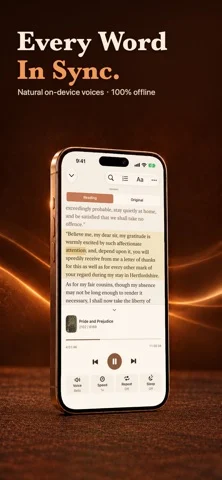
ReadAloud 1.9.0 brings natural voices for Japanese and Korean, and much better pronunciation in French, Italian, Spanish and Portuguese. • Japanese and Korean neural voices: four voices each, running entirely on your device. A voice pack downloads once, on demand. Numbers, dates and counters are spoken the way each language says them. • Much better French, Italian, Spanish and Portuguese: words with nasal vowels are no longer cut short, names such as “Maria” are no longer mispronounced, and the highlighted word follows the voice. • When a document has a better voice available, for example in French or Chinese, ReadAloud offers it and switches to it as soon as the download finishes. • Very long books and big web pages now import much faster. • Web articles read cleaner: the contents list, pronunciation guides and footnote numbers of Wikipedia pages are no longer read aloud. • Fixed: the preview of a long imported web article could be blank on some iPhones. Importing a link now starts with an empty box every time. • A redesigned widget keeps your last document so you can continue with one tap, and the larger sizes show what plays next.
개발자가 이 내용을 한국어로 제공하지 않았습니다.
App Store 설명개발자가 작성한 내용입니다.
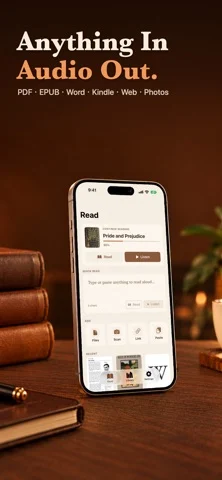
ReadAloud turns any text into natural speech with on-device voices: neural voices for English, Chinese, Japanese, Korean, Spanish, French, German and more, plus Apple's system voices. Listen to PDFs, Word documents, EPUB and Kindle books, articles, photos, and any text in 60+ languages, 100% offline. WHAT YOU CAN DO • LISTEN TO ANYTHING Type or paste text, import a PDF, Word (DOCX), EPUB, or Kindle (MOBI/AZW3, DRM-free) document, scan a photo or a printed page with your camera, or paste a URL to hear the article text. Auto language detection picks the right voice for you. Jump between chapters in EPUB and Word documents, and skip straight to any page in a PDF. Long books, including web novels with thousands of chapters, are supported. • NATURAL VOICES, ON YOUR DEVICE Neural voices run entirely on your iPhone, so there is no internet needed once a voice is downloaded. Japanese and Korean now have four neural voices each. All Apple system voices are included too (Default, Enhanced and Premium), with a voice quality indicator that guides you to the best voice for each language. • LISTEN IN THE CAR WITH CARPLAY Browse your library and folders, pick up where you stopped, see what plays next, and change speed from the Now Playing screen. CarPlay is part of ReadAloud Pro. • PICK UP WHERE YOU LEFT OFF Your place in every document is remembered. Continue from the Lock Screen, AirPods, the widget, Apple Watch or CarPlay. The widget keeps your last document and shows what plays next. Your library syncs between your devices through your own iCloud. • CLEAN, DISTRACTION-FREE READING Reference and footnote numbers are automatically skipped so they never interrupt what you are listening to, and academic two-column PDFs read in the correct order. In any PDF, drag a frame in the Reading Area to choose what is read, so headers, footers and page numbers stay out. • YOUR RULES Teach ReadAloud how to say a word with the Pronunciation Dictionary, and skip anything you do not want read with Skip Rules. • ORGANIZE WITH FOLDERS Sort your Library into folders, so long reading lists stay easy to find. • TAP TO DEFINE Long-press any sentence while listening to look up a word's definition, highlight it, or add a bookmark, without losing your place. • READING THEMES Choose System, Sepia, or Night page themes, adjustable line spacing, and a dyslexia-friendly OpenDyslexic font option. • POWERFUL PLAYBACK Speed control from 0.75x to 2x, drag the progress bar to jump to any point, current sentence highlighted with auto-scroll, skip by sentence, a sleep timer, full Lock Screen and AirPods support, and true background playback so you can listen while doing anything else. While charging, ReadAloud can prepare about an hour of audio ahead for smoother playback. • EXPORT TO MP3 & NOTES Select multiple documents in your Library and export them all to MP3 at once, completely on-device, or export your highlights and bookmarks as a Markdown notes file. Share via AirDrop, Files, or Messages. • SIRI, SHORTCUTS & SHARING Send text, files or web links to ReadAloud from the share sheet in any app, or hand any text to it from Siri and the Shortcuts app. • APPLE WATCH & IPAD See what is reading and control playback from your wrist, and enjoy a layout designed for the bigger iPad screen. PRIVACY FIRST No account, no analytics, no tracking, no third-party SDKs, and we collect no data. Your documents are read and voiced on your device. The network is used only to fetch a web link you paste, to download voices, to sync your library through your own iCloud, and for purchases. Start by importing documents with 10 minutes of real listening included. ReadAloud Pro unlocks unlimited listening, CarPlay, audio export, the Pronunciation Dictionary and Skip Rules. The yearly plan includes an eligible 3-day free trial. Monthly and lifetime options are also available. Terms of Use: https://taxlite.net/read_aloud/terms.html Privacy Policy: https://taxlite.net/read_aloud/pri…
iPhone Duo에서의 ReadAloud: Text to Speech PDF: 자주 묻는 질문
ReadAloud: Text to Speech PDF은(는) iPhone Duo에 최적화되어 있나요?
개발자 또는 스토어가 iPhone Duo 지원을 안내합니다.
ReadAloud: Text to Speech PDF의 가격은 얼마인가요?
ReadAloud: Text to Speech PDF은(는) App Store에서 무료로 다운로드할 수 있습니다.
다른 생산성 앱
모두 보기 ›
걸리는 시간별로 할 일을 분류하는 차분한 할 일 목록 겸 종이 스타일 플래너

iPhone Duo의 두 디스플레이에 맞춘 레이아웃을 갖춘 작업·프로젝트 관리 앱

펼치면 메시지와 받은 편지함을 나란히 보여 주는 Readdle의 통합 받은 편지함

Cultured Code의 작업 관리 앱, iPhone Duo의 모든 자세에 맞게 재구성

iPhone Duo를 펼치면 열리는, 손글씨 느낌의 프라이빗 노트

북 자세와 탁상 자세에 맞춘 집중 타이머를 갖춘 시각적 타임라인 일일 플래너