
iPhone スクリーンショット
新機能
バージョン 2.2.14 ·
● iOS 27 status bar in image editing: the added time, signal, and battery match your screenshot's style, size, and color. ● New "Hide Live Activities" toggle: on erases Live Activities in the Dynamic Island; off keeps the island intact with clean edges. ● Small icons beside the time, like Location and Focus, are erased cleanly with it, even on busy backgrounds. ● The yearly plan now shows its monthly equivalent. ● Refinements and stability improvements.
開発者はこの内容を日本語化していません。
App Store の説明開発者による説明です。
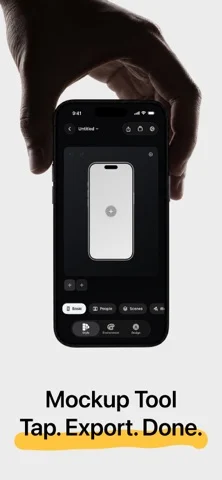
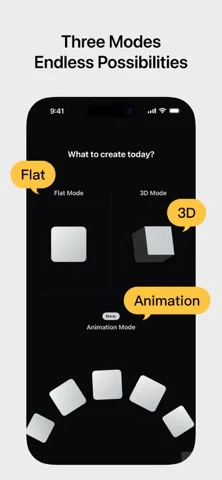
Shell Yeah is an animation, 2D, and 3D mockup tool built for developers, designers, and content creators. Drop in screenshots or screen recordings, choose Animation, Flat Mockup, or 3D Mockup, then set up your canvas size, device style, scene look, and design layers. Shell Yeah helps you create polished product images and short videos for the App Store, social platforms, launch posts, and product updates. Key features: ● Choose between Animation, 2D Flat Mockup mode, and 3D Mockup mode, each with its own projects and creative state ● Turn screenshots into motion-ready grids, orbits, card flows, and hero compositions with Motion presets ● Adjust Fit / Fill, zoom, position, and corners for each image in an Animation project ● Use PSD/Smart Object-based 2D templates with screen replacement, rounded corners, occlusion, and depth effects ● Import screen recordings in Flat Mockups, preview playback on the canvas, scrub the timeline, and export MP4 videos ● Build single-device and multi-device flat layouts with Basic 2D devices ● Use Icon Card to turn app icons and square artwork into polished 3D mockups with adjustable corner radius, thickness, bevel, body color, and automatic color sampling ● Use Progressive Blur and handheld styles to keep the interface as the visual focus ● Use People / Space, Hand / Indoor, and Dark Hand Grip lifestyle templates for more scene-rich product visuals ● Use GPU-accelerated PSD screen replacement when available for smoother Flat Mockup previews, image exports, video exports, and project thumbnails ● Import screenshots or screen recordings and fit them to device screens ● Adjust device angle, scale, screen close-ups, and canvas ratio, with support for showing 2-4 phones at once ● Add text, images, SF Symbols, SVG assets, ratings, badges, and shapes on top of the mockup ● Use built-in NEW, PRO, AI, 4K, Free, Sale, brand badge, rating, and decorative assets ● Use Stylized Icons assets like Dev and Line Art to expand your home-screen icon showcase ● Keep independent scene settings and design elements per image in multi-image projects, or copy/apply styles in one tap ● Switch device finishes and band colors ● Use mockups for iPhone, iPad, Apple Watch, Studio Display, and Macintosh Classic ● Create animated videos with preset Motion templates and AI animation ● Fine-tune lighting, background, depth, shadows, and scene bases ● Use solid colors, transparent backgrounds, linear gradients, mesh gradients, or custom background images ● Export PNG / JPEG / HEIC images, MP4 videos, and Live Photos ● Support common canvas sizes for social media and App Store content Shell Yeah is designed for app screenshots, product launch visuals, update posts, and social content, helping you create polished mockups without the usual manual hassle. Privacy Policy: https://taoker.fun/privacy/ Support: https://taoker.fun/support/ Apple Standard Terms of Use (EULA): https://www.apple.com/legal/internet-services/itunes/dev/stdeula/ Terms of Service: https://taoker.fun/terms/
iPhone Duo での ShellYeah - Screenshot Mockups:よくある質問
ShellYeah - Screenshot Mockups は iPhone Duo に最適化されていますか?
開発者またはストアに iPhone Duo 対応の記載があります。
ShellYeah - Screenshot Mockups の価格は?
ShellYeah - Screenshot Mockups は App Store で無料でダウンロードできます。
その他のユーティリティアプリ
すべて見る ›
iPhone Duoのヒンジで0.1°まで角度を測定し、目標・照合・水平器も使える。

iPhone Duoを留め継ぎゲージに変え、ヒンジ角度を読み取る。他のiPhoneでは水平器として使える。

iPhone Duoをカードスロットや現金、ペン、レシート付きの本物そっくりの二つ折り財布に変える。

iPhone Duoのヒンジを角度・基準ツール集に変える。他のiPhoneでは無料の気泡水平器が使える。

iPhoneを定規・分度器・水平器・直径ゲージに、iPhone Duoを折り角度を映す折り尺にする。

iPhone Duoのヒンジ角度をリアルタイム測定。水平器や分度器、勾配計、カメラ角度計にもなる。