
iPhone 스크린샷
새로운 기능
버전 2.2.14 ·
● iOS 27 status bar in image editing: the added time, signal, and battery match your screenshot's style, size, and color. ● New "Hide Live Activities" toggle: on erases Live Activities in the Dynamic Island; off keeps the island intact with clean edges. ● Small icons beside the time, like Location and Focus, are erased cleanly with it, even on busy backgrounds. ● The yearly plan now shows its monthly equivalent. ● Refinements and stability improvements.
개발자가 이 내용을 한국어로 제공하지 않았습니다.
App Store 설명개발자가 작성한 내용입니다.
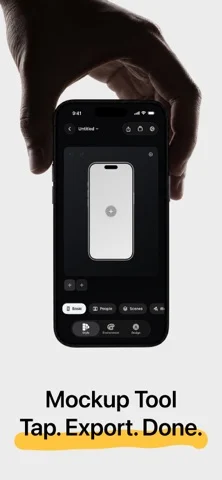
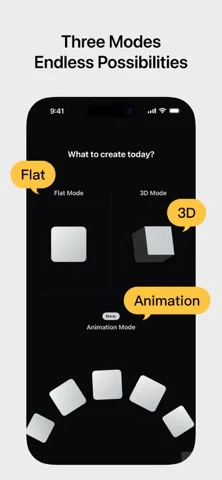
Shell Yeah is an animation, 2D, and 3D mockup tool built for developers, designers, and content creators. Drop in screenshots or screen recordings, choose Animation, Flat Mockup, or 3D Mockup, then set up your canvas size, device style, scene look, and design layers. Shell Yeah helps you create polished product images and short videos for the App Store, social platforms, launch posts, and product updates. Key features: ● Choose between Animation, 2D Flat Mockup mode, and 3D Mockup mode, each with its own projects and creative state ● Turn screenshots into motion-ready grids, orbits, card flows, and hero compositions with Motion presets ● Adjust Fit / Fill, zoom, position, and corners for each image in an Animation project ● Use PSD/Smart Object-based 2D templates with screen replacement, rounded corners, occlusion, and depth effects ● Import screen recordings in Flat Mockups, preview playback on the canvas, scrub the timeline, and export MP4 videos ● Build single-device and multi-device flat layouts with Basic 2D devices ● Use Icon Card to turn app icons and square artwork into polished 3D mockups with adjustable corner radius, thickness, bevel, body color, and automatic color sampling ● Use Progressive Blur and handheld styles to keep the interface as the visual focus ● Use People / Space, Hand / Indoor, and Dark Hand Grip lifestyle templates for more scene-rich product visuals ● Use GPU-accelerated PSD screen replacement when available for smoother Flat Mockup previews, image exports, video exports, and project thumbnails ● Import screenshots or screen recordings and fit them to device screens ● Adjust device angle, scale, screen close-ups, and canvas ratio, with support for showing 2-4 phones at once ● Add text, images, SF Symbols, SVG assets, ratings, badges, and shapes on top of the mockup ● Use built-in NEW, PRO, AI, 4K, Free, Sale, brand badge, rating, and decorative assets ● Use Stylized Icons assets like Dev and Line Art to expand your home-screen icon showcase ● Keep independent scene settings and design elements per image in multi-image projects, or copy/apply styles in one tap ● Switch device finishes and band colors ● Use mockups for iPhone, iPad, Apple Watch, Studio Display, and Macintosh Classic ● Create animated videos with preset Motion templates and AI animation ● Fine-tune lighting, background, depth, shadows, and scene bases ● Use solid colors, transparent backgrounds, linear gradients, mesh gradients, or custom background images ● Export PNG / JPEG / HEIC images, MP4 videos, and Live Photos ● Support common canvas sizes for social media and App Store content Shell Yeah is designed for app screenshots, product launch visuals, update posts, and social content, helping you create polished mockups without the usual manual hassle. Privacy Policy: https://taoker.fun/privacy/ Support: https://taoker.fun/support/ Apple Standard Terms of Use (EULA): https://www.apple.com/legal/internet-services/itunes/dev/stdeula/ Terms of Service: https://taoker.fun/terms/
iPhone Duo에서의 ShellYeah - Screenshot Mockups: 자주 묻는 질문
ShellYeah - Screenshot Mockups은(는) iPhone Duo에 최적화되어 있나요?
개발자 또는 스토어가 iPhone Duo 지원을 안내합니다.
ShellYeah - Screenshot Mockups의 가격은 얼마인가요?
ShellYeah - Screenshot Mockups은(는) App Store에서 무료로 다운로드할 수 있습니다.
다른 유틸리티 앱
모두 보기 ›
iPhone Duo 힌지로 0.1°까지 각도를 측정하고 목표, 매칭, 수평계 도구를 제공합니다.

iPhone Duo를 경사 게이지로 바꿔 힌지 각도를 읽고, 다른 iPhone에서는 수평계로 쓴다.

iPhone Duo를 카드 슬롯과 현금, 펜, 영수증이 있는 실제 같은 반지갑으로 바꾼다.

iPhone Duo 힌지를 각도와 기준 도구 모음으로 바꾸며, 다른 iPhone에서는 무료 수평계를 쓴다.

iPhone을 자, 각도기, 수평계, 지름 게이지로, iPhone Duo를 실시간 접힘 각도 자로 만든다.

iPhone Duo 힌지 각도를 실시간 측정하고, 수평계와 각도기, 경사계, 카메라 각도기로도 쓴다.