
DayCast: Plan + Reflect
Duo 지원 상태는 출처 확인이 필요하며 실제 기기 동작은 미검증입니다.
JC Mobile App Studio LLC · 생산성 · 무료
iPhone 스크린샷
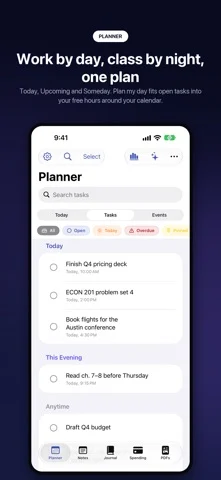
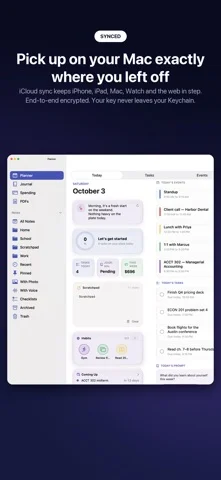
iPhone Duo 활용 방식
Duo support is reported in the linked sources. The specific fold interaction and real-device behavior have not been independently verified.
새로운 기능
버전 2.0.1 ·
DayCast 2.0.1 makes 2.0 simpler and faster, with a few new things. • Choose your DayCast: keep the sections you use (Tasks & Calendar, Journal, Spending, PDFs, Habits) and hide the rest. Notes are always there. • Instant search with answers: search is many times faster, and it shows the date, amount or confirmation code you were looking for first. Nothing found? Make it a note or a task right from search. • Type / at the start of a line for headings, checklists, tables, photos and more. Type # to tag as you write. • Folders are now notebooks. Anything you share, clip or email to DayCast waits in the new Inbox until you file it. • One + for everything: tap it for what the tab is for, hold it to make a note, task, event, entry or expense from anywhere. • Safe to Spend can start from your real balance. Every expense and Apple Card or Wallet purchase comes off it, so you see what's really left. • Notes can show as cards, with photos. • A Quick Note control for Control Center and the Lock Screen. • Shorter menus: Spending's tools are grouped into Insights, Plan and Tools, and specialist extras moved to Settings → Labs. • Wondering where something went? Help → How To → What moved in 2.0.1.
개발자가 이 내용을 한국어로 제공하지 않았습니다.
앱 소개
Duo support is reported in the linked sources. The specific fold interaction and real-device behavior have not been independently verified.
영어 원문을 번역한 내용입니다.
App Store 설명개발자가 작성한 내용입니다.
Your planner, notes, journal and spending tracker in one private app, on iPhone, iPad, Mac, Apple Watch and the web. Keep only the sections you use. PLANNER • Today shows your day at a glance, with a Weekly Review of tasks, habits, mood and spending • Today, Upcoming, Anytime and Someday views, plus a Logbook of what you finished • Type naturally: "Call Sam Friday 3pm !!" fills in the date, time and priority • Plan My Day, Paste as Tasks, and import from Reminders • Time and location reminders, and repeating tasks you can pause • Day, week, month and timeline views; projects, energy levels and a completion heatmap • Habits with streaks and daily reminders NOTES • Type / for headings, checklists, tables, photos and callouts; type # to tag as you write • An Inbox for everything you share, clip or email in, until you file it in a notebook • Rich text with highlight colors, collapsible headings, code blocks and inline math • Notebooks, tags, saved searches, links, flashcards and version history • List or card view, a daily note, handwriting and document scanning • Paper, color or photo backgrounds, and color labels • Search shows the date, amount or code you need first • Import your notes from Evernote (ENEX) JOURNAL • Moods, activities and custom scales, with Apple Health mood logging • Photos, video with transcripts, maps and a calendar view • Prompt packs, On This Day, Life Patterns and a Year in Review • Breathing sessions saved as Mindful Minutes, and a First Aid Kit for hard days • Import from Apple Journal SPENDING • Apple Card and Wallet auto-import: purchases arrive on their own, already categorized • Safe to Spend: what's really free today, from your balance or this month's income, and from Siri • Zero-based budgeting with Ready to Assign, budget history and burndown • Scan receipts with line items • Import bank files (OFX, QFX, QIF); transfers stay out of your totals • Subscriptions with trial reminders, bills calendar, savings goals • Budget alerts, Hide Amounts and Month in Review REPORTS HUB Spending trends, cash-flow forecast, merchant insights, tax report and reimbursements. PDFs Read, mark up, fill forms, reorder pages, listen aloud, and ask questions about any PDF. LABS Switch on extras in Settings: priority matrix, duplicate day, note map, net worth, debt payoff and product prices. EVERYWHERE YOU WORK • A real Mac app with menus, multiple windows, an inspector and Handoff • Apple Watch app for quick tasks, expenses and moods • DayCast on the web, unlocked with your own passphrase • Email things in, or save pages into a notebook with the web clipper • Widgets, Control Center controls including Quick Note, Live Activities and Siri SHARE WHEN YOU WANT Share a note or a journal with other iCloud users and comment together. Only the people you invite can read them. PRIVACY FIRST • No DayCast account, no ads, no tracking • Your data is encrypted on your devices before it syncs; Apple only stores ciphertext • iCloud sync is optional; DayCast works fully offline • Face ID or passcode lock ON-DEVICE AI Summaries, proofreading, translation, journal reflections, a spending coach and Ask DayCast run on your device with Apple Intelligence. Ask DayCast can also use Private Cloud Compute, only if you turn it on. PREMIUM DayCast is free to use. Premium unlocks Apple Card and Wallet import, the AI tools, Reports Hub, advanced PDF tools, extra journals, unlimited budgets and goals, custom repeats and more. One subscription covers iPhone, iPad, Mac and the web app. Monthly or yearly, with a free trial. Payment is charged to your Apple Account at confirmation. Subscriptions renew automatically unless cancelled at least 24 hours before the end of the current period. Manage or cancel in your Apple Account settings. Terms of Use (EULA): https://www.apple.com/legal/internet-services/itunes/dev/stdeula/ Privacy Policy: https://jcmobileappstudio.com/apps/daycast/privacy Website: https://jcmobileappstudio.com
iPhone Duo에서의 DayCast: Plan + Reflect: 자주 묻는 질문
DayCast: Plan + Reflect은(는) iPhone Duo에 최적화되어 있나요?
개발자 또는 스토어가 iPhone Duo 지원을 안내합니다.
iPhone Duo에서 DayCast: Plan + Reflect은(는) 어떻게 보이나요?
Duo support is reported in the linked sources. The specific fold interaction and real-device behavior have not been independently verified.
DayCast: Plan + Reflect의 가격은 얼마인가요?
DayCast: Plan + Reflect은(는) App Store에서 무료로 다운로드할 수 있습니다.
다른 생산성 앱
모두 보기 ›
걸리는 시간별로 할 일을 분류하는 차분한 할 일 목록 겸 종이 스타일 플래너

iPhone Duo의 두 디스플레이에 맞춘 레이아웃을 갖춘 작업·프로젝트 관리 앱

펼치면 메시지와 받은 편지함을 나란히 보여 주는 Readdle의 통합 받은 편지함

Cultured Code의 작업 관리 앱, iPhone Duo의 모든 자세에 맞게 재구성

iPhone Duo를 펼치면 열리는, 손글씨 느낌의 프라이빗 노트

북 자세와 탁상 자세에 맞춘 집중 타이머를 갖춘 시각적 타임라인 일일 플래너