
iPhone 스크린샷
새로운 기능
버전 2.0.15 ·
Works without a connection: add and edit appointments and lists offline, and they sync automatically as soon as you are back online. Plus small improvements to launch and Shifts.
개발자가 이 내용을 한국어로 제공하지 않았습니다.
App Store 설명개발자가 작성한 내용입니다.
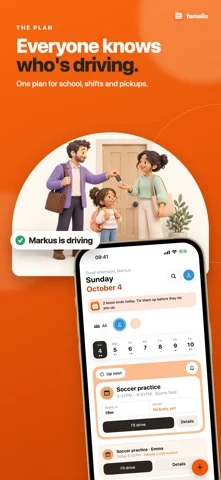
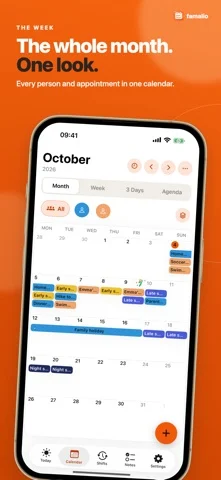
Who is picking up the kids when your shift runs late? Where did that school date go? Famalio keeps the event, responsible person and pickup plan together in one shared family calendar, so everyone knows what to do. ONE PLAN YOUR FAMILY CAN FOLLOW See school, work, sport and appointments in day, week and month views. Filter by person to see whose plans you are looking at. Add repeating events, locations and notes, and keep today and tomorrow close at hand. MAKE PICKUP RESPONSIBILITIES CLEAR For children's activities, record who is responsible, who is driving and who can step in. Keep preparation checklists with the event, so the next person can see what still needs doing. FIT SHIFT WORK INTO FAMILY LIFE Add repeating shifts and rotations with templates and patterns. Look at work alongside family plans when deciding who can handle the next school run or appointment. GET SCHOOL DATES OFF THE PAPER Photograph a school notice or schedule, review the proposed appointments and save the ones you need. One reviewed import per month per device is included free. You stay in control of what reaches the calendar. SHARE THE SMALL THINGS, TOO Keep shared notes and checklists together. Choose reminders for yourself, everyone or selected family members. Home Screen widgets show upcoming plans. The Apple Watch companion shows data transferred from your paired iPhone; open the iPhone app to refresh it. FIND A GAP FOR TIME TOGETHER See free intervals between recorded appointments, without changing events. Travel time and plans you have not entered may affect actual availability. START WITH YOUR FAMILY Sign in with Apple or Google, create a family and invite the other person by link, code or QR. Use roles to choose who can organize, edit or view. You can also display device calendars and assign them to people without editing the original calendar. OPTIONAL FAMILY PRO The free plan supports two signed-in accounts per Famalio family; child profiles without sign-in do not count. The shared calendar, invitations, roles, ordinary and modular shifts, reminders and notes remain free within this limit. Family Pro adds unlimited signed-in accounts in the purchaser’s current Famalio family, 100 reviewed imports per month per device, timetable tools and family week-plan PDF export. Choose monthly or annual billing with the same features. Prices and renewal terms appear in the App Store purchase sheet. Subscriptions renew automatically unless cancelled in Apple Account settings. Restore purchases in the app. Apple Family Sharing is supported for eligible purchases and is separate from Famalio family membership. OPTIONAL FAMALIO HOME Famalio Home is a separate, optional one-time in-app purchase (not a subscription). It lets you keep your family calendar on your own server, for example with Home Assistant or on a Linux server, instead of the Famalio cloud. One purchase covers your whole Famalio family. You run and back up the server yourself; step-by-step setup instructions are free on github.com/fisch192/famalio-home. The price appears in the App Store purchase sheet. You can restore the purchase in the app. The app and Family Pro work fully without Famalio Home. Sign in with Apple or Google using an existing account. Connections are encrypted and account permissions protect family access. Family data is not end-to-end encrypted. Privacy: https://sites.google.com/view/famalio-privacy Terms: https://www.apple.com/legal/internet-services/itunes/dev/stdeula/
iPhone Duo에서의 Famalio: Family Calendar: 자주 묻는 질문
Famalio: Family Calendar은(는) iPhone Duo에 최적화되어 있나요?
개발자 또는 스토어가 iPhone Duo 지원을 안내합니다.
Famalio: Family Calendar의 가격은 얼마인가요?
Famalio: Family Calendar은(는) App Store에서 무료로 다운로드할 수 있습니다.
다른 생산성 앱
모두 보기 ›
걸리는 시간별로 할 일을 분류하는 차분한 할 일 목록 겸 종이 스타일 플래너

iPhone Duo의 두 디스플레이에 맞춘 레이아웃을 갖춘 작업·프로젝트 관리 앱

펼치면 메시지와 받은 편지함을 나란히 보여 주는 Readdle의 통합 받은 편지함

Cultured Code의 작업 관리 앱, iPhone Duo의 모든 자세에 맞게 재구성

iPhone Duo를 펼치면 열리는, 손글씨 느낌의 프라이빗 노트

북 자세와 탁상 자세에 맞춘 집중 타이머를 갖춘 시각적 타임라인 일일 플래너