
iPhone 스크린샷
iPhone Duo 활용 방식
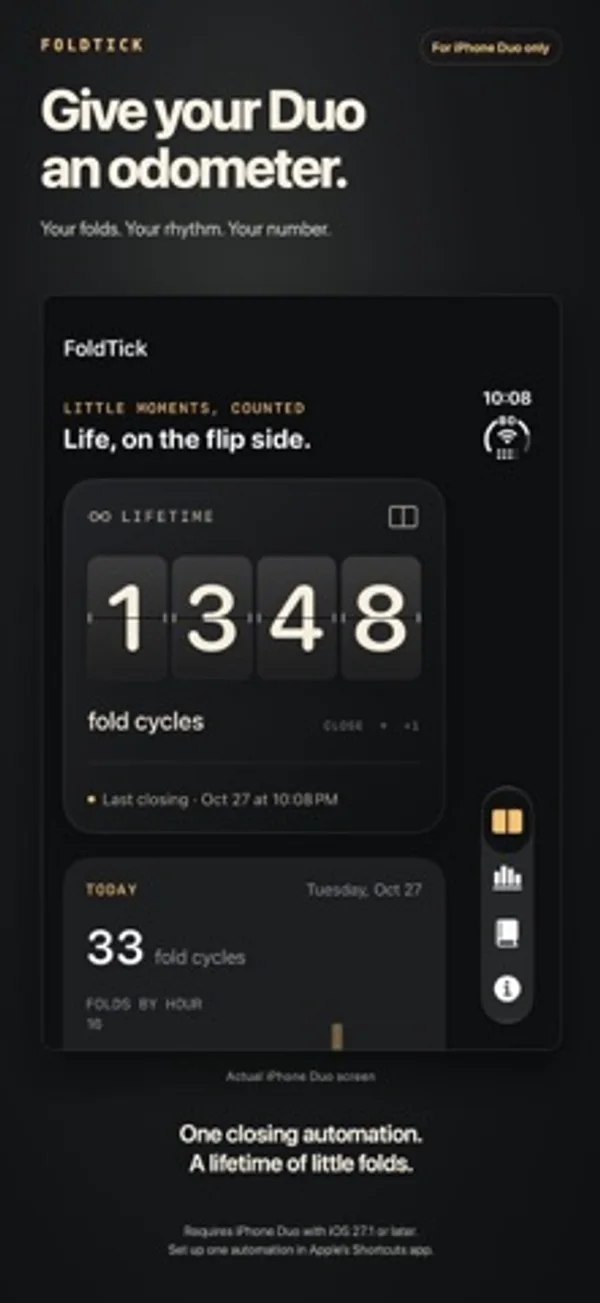
단축어에서 닫기 자동화를 켜면 전달된 동작을 셉니다. 기관실의 기계는 힌지를 따라 움직입니다.
새로운 기능
버전 1.8 ·
Give your fold counter a new face. Choose from Modern Minimalist, Departure Board, Mechanical Odometer, Vintage Nixie and Industrial Tally. Preview each style in Settings, then see it on your Counter and full-color Home Screen widgets.
개발자가 이 내용을 한국어로 제공하지 않았습니다.
App Store 설명개발자가 작성한 내용입니다.
For iPhone Duo only. Give your Duo a fold counter with a face of its own. That satisfying feeling of folding your Duo closed? Put a number on it. FoldTick turns everyday folds into a customizable counter, useful widgets and a growing picture of how you use your Duo. A COUNTER WITH CHARACTER Choose from Modern Minimalist, Departure Board's split flaps, Mechanical Odometer's ivory drums, Vintage Nixie's amber glow or Industrial Tally's steel case. Preview all five in Settings under Counter Style. Your choice carries across to full-color Home Screen widgets. MILESTONE CERTIFICATES The FoldTick Office of Hinge Affairs takes your folds with entirely unnecessary seriousness. At 100, 500, 1,000, 5,000 and every 10,000 folds, claim a dated certificate with your name and an absurdly formal title. Share it as an image, save an A4 PDF or print it for the wall. DUO ENGINE ROOM Your Duo has a secret world inside. Unfold it and step into an imagined steampunk engine room of brass gears, winding springs and mysterious amber light. Gently move the hinge and the machinery turns with you. A glass bulb brightens as you move, then fades as you hold still, while mechanical flap displays show your hinge angle and lifetime fold count. Made for the inner display, in portrait or landscape. YOUR COUNT, WHERE YOU WANT IT Home Screen widgets range from compact and wide counters to a medium Weekly Counter. The large Activity widget combines your lifetime count, seven-day chart and 30-day calendar. Main counters support Today or All time; the Activity widget shows All time. Home Screen widgets adapt to light and dark. The Lock Screen 7-Day Counter comes in circular and rectangular sizes. It totals recorded folds from today and the previous six days. Tap a seven-day counter or Home Screen chart to open Activity. Widgets update automatically as folds are recorded. A HEAD START FOR YOUR COUNTER Folded your Duo before installing FoldTick? Add an estimate in Settings. It contributes to your lifetime total and milestones; daily activity and insights use recorded folds. Edit or clear the estimate any time. SEE HOW YOUR DAY UNFOLDS Explore hourly activity, a seven-day chart, a 30-day calendar and your latest folds. Personal insights show your daily average, busiest day and hour, and weekly change using up to 30 completed days. SHARE A LITTLE OF YOUR RHYTHM Save or share styled images of your lifetime count, daily folds, weekly chart, 30-day calendar or insights. SET IT UP. LET IT TICK. Add FoldTick's ready-made Record Fold shortcut, then turn on Automation. The illustrated guide walks through import, enabling, a one-fold check and an optional earlier-fold estimate. It links to Shortcuts on the App Store if needed. Existing working automations need no replacement. Once configured, Record Fold can count off-screen, including while your Duo is locked after its first unlock. JUST YOUR FOLDS No account. No ads. No subscriptions. No analytics service. History and insights stay on your device. Sharing is your choice. IMPORTANT COMPATIBILITY AND SETUP Automatic counting requires iPhone Duo with iOS 27.1 or later and one enabled closing automation in Apple's Shortcuts app. Other iPhone models lack the required closing trigger. Each closing action delivered by Shortcuts adds one fold cycle. Counting starts after setup; earlier folds and undelivered actions cannot be recovered. Insights exclude today, the first recording day and your Earlier folds estimate; weekly comparisons need 14 completed days. Days without received folds count as zero, including when an automation did not run. iOS schedules widget updates, so widgets may lag behind the saved count. FoldTick is independent and is not affiliated with or endorsed by Apple. iPhone Duo is a trademark of Apple Inc.
iPhone Duo에서의 FoldTick: 자주 묻는 질문
FoldTick은(는) iPhone Duo에 최적화되어 있나요?
네. FoldTick은(는) Duo 전용 설계 앱으로, 폴딩, Split View 또는 외부 디스플레이를 활용합니다. 2026년 11월 15일 확인(개발자 발표).
iPhone Duo에서 FoldTick은(는) 어떻게 보이나요?
단축어에서 닫기 자동화를 켜면 전달된 동작을 셉니다. 기관실의 기계는 힌지를 따라 움직입니다.
FoldTick의 가격은 얼마인가요?
FoldTick은(는) App Store에서 ₩1,100입니다.
다른 유틸리티 앱
모두 보기 ›
세계 시각과 날씨를 보고 도시 풍경을 화면에 꾸미거나 집중 타이머를 켭니다.

한쪽 엄지에 맞추거나 둘로 나눌 수 있는 키보드로 글자를 누르거나 쓸어 입력합니다.

휴대전화 개폐 횟수와 일별 패턴을 기록하고 위젯으로 통계를 확인합니다.

휴대폰을 접고 펼친 횟수와 추이를 확인하고 하루 한도를 설정합니다.

개폐 횟수, 자세별 시간과 일별 패턴을 기록하고 실시간, 추정과 수동 기록을 구분합니다.

기본·공학·프로그래머 키패드로 계산하고 단위를 변환하며 기록을 재사용합니다.