
iPhone 스크린샷
iPhone Duo 활용 방식
FoldWall is a wallpaper previewer and cropper for iPhone Duo. One wallpaper has to cover two screens, and until you actually set
새로운 기능
버전 1.0.1 ·
Better support for iPhone Duo.
개발자가 이 내용을 한국어로 제공하지 않았습니다.
앱 소개
FoldWall is a wallpaper previewer and cropper for iPhone Duo. One wallpaper has to cover two screens, and until you actually set
영어 원문을 번역한 내용입니다.
App Store 설명개발자가 작성한 내용입니다.
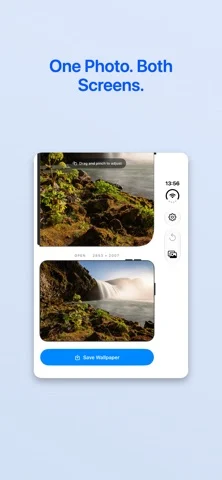
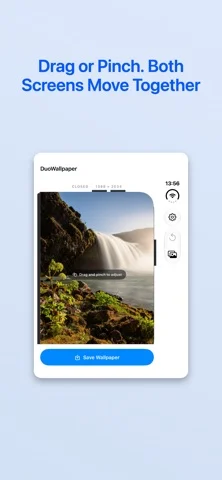
FoldWall is a wallpaper previewer and cropper for iPhone Duo. One wallpaper has to cover two screens, and until you actually set it there's no way to tell what either screen will get. FoldWall shows both at once. Drag or pinch your photo and the closed-screen and open-screen framings update side by side, so you can see how each one lands before you save anything. How it works 1. Pick one photo from your library. 2. Drag or pinch on either preview. Both framings update together. 3. Unfold the device to check the inner screen at full size. 4. Save, then set it from Settings ▸ Wallpaper. Why one photo covers two screens The cover screen shows almost exactly the middle vertical slice of the inner screen. You only ever set one wallpaper, and iPhone Duo takes from it whatever the active screen needs. That's why the framing matters, and why seeing both at the same time is the whole point. Unfold for a real check Open the device and FoldWall drops its interface, drawing your wallpaper edge to edge on the inner screen. Not a mockup, not an animation — the finished image, on the screen it was made for. Fold it closed and you're back to adjusting. Framed to the actual hardware Both previews use the device's real pixel dimensions and real corner radii, down to the cover screen's uneven corners: 8 pt on the hinge side, 59 pt on the other. Those numbers come from the device profile, so the preview is worth trusting. Entirely on your device No account. No network requests. No analytics. No tracking. No data collection. No subscriptions and no in-app purchases. Photo access is add-only, so FoldWall can save the wallpaper it makes and nothing else. Good to know • iOS gives apps no public way to set wallpaper, so the last step happens in Settings rather than here. It's the only route the system allows. • The smallest zoom still fills both screens, so an empty edge isn't possible. • Reset returns the photo to centered and filling both screens. • A first-run guide covers the five things you'd otherwise have to work out yourself, and stays available under Settings ▸ How It Works.
iPhone Duo에서의 FoldWall: 자주 묻는 질문
FoldWall은(는) iPhone Duo에 최적화되어 있나요?
네. FoldWall은(는) Duo 전용 설계 앱으로, 폴딩, Split View 또는 외부 디스플레이를 활용합니다. 2026년 10월 25일 확인(App Store 설명).
iPhone Duo에서 FoldWall은(는) 어떻게 보이나요?
FoldWall is a wallpaper previewer and cropper for iPhone Duo. One wallpaper has to cover two screens, and until you actually set
FoldWall의 가격은 얼마인가요?
FoldWall은(는) App Store에서 $1.99입니다.
다른 유틸리티 앱
모두 보기 ›
Duo 인터랙션에 관한 출처가 있습니다. 실제 기기 동작은 별도로 검증하지 않았습니다.

Duo 인터랙션에 관한 출처가 있습니다. 실제 기기 동작은 별도로 검증하지 않았습니다.

Duo 인터랙션에 관한 출처가 있습니다. 실제 기기 동작은 별도로 검증하지 않았습니다.

Duo 인터랙션에 관한 출처가 있습니다. 실제 기기 동작은 별도로 검증하지 않았습니다.

Duo 인터랙션에 관한 출처가 있습니다. 실제 기기 동작은 별도로 검증하지 않았습니다.

Duo 인터랙션에 관한 출처가 있습니다. 실제 기기 동작은 별도로 검증하지 않았습니다.