
FoldWall
FoldWall is a wallpaper previewer and cropper for iPhone Duo. One wallpaper has to cover two screens, and until you actually set
Xu Wang · Utilities · $1.99
iPhone screenshots
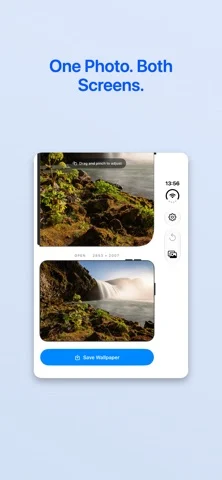
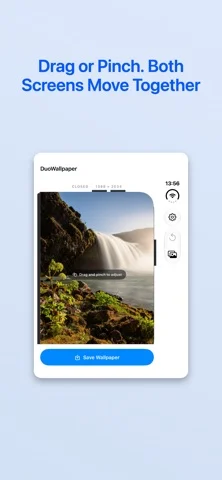
How it uses iPhone Duo
FoldWall is a wallpaper previewer and cropper for iPhone Duo. One wallpaper has to cover two screens, and until you actually set
What’s New
Version 1.0.1 ·
Better support for iPhone Duo.
About this app
FoldWall is a wallpaper previewer and cropper for iPhone Duo. One wallpaper has to cover two screens, and until you actually set it there's no way to tell what either screen will get.
App Store descriptionWritten by the developer.
FoldWall is a wallpaper previewer and cropper for iPhone Duo. One wallpaper has to cover two screens, and until you actually set it there's no way to tell what either screen will get. FoldWall shows both at once. Drag or pinch your photo and the closed-screen and open-screen framings update side by side, so you can see how each one lands before you save anything. How it works 1. Pick one photo from your library. 2. Drag or pinch on either preview. Both framings update together. 3. Unfold the device to check the inner screen at full size. 4. Save, then set it from Settings ▸ Wallpaper. Why one photo covers two screens The cover screen shows almost exactly the middle vertical slice of the inner screen. You only ever set one wallpaper, and iPhone Duo takes from it whatever the active screen needs. That's why the framing matters, and why seeing both at the same time is the whole point. Unfold for a real check Open the device and FoldWall drops its interface, drawing your wallpaper edge to edge on the inner screen. Not a mockup, not an animation — the finished image, on the screen it was made for. Fold it closed and you're back to adjusting. Framed to the actual hardware Both previews use the device's real pixel dimensions and real corner radii, down to the cover screen's uneven corners: 8 pt on the hinge side, 59 pt on the other. Those numbers come from the device profile, so the preview is worth trusting. Entirely on your device No account. No network requests. No analytics. No tracking. No data collection. No subscriptions and no in-app purchases. Photo access is add-only, so FoldWall can save the wallpaper it makes and nothing else. Good to know • iOS gives apps no public way to set wallpaper, so the last step happens in Settings rather than here. It's the only route the system allows. • The smallest zoom still fills both screens, so an empty edge isn't possible. • Reset returns the photo to centered and filling both screens. • A first-run guide covers the five things you'd otherwise have to work out yourself, and stays available under Settings ▸ How It Works.
FoldWall on iPhone Duo: FAQ
Is FoldWall optimized for iPhone Duo?
Yes. FoldWall is Built for Duo: it uses the fold, Split View or the outer display. Verified on October 25, 2026 (App Store text).
What does FoldWall look like on iPhone Duo?
FoldWall is a wallpaper previewer and cropper for iPhone Duo. One wallpaper has to cover two screens, and until you actually set
How much does FoldWall cost?
FoldWall costs $1.99 on the App Store.
More Utilities apps
See all ›
Angle Gauge turns the hinge of iPhone Duo into a precision protractor. Set the phone into a corner, against two surfaces or

Fold Protractor turns iPhone Duo into a bevel gauge. Open the phone, set it into a corner or against two edges, and

Foldhide turns iPhone Duo into the thing you used to carry in your pocket.

Put useful angles within reach. FoldLab turns the physical hinge in iPhone Duo into an angle and reference toolkit. Other iPhones can

Foldmeter turns your iPhone into a measuring tool – and your iPhone Duo into a folding rule: unfold it and the app

Open iPhone Duo and Foldometer turns its hinge into a precision instrument. Watch the two halves move on screen as you open