
fornews.ai — AI news digest
기사를 기기 안에서 주제 파일로 정리해 보고서 생성과 질의응답을 한다.
Patrick Ostertag · 독서 및 뉴스 · 무료
iPhone 스크린샷
새로운 기능
버전 1.7.2 ·
This is the Apple Watch update: your watch now follows the news on its own. • Your watch fetches the latest articles every hour, even when your iPhone has been left behind. They are prepared by your Mac, or otherwise by your iPhone. • A new home screen on the watch: the latest article's image full screen, the article list and the daily editorial one tap away, and three gauges for unread articles, the news pulse and the topic heating up. • Two new pages on the watch: the daily editorial, and today's pictures. • New "Top stories in pictures" complication: the photo of one of the latest articles, changing every ten minutes. New "Figure of the moment" complication: the figures found in your articles, also changing every ten minutes. • Tap a person, a country or an organisation to open its page: photo, description, a map with a link to Maps, and its most recent articles. Every article also shows its three main entities. • Tapping a complication opens the article it is about. And an article started on your wrist carries on on your iPhone: tap "Open on iPhone", then the notification. • Complications are now translated into your watch's language. • Choose your notifications, type by type and device by device. A new notification flags two sources giving different tolls for the same event, and another tells you if your watch is no longer receiving anything. • New "App health" screen in the iPhone and Mac settings: unexpected quits and frozen screens reported by the system. These reports never leave your device. • Three new widgets on iPhone, iPad and Mac: "Figure of the moment", "Editorial of the day" and "Top stories in pictures". Photos now fill the whole widget, and in StandBy the latest articles take turns. • On Apple TV, every five articles the slideshow pauses on the news dashboard: six tiles you can read from the sofa. • Every section of the settings can now be found by search.
개발자가 이 내용을 한국어로 제공하지 않았습니다.
App Store 설명개발자가 작성한 내용입니다.
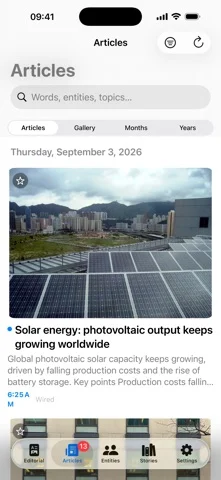
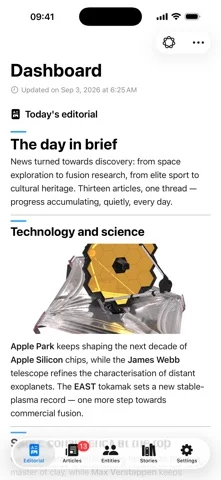
A reader hands you articles. fornews.ai makes something else of them. The app doesn't just read headlines: it reads WHO and WHAT. People, organisations and places are pulled from every article and identified against Wikidata. A name that keeps coming back then becomes a FILE: a subject you name, which fills itself, and which also takes your links, your documents and your notes. That file produces a written, illustrated REPORT, readable in another app. And you can QUESTION your own corpus — on the device, or from an external assistant. Everything is processed ON YOUR DEVICE with Apple Intelligence — no article and no personal data ever leaves it. No account, no subscription, no quota. • YOUR STORIES: name a subject; a rule of entities and keywords lets new articles in. Add links, documents and notes; an iCloud folder per story, visible in Files and the Finder. A monthly calendar shows the subject's rhythm. • A REPORT TO TAKE AWAY: the story becomes an illustrated Markdown document in your iCloud folder. • CORRECT AN ENTITY: the fix applies to articles already read as well as the next ones, and undoes. • Add RSS/Atom feeds or any web page; build AND/OR/EXCEPT keyword rules (with AI prefill). • On-device summaries, named-entity detection & enrichment, automatic translation. • Ask questions about any article — a free-form chat answered ON YOUR DEVICE. • Daily AI editorial. Immersive full-screen reading (Ken Burns effect in landscape). • Media-player style widgets (featured + latest) on iPhone, iPad AND Mac — tap to open the article. • Rename entities from Wikidata; export an entity's or keyword's articles to JSON via the share sheet. • MUSIC FROM THE NEWS: Apple Intelligence spots the artists, albums and soundtracks tied to today's headlines and finds them in Apple Music — a genuinely fun way to discover and play music as you read, plus a daily mood. Computed once on iPhone/Mac, shared via iCloud to every screen, even Apple TV. • Search and play any Apple Music album from Settings. • iPhone, iPad, Mac, Apple Watch and Apple TV — an immersive slideshow (with a kiosk mode for waiting rooms). • Apple Watch: the news and your alerts on your wrist, an illustrated home screen and eight watch face complications. • Mac mini as Data Provider + iPhone in "iCloud Only" mode: full processing on Mac, pure reading on mobile. • BUILD A CORPUS: your sources and keywords grow a solid, kept-on-device archive (articles aren't deleted after reading). A local MCP server (Mac) plus JSON/CSV export let researchers, journalists, students and news enthusiasts analyze, synthesize and produce full reports (trends, shifts) — e.g. with Claude. • Adaptive per-source polling (15 min to 4 h based on activity). • Synced via your private iCloud. No data collection, no account, no tracking. Requires Apple Intelligence. Free for 7 days, then a one-time purchase; the Apple TV app is included with the iPhone or Mac purchase.
iPhone Duo에서의 fornews.ai — AI news digest: 자주 묻는 질문
fornews.ai — AI news digest은(는) iPhone Duo에 최적화되어 있나요?
개발자 또는 스토어가 iPhone Duo 지원을 안내합니다.
fornews.ai — AI news digest의 가격은 얼마인가요?
fornews.ai — AI news digest은(는) App Store에서 무료로 다운로드할 수 있습니다.
다른 독서 및 뉴스 앱
모두 보기 ›
실제 종이접기를 시뮬레이션해 접는 선을 자유롭게 끌거나 단계별 안내로 학, 비행기, 병아리를 접습니다.

답을 얼마나 드러냈는지로 카드 복습 시점을 정하고 난이도는 평가하지 않는다.

iPhone Duo를 접고 펼칠 때마다 화면이 바뀌는, 요약 기능을 갖춘 RSS 리더

접고 펼치는 데 맞춰 레이아웃이 바뀌는 RSS·뉴스 리더

26권의 고전을 읽고 낭독하며 각 페이지 옆에 이야기 세계를 보여줍니다.

도감 항목을 음성으로 읽어 주고 카메라로 장난감이나 그림을 스캔해 인식합니다.