
iPhone 스크린샷
새로운 기능
버전 1.3.1 ·
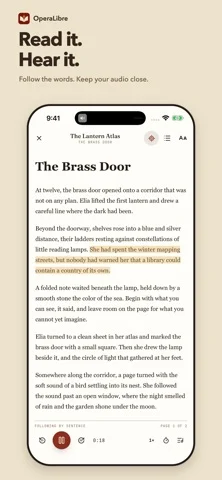
What's New in 1.3.1 • Preview audiobooks from their details page and keep listening where the preview stopped. Previews can be turned off in Settings. • Up Next lets you line up books without starting them. • New sleep timer option: stop at the end of the chapter. • Add a profile picture to your account. • Group your shelf by series, tag, genre or progress, and filter by ebook or Follow Along. • Store purchases not yet on your server now have a details page, and store accounts are simpler to manage. • Missing offline files are flagged and can be repaired. • Follow Along grades sync by chapter and can re-run a single chapter. • Playback recovers more reliably after calls and interruptions, and seeks no longer jump back to 0:00. • A redesigned server connection screen, plus security and layout fixes.
개발자가 이 내용을 한국어로 제공하지 않았습니다.
App Store 설명개발자가 작성한 내용입니다.
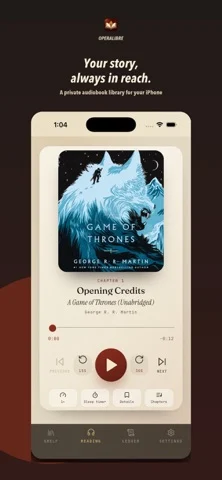
OperaLibre is an audiobook player for libraries you control. Connect to your own OperaLibre or Jellyfin server, browse your collection, and enjoy a focused listening experience designed for spoken audio. LISTEN YOUR WAY • Stream audiobooks from OperaLibre or Jellyfin • Continue listening in the background or from the Lock Screen • Save your playback position and resume where you stopped • Browse and navigate audiobook chapters • Skip backward or forward with dedicated controls • Adjust playback speed • Set a sleep timer • View cover artwork, titles, authors, and chapter information YOUR LIBRARY, YOUR SERVER OperaLibre connects directly to a compatible server you choose. Your audiobook collection remains under your control instead of being tied to a commercial audiobook store. BUILT FOR SELF-HOSTED LISTENING Use the dedicated OperaLibre server for the complete experience, or connect with an existing Jellyfin account to access a compatible audiobook library. OperaLibre does not sell, provide, or include audiobooks. A reachable OperaLibre or Jellyfin server and access to your own audiobook collection are required.
iPhone Duo에서의 OperaLibre: 자주 묻는 질문
OperaLibre은(는) iPhone Duo에 최적화되어 있나요?
개발자 또는 스토어가 iPhone Duo 지원을 안내합니다.
OperaLibre의 가격은 얼마인가요?
OperaLibre은(는) App Store에서 무료로 다운로드할 수 있습니다.
다른 독서 및 뉴스 앱
모두 보기 ›
실제 종이접기를 시뮬레이션해 접는 선을 자유롭게 끌거나 단계별 안내로 학, 비행기, 병아리를 접습니다.

답을 얼마나 드러냈는지로 카드 복습 시점을 정하고 난이도는 평가하지 않는다.

iPhone Duo를 접고 펼칠 때마다 화면이 바뀌는, 요약 기능을 갖춘 RSS 리더

접고 펼치는 데 맞춰 레이아웃이 바뀌는 RSS·뉴스 리더

26권의 고전을 읽고 낭독하며 각 페이지 옆에 이야기 세계를 보여줍니다.

도감 항목을 음성으로 읽어 주고 카메라로 장난감이나 그림을 스캔해 인식합니다.