
iPhone 스크린샷
새로운 기능
버전 1.2.1 ·
v1.2.1 1. Bug fix: The subtitle mode in "Txt to Srt" supports "dual line" conversion.
개발자가 이 내용을 한국어로 제공하지 않았습니다.
App Store 설명개발자가 작성한 내용입니다.
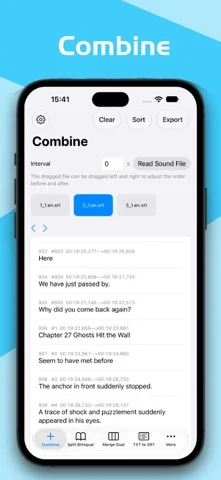
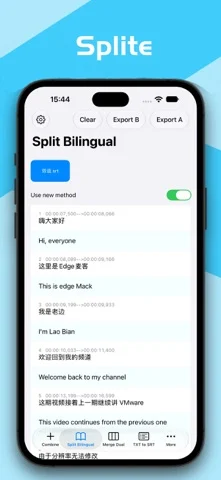
SRT Subtitle Toolbox Mobile is a professional iOS workflow for SubRip (SRT) files. Built for subtitle teams, translators, editors, and multilingual video creators, it brings desktop-grade subtitle production to iPhone and iPad: merge, split, align, re-segment, and quality-check—without leaving your device. All processing runs locally. Your files stay on the device. No cloud upload is required, so client assets and unpublished content remain private. KEY CAPABILITIES 1. Combine Import multiple SRT files, join them in order, and stack timelines automatically into one delivery-ready file. 2. Split bilingual Separate a two-language SRT into two independent files for distribution, review, or further translation. 3. Merge bilingual Combine source and translation SRTs into a two-line bilingual file (source on top, translation below). 4. TXT to SRT / SRT to TXT Turn plain or bilingual text into timed SRT for your NLE, or strip timing and export clean text for translators. 5. Match translated scripts Pair a timed original SRT with an untimed translator draft to produce a timed bilingual file—built for real production handoff. 6. Text filter Keep Chinese, English, or the inverse, drop empty lines, and export SRT. 7. Pinyin / Zhuyin Convert cues to pinyin or Zhuyin, optionally with tones and the original line. 8. Time shift Move the entire timeline earlier or later to fix sync. 9. Smart split Re-segment Whisper and similar ASR output in Chinese and English so translation and layout stay clean. 10. Crop Keep only the time range you need. 11. Reformat Split long cues by character limit, deduplicate adjacent lines, and flatten multi-line text. 12. Prefix / suffix Batch-add speaker names or labels to selected or all cues. 13. Interval cleanup Close gaps that are too small between adjacent cues. 14. Find & replace Run multiple replacement schemes across multiple files to keep terminology consistent. 15. Statistics Count characters, speech rate (CPS), and lines, and highlight cues over your threshold before delivery. WHO IT’S FOR Subtitle groups, localization teams, freelance translators, course and short-form creators, and anyone who needs a reliable SRT finish on the go. EXPORT UNLOCK The app is free to use. Exporting results requires unlock: • Lifetime — one-time purchase, export forever (best value) • Yearly — 7-day free trial, then auto-renews annually Subscription terms: Payment is charged to your Apple ID. The yearly subscription renews automatically unless canceled at least 24 hours before the end of the current period. Renewal is charged within 24 hours prior to the end of the current period. Manage or cancel anytime in Settings > Apple ID > Subscriptions. Lifetime unlock is a non-consumable in-app purchase. Prices are shown in the app at the time of purchase. Support: hahale89#outlook.com (replace # with @) Terms of Use: https://www.apple.com/legal/internet-services/itunes/dev/stdeula/
iPhone Duo에서의 SRT Subtitle Toolbox Mobile: 자주 묻는 질문
SRT Subtitle Toolbox Mobile은(는) iPhone Duo에 최적화되어 있나요?
개발자 또는 스토어가 iPhone Duo 지원을 안내합니다.
SRT Subtitle Toolbox Mobile의 가격은 얼마인가요?
SRT Subtitle Toolbox Mobile은(는) App Store에서 무료로 다운로드할 수 있습니다.
다른 생산성 앱
모두 보기 ›
걸리는 시간별로 할 일을 분류하는 차분한 할 일 목록 겸 종이 스타일 플래너

iPhone Duo의 두 디스플레이에 맞춘 레이아웃을 갖춘 작업·프로젝트 관리 앱

펼치면 메시지와 받은 편지함을 나란히 보여 주는 Readdle의 통합 받은 편지함

Cultured Code의 작업 관리 앱, iPhone Duo의 모든 자세에 맞게 재구성

iPhone Duo를 펼치면 열리는, 손글씨 느낌의 프라이빗 노트

북 자세와 탁상 자세에 맞춘 집중 타이머를 갖춘 시각적 타임라인 일일 플래너