
Tasks - To Do Lists & Reminder
프로젝트, 하위 작업, 사용자 상태, 칸반 보드, 자동화로 할 일을 관리한다.
Msquare Labs Technologies Private Limited · 생산성 · 무료
iPhone 스크린샷
새로운 기능
버전 5.2 ·
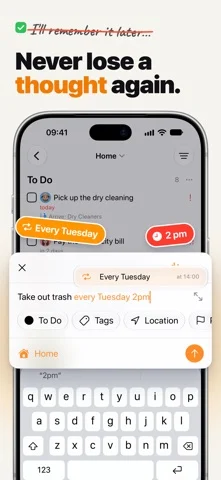
Tasks has been rethought and optimized for iPhone Duo. This update also brings AI assistants into your projects and smarter ways to create tasks. New in Tasks 5.2: - Make the most of iPhone Duo with layouts, navigation, and controls designed to adapt naturally as your screen changes - Connect compatible AI assistants to the projects you choose, assign them tasks, and manage their access from Tasks - Manage shared projects with clearer collaborator roles, simpler invitations, and easier re-invites - Get smarter inline suggestions for dates, repeating schedules, locations, priorities, and tags, with support for English, French, German, and Spanish - Add tags with # and choose a project with / as you type a new task - Choose how many lines task titles and notes show on cards, and hide links or display simple or rich previews - Set up repeating tasks with clearer schedule descriptions and weekday ordering that follows your calendar settings - Paste images and PDFs more reliably when creating tasks, including from keyboard suggestions - Open .tasks files from Files, Mail, or AirDrop to import them directly - Follow your timer more easily with refined Live Activities on the Lock Screen, Dynamic Island, and Apple Watch - Find your way around refreshed Settings and choose whether to share usage analytics - Enjoy clearer drag-and-drop feedback, sharper image previews, cleaner Markdown, and layouts that adapt better to smaller screens and iPad multitasking - Get fixes for timers in existing projects, Smart List date filters, syncing, and task links opened when the app isn't running If you're enjoying Tasks, leaving a review would mean the world to me and help more people discover the app. If you have any feedback or run into any issues, please write to me at tasks@msquarelabs.com. I'd love to hear what you think. Stay productive, and thanks for reading! Mustafa
개발자가 이 내용을 한국어로 제공하지 않았습니다.
App Store 설명개발자가 작성한 내용입니다.
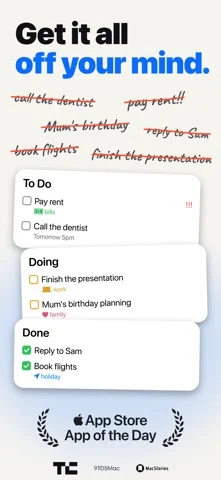
Tasks is a flexible task manager built for Apple devices. Start with a simple to-do list, then add structure only when you need it—with projects, subtasks, tags, priorities, custom statuses, Kanban boards, collaboration, and powerful automations. Your work is rarely just “to do” or “done.” A task might be in progress, waiting, under review, or following a workflow unique to your team. Tasks lets you shape every project around the way you actually work, without overwhelming you upfront. START SIMPLE. GROW YOUR WAY. • Capture tasks quickly and organise them into folders, projects, and subtasks • Add tags, priorities, task types, notes, links, images, PDFs, and other details • Create custom statuses for any workflow • Use fixed or completion-based recurring reminders • Build Smart Lists with powerful filters across all your projects • Find tasks, comments, and project information with advanced search • Start faster with project templates and helpful tag and date suggestions SEE WORK MOVE FORWARD Turn any project into a clear visual workflow with Kanban. Move tasks between custom statuses, or let completing a task advance it naturally through your flow. From a personal checklist to a multi-stage project, you can always see what is happening and what comes next. AUTOMATE ALMOST ANYTHING With more than 50 App Intents, Tasks works deeply with Siri, Shortcuts, Spotlight, and system automations. Create, edit, clone, search, and organise tasks and projects without opening the app. Build workflows around dates, recurring rules, locations, tags, priorities, statuses, comments, and collaborators. COLLABORATE WITHOUT THE OVERHEAD Share projects by email or public link, assign work, add comments, and keep files with the tasks they belong to. Only the person sharing a project needs Tasks Plus—collaborators can join without purchasing their own subscription. MADE FOR THE APPLE ECOSYSTEM Tasks is designed for iPhone, iPad, Mac, Apple Watch, and Apple Vision Pro, with reliable CloudKit-powered sync across your devices. • Interactive Home Screen and Lock Screen widgets • A full Apple Watch app for capturing and completing tasks from your wrist • Share and Action extensions for creating tasks from other apps • Focus Filters, rich notifications, and Time Sensitive alerts • Keyboard, trackpad, drag-and-drop, and multi-window support • Native dark mode, Dynamic Type, and accessibility support • Face ID and Touch ID protection for private projects • Import from Apple Reminders and Notes • Export and import complete backups using the .tasks format • URL schemes and x-callback-url support for advanced workflows PRIVATE BY DESIGN Tasks is built with privacy in mind, with secure CloudKit-powered sync across your Apple devices. START FREE Tasks is free to download with a generous free tier. Upgrade to Tasks Plus with monthly, annual, family, and lifetime options when you need more. Questions or feedback? We read every message. tasks@msquarelabs.com Privacy Policy: https://thetasks.app/legal/privacy/ Terms of Use: https://thetasks.app/legal/terms/
iPhone Duo에서의 Tasks - To Do Lists & Reminder: 자주 묻는 질문
Tasks - To Do Lists & Reminder은(는) iPhone Duo에 최적화되어 있나요?
개발자 또는 스토어가 iPhone Duo 지원을 안내합니다.
Tasks - To Do Lists & Reminder의 가격은 얼마인가요?
Tasks - To Do Lists & Reminder은(는) App Store에서 무료로 다운로드할 수 있습니다.
다른 생산성 앱
모두 보기 ›
걸리는 시간별로 할 일을 분류하는 차분한 할 일 목록 겸 종이 스타일 플래너

iPhone Duo의 두 디스플레이에 맞춘 레이아웃을 갖춘 작업·프로젝트 관리 앱

펼치면 메시지와 받은 편지함을 나란히 보여 주는 Readdle의 통합 받은 편지함

Cultured Code의 작업 관리 앱, iPhone Duo의 모든 자세에 맞게 재구성

iPhone Duo를 펼치면 열리는, 손글씨 느낌의 프라이빗 노트

북 자세와 탁상 자세에 맞춘 집중 타이머를 갖춘 시각적 타임라인 일일 플래너