
iPhone 截图
在 iPhone Duo 上的表现
烹饪模式随折叠姿态调整,分区安排步骤及多道菜计时。
新功能
版本 2.4.1 ·
Adds iPhone Duo screenshots and improves Duo layouts (Cooking Mode, Library grid).
开发者尚未提供此内容的中文版本。
App Store 简介由开发者撰写。
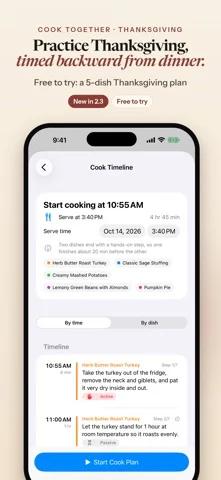
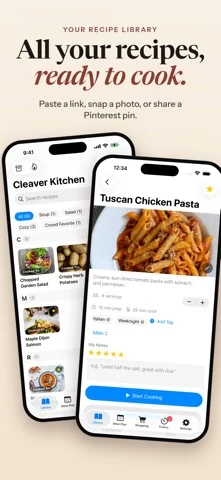
Cook the recipes you already love, all on one timeline. Save them from a link, a photo, a Pinterest pin or the share sheet, pick the dishes for tonight, and Cleaver Kitchen tells you when to start each step, working back from the time you want to eat. NEW: IPAD AND FREE ICLOUD SYNC Cleaver Kitchen now runs natively on iPad, with a Library sidebar, ingredients and steps side by side, and a large-type Cooking Mode. Free iCloud sync keeps your recipes, meal plans and shopping list the same on your iPhone and iPad, stored in your own iCloud account. One purchase covers both. Ready for iPhone Duo Cooking Mode adapts to how you hold your Duo: • Closed: the current step, timers and big Prev / Next buttons on the outer screen. • Half-open on the counter: the step on top; that step's ingredients, timers and big buttons below. • Flat: the full step list on one side, ingredients and timers on the other. Each step shows just the ingredients it uses. HOW IT WORKS 1. Add your recipes. Paste a link, browse the web inside the app and save, snap a photo, paste a Pinterest pin, or send a recipe from another app. You check a preview before anything is saved. 2. Pick your dishes and the time you want to eat. 3. Cook Together builds one timeline that works backward from your serve time, starts each step's timer and reminds you when to begin the next. New here? Tap "Try a sample dinner" on the empty Library screen to see a two-dish timeline in about a minute. BRING YOUR OWN RECIPES Import from a recipe website, a photo of a cookbook page, the share sheet, the in-app browser, a Pinterest pin (Cleaver Kitchen follows the pin to the recipe site behind it) or a recipe post from X. You can also paste recipe text. Add or replace a recipe's photo, and rename or re-file recipes any time. COOKING MODE WITH VOICE CONTROL Big, step-by-step text for one recipe at a time. Turn on Voice Control, hold the mic and say "next", "back", "timer" or "read step". Free for everyone. TIMERS THAT KEEP UP Timers are picked up from your steps. Run several at once and follow them in the Dynamic Island and on your Lock Screen with Live Activities. MEAL PLAN AND ONE SHOPPING LIST Plan your week or month. Ingredients from your planned recipes merge into one shopping list, grouped by aisle. A TIDY LIBRARY Photo tiles under A-Z headings with a quick-jump index, search and tags. Export your recipes any time. PRIVATE BY DESIGN No account to create. No ads, no analytics, no tracking. Your recipes, plans and lists stay on your devices and, if you turn on iCloud, in your own private iCloud account. We run no servers and can't see your data. GOOD TO KNOW Cook Together is built for one cook doing hands-on steps one at a time. Step times come from the recipe text, with estimates when a recipe has none. Timers start automatically while the app is open. iCloud sync needs you signed in to iCloud with iCloud turned on for Cleaver Kitchen, uses your iCloud storage, and the first sync on a new device can take a minute or more. FREE TO START, PRO FOR MORE Free: up to 15 recipes, every cooking feature, iCloud sync, and Cook Together for up to 2 dishes at a time. Cleaver Kitchen Pro adds unlimited recipes and Cook Together for 3 or more dishes. - Pro Monthly: $4.99 per month - Pro Yearly: $29.99 per year, with a 7-day free trial for eligible new subscribers - Pro Lifetime: $79.99, one-time purchase Payment is charged to your Apple Account. Subscriptions renew automatically unless canceled at least 24 hours before the end of the current period. Manage or cancel in Settings > [your name] > Subscriptions. Prices are US prices and may vary by region. Terms of Use (EULA): https://www.apple.com/legal/internet-services/itunes/dev/stdeula/ Cleaver Kitchen Terms: https://cleaverkitchen.com/terms/ Privacy Policy: https://cleaverkitchen.com/privacy/
Cleaver Kitchen: Cooking App 在 iPhone Duo 上:常见问题
Cleaver Kitchen: Cooking App 针对 iPhone Duo 优化了吗?
是的。Cleaver Kitchen: Cooking App 属于「专为 Duo 打造」:它利用了折叠形态、Split View 或外屏。资料更新于 2026年10月25日(App Store 文字)。
Cleaver Kitchen: Cooking App 在 iPhone Duo 上是什么样子?
烹饪模式随折叠姿态调整,分区安排步骤及多道菜计时。
Cleaver Kitchen: Cooking App 多少钱?
Cleaver Kitchen: Cooking App 可在 App Store 免费下载。
更多美食佳饮应用
查看全部 ›
登记藏酒信息,追踪适饮期,并由AI侍酒师提供品鉴与配餐建议。

记录家中酒柜,显示现有材料能调的鸡尾酒,并由AI按你的酒推荐新配方。

食谱管理应用,含膳食计划、购物清单和分步烹饪模式

按家人口味推荐餐食,并一键生成每周用餐计划。

众包地图展示英国1000多家酒吧的真实一品脱啤酒价格。

烹饪日志,记录灶台前实际发生的事,下次做菜时回看。