
Cleaver Kitchen: Cooking App
레시피를 저장하고 식사 시간에서 역산한 조리 타임라인을 만듭니다.
Bradley Wikholm · 음식 및 음료 · 무료
iPhone 스크린샷
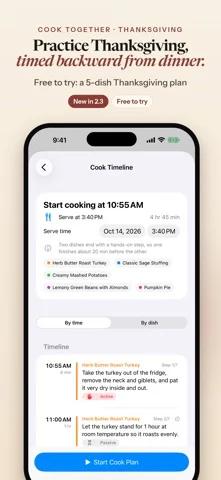
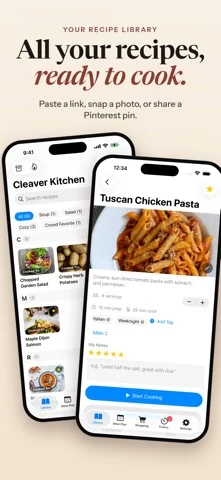
iPhone Duo 활용 방식
Ready for iPhone Duo
새로운 기능
버전 2.4.1 ·
Adds iPhone Duo screenshots and improves Duo layouts (Cooking Mode, Library grid).
개발자가 이 내용을 한국어로 제공하지 않았습니다.
App Store 설명개발자가 작성한 내용입니다.
Cook the recipes you already love, all on one timeline. Save them from a link, a photo, a Pinterest pin or the share sheet, pick the dishes for tonight, and Cleaver Kitchen tells you when to start each step, working back from the time you want to eat. NEW: IPAD AND FREE ICLOUD SYNC Cleaver Kitchen now runs natively on iPad, with a Library sidebar, ingredients and steps side by side, and a large-type Cooking Mode. Free iCloud sync keeps your recipes, meal plans and shopping list the same on your iPhone and iPad, stored in your own iCloud account. One purchase covers both. Ready for iPhone Duo Cooking Mode adapts to how you hold your Duo: • Closed: the current step, timers and big Prev / Next buttons on the outer screen. • Half-open on the counter: the step on top; that step's ingredients, timers and big buttons below. • Flat: the full step list on one side, ingredients and timers on the other. Each step shows just the ingredients it uses. HOW IT WORKS 1. Add your recipes. Paste a link, browse the web inside the app and save, snap a photo, paste a Pinterest pin, or send a recipe from another app. You check a preview before anything is saved. 2. Pick your dishes and the time you want to eat. 3. Cook Together builds one timeline that works backward from your serve time, starts each step's timer and reminds you when to begin the next. New here? Tap "Try a sample dinner" on the empty Library screen to see a two-dish timeline in about a minute. BRING YOUR OWN RECIPES Import from a recipe website, a photo of a cookbook page, the share sheet, the in-app browser, a Pinterest pin (Cleaver Kitchen follows the pin to the recipe site behind it) or a recipe post from X. You can also paste recipe text. Add or replace a recipe's photo, and rename or re-file recipes any time. COOKING MODE WITH VOICE CONTROL Big, step-by-step text for one recipe at a time. Turn on Voice Control, hold the mic and say "next", "back", "timer" or "read step". Free for everyone. TIMERS THAT KEEP UP Timers are picked up from your steps. Run several at once and follow them in the Dynamic Island and on your Lock Screen with Live Activities. MEAL PLAN AND ONE SHOPPING LIST Plan your week or month. Ingredients from your planned recipes merge into one shopping list, grouped by aisle. A TIDY LIBRARY Photo tiles under A-Z headings with a quick-jump index, search and tags. Export your recipes any time. PRIVATE BY DESIGN No account to create. No ads, no analytics, no tracking. Your recipes, plans and lists stay on your devices and, if you turn on iCloud, in your own private iCloud account. We run no servers and can't see your data. GOOD TO KNOW Cook Together is built for one cook doing hands-on steps one at a time. Step times come from the recipe text, with estimates when a recipe has none. Timers start automatically while the app is open. iCloud sync needs you signed in to iCloud with iCloud turned on for Cleaver Kitchen, uses your iCloud storage, and the first sync on a new device can take a minute or more. FREE TO START, PRO FOR MORE Free: up to 15 recipes, every cooking feature, iCloud sync, and Cook Together for up to 2 dishes at a time. Cleaver Kitchen Pro adds unlimited recipes and Cook Together for 3 or more dishes. - Pro Monthly: $4.99 per month - Pro Yearly: $29.99 per year, with a 7-day free trial for eligible new subscribers - Pro Lifetime: $79.99, one-time purchase Payment is charged to your Apple Account. Subscriptions renew automatically unless canceled at least 24 hours before the end of the current period. Manage or cancel in Settings > [your name] > Subscriptions. Prices are US prices and may vary by region. Terms of Use (EULA): https://www.apple.com/legal/internet-services/itunes/dev/stdeula/ Cleaver Kitchen Terms: https://cleaverkitchen.com/terms/ Privacy Policy: https://cleaverkitchen.com/privacy/
iPhone Duo에서의 Cleaver Kitchen: Cooking App: 자주 묻는 질문
Cleaver Kitchen: Cooking App은(는) iPhone Duo에 최적화되어 있나요?
네. Cleaver Kitchen: Cooking App은(는) Duo 전용 설계 앱으로, 폴딩, Split View 또는 외부 디스플레이를 활용합니다. 2026년 10월 25일 확인(App Store 설명).
iPhone Duo에서 Cleaver Kitchen: Cooking App은(는) 어떻게 보이나요?
Ready for iPhone Duo
Cleaver Kitchen: Cooking App의 가격은 얼마인가요?
Cleaver Kitchen: Cooking App은(는) App Store에서 무료로 다운로드할 수 있습니다.
다른 음식 및 음료 앱
모두 보기 ›
와인을 등록해 적정 음용 시기를 관리하고 AI 소믈리에가 추천을 제공하는 앱.

집에 있는 술을 관리하고 만들 수 있는 칵테일과 AI가 제안하는 레시피를 보여줌.

식단 계획, 장보기 목록, 단계별 요리 모드를 갖춘 레시피 관리 앱

가족 입맛에 맞춘 식사를 추천하고 주간 식단 계획을 짜는 앱.

영국 1,000개 이상 펍의 실제 맥주 가격을 보여주는 크라우드소싱 지도입니다.

조리 중 실제 있었던 일을 기록하고 다음 요리 때 되짚는 요리 일지.