
iPhone スクリーンショット
iPhone Duo での活用
Ready for iPhone Duo
新機能
バージョン 2.4.1 ·
Adds iPhone Duo screenshots and improves Duo layouts (Cooking Mode, Library grid).
開発者はこの内容を日本語化していません。
App Store の説明開発者による説明です。
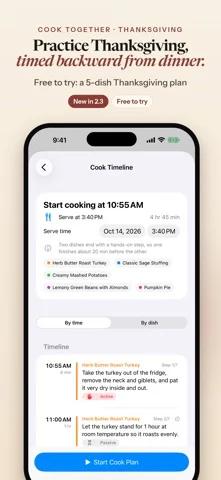
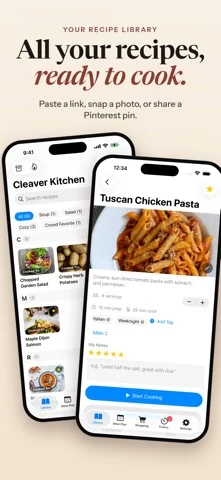
Cook the recipes you already love, all on one timeline. Save them from a link, a photo, a Pinterest pin or the share sheet, pick the dishes for tonight, and Cleaver Kitchen tells you when to start each step, working back from the time you want to eat. NEW: IPAD AND FREE ICLOUD SYNC Cleaver Kitchen now runs natively on iPad, with a Library sidebar, ingredients and steps side by side, and a large-type Cooking Mode. Free iCloud sync keeps your recipes, meal plans and shopping list the same on your iPhone and iPad, stored in your own iCloud account. One purchase covers both. Ready for iPhone Duo Cooking Mode adapts to how you hold your Duo: • Closed: the current step, timers and big Prev / Next buttons on the outer screen. • Half-open on the counter: the step on top; that step's ingredients, timers and big buttons below. • Flat: the full step list on one side, ingredients and timers on the other. Each step shows just the ingredients it uses. HOW IT WORKS 1. Add your recipes. Paste a link, browse the web inside the app and save, snap a photo, paste a Pinterest pin, or send a recipe from another app. You check a preview before anything is saved. 2. Pick your dishes and the time you want to eat. 3. Cook Together builds one timeline that works backward from your serve time, starts each step's timer and reminds you when to begin the next. New here? Tap "Try a sample dinner" on the empty Library screen to see a two-dish timeline in about a minute. BRING YOUR OWN RECIPES Import from a recipe website, a photo of a cookbook page, the share sheet, the in-app browser, a Pinterest pin (Cleaver Kitchen follows the pin to the recipe site behind it) or a recipe post from X. You can also paste recipe text. Add or replace a recipe's photo, and rename or re-file recipes any time. COOKING MODE WITH VOICE CONTROL Big, step-by-step text for one recipe at a time. Turn on Voice Control, hold the mic and say "next", "back", "timer" or "read step". Free for everyone. TIMERS THAT KEEP UP Timers are picked up from your steps. Run several at once and follow them in the Dynamic Island and on your Lock Screen with Live Activities. MEAL PLAN AND ONE SHOPPING LIST Plan your week or month. Ingredients from your planned recipes merge into one shopping list, grouped by aisle. A TIDY LIBRARY Photo tiles under A-Z headings with a quick-jump index, search and tags. Export your recipes any time. PRIVATE BY DESIGN No account to create. No ads, no analytics, no tracking. Your recipes, plans and lists stay on your devices and, if you turn on iCloud, in your own private iCloud account. We run no servers and can't see your data. GOOD TO KNOW Cook Together is built for one cook doing hands-on steps one at a time. Step times come from the recipe text, with estimates when a recipe has none. Timers start automatically while the app is open. iCloud sync needs you signed in to iCloud with iCloud turned on for Cleaver Kitchen, uses your iCloud storage, and the first sync on a new device can take a minute or more. FREE TO START, PRO FOR MORE Free: up to 15 recipes, every cooking feature, iCloud sync, and Cook Together for up to 2 dishes at a time. Cleaver Kitchen Pro adds unlimited recipes and Cook Together for 3 or more dishes. - Pro Monthly: $4.99 per month - Pro Yearly: $29.99 per year, with a 7-day free trial for eligible new subscribers - Pro Lifetime: $79.99, one-time purchase Payment is charged to your Apple Account. Subscriptions renew automatically unless canceled at least 24 hours before the end of the current period. Manage or cancel in Settings > [your name] > Subscriptions. Prices are US prices and may vary by region. Terms of Use (EULA): https://www.apple.com/legal/internet-services/itunes/dev/stdeula/ Cleaver Kitchen Terms: https://cleaverkitchen.com/terms/ Privacy Policy: https://cleaverkitchen.com/privacy/
iPhone Duo での Cleaver Kitchen: Cooking App:よくある質問
Cleaver Kitchen: Cooking App は iPhone Duo に最適化されていますか?
はい。Cleaver Kitchen: Cooking App は「Duo 専用設計」で、折りたたみ、Split View、外側ディスプレイを活用しています。2026年10月25日 に確認(App Store の記載)。
iPhone Duo での Cleaver Kitchen: Cooking App はどう見えますか?
Ready for iPhone Duo
Cleaver Kitchen: Cooking App の価格は?
Cleaver Kitchen: Cooking App は App Store で無料でダウンロードできます。
その他のフード/ドリンクアプリ
すべて見る ›
ワインを登録して飲み頃を管理し、AIソムリエが鑑定や料理との相性を提案する。

自宅の酒棚を管理し、手持ちの酒で作れるカクテルとAI考案レシピを表示。

献立計画、買い物リスト、ステップ表示の調理モードを備えたレシピ管理アプリ

家族の好みに合わせた献立を提案し、週の食事計画を組む。

英国内1,000軒以上のパブの実際のビール価格を地図で表示。

コンロで実際に起きたことを記録し、次回調理時に読み返す料理ジャーナル。