
iPhone 截图
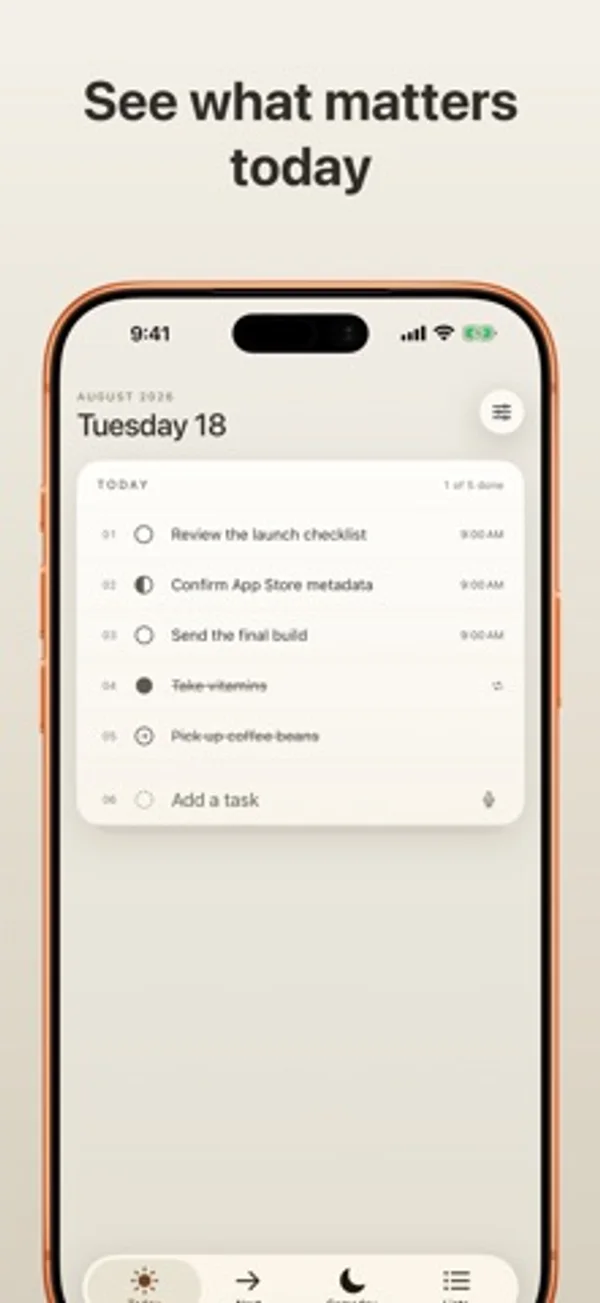
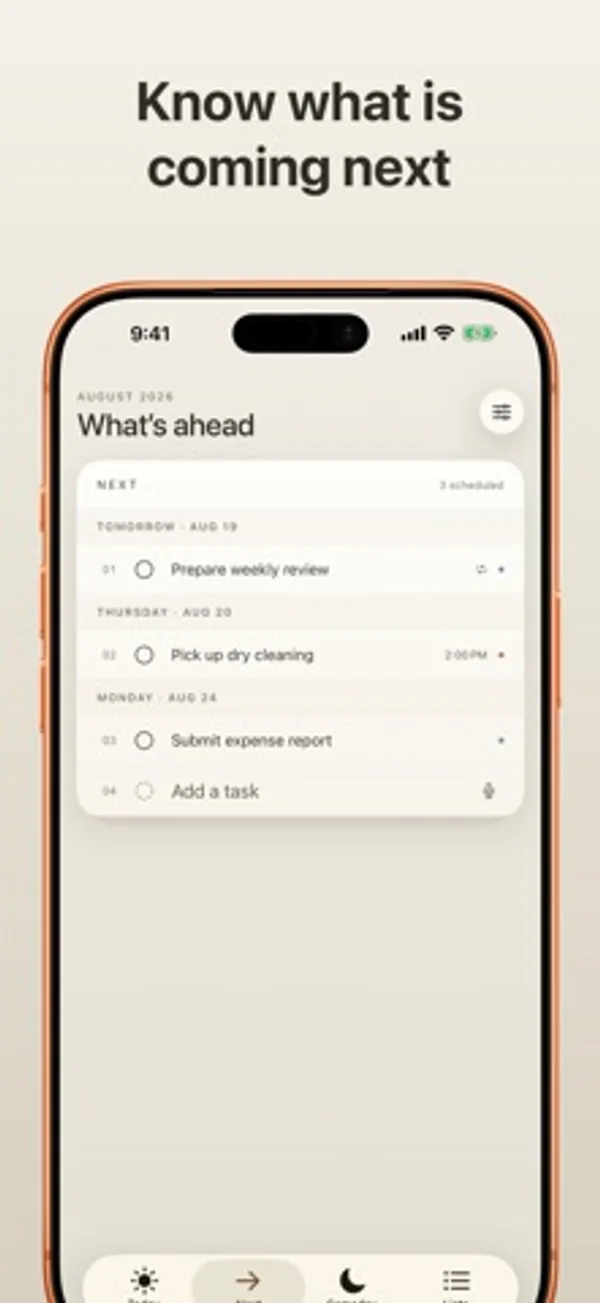
在 iPhone Duo 上的表现
展开 Duo 可并排查看今天与接下来,或把列表和概览放在一起;合起后回到单张卡片,切换分区仍保留规划页滚动位置。
新功能
版本 1.0.6 ·
Fits iPhone Duo Open Duo to see Today and Next side by side, and browse a list beside your list overview. Fold it to return to a single card. Each planner page keeps its scroll position when you visit Someday or Lists. Fresher widgets Widgets fetch current Apple Reminders even when Daycard is closed. Refresh timing is managed by the system. Quick moves from Someday On iPhone and iPad, swipe a Someday task to move it to Today or Tomorrow. On Mac, use the hover shortcuts. Undo restores the previous schedule. Smoother task changes Completed list tasks briefly show their finished state before disappearing when hidden. Mac task titles, status circles and cards move together as rows change. Keep your place Switch sections without losing your draft or scheduling Undo. Task entry stays steady as date and list suggestions appear. Long task titles wrap in narrow cards. Add Task preserves your wording Writing and drafting actions and full product names stay in your task titles. Daycard extracts dates, times, links, and list hints, with better handling of French dates and times and repeated date words. More reliable scheduling and refresh Schedule repeating reminders without losing their repeat rules. Upcoming weekday requests keep their time on the correct day. More reliable handling of noon and midnight, Spanish weekdays, and Spanish and Japanese relative dates. Reminders refresh handles interrupted or failed fetches more safely. Better daily words Examples match the displayed word. Daycard remembers shown words and uses the full vocabulary before repeating. Open in Reminders safely (Mac) Fixed a crash that could occur after opening a task in Apple Reminders.
开发者尚未提供此内容的中文版本。
App Store 简介由开发者撰写。
Daycard turns Apple Reminders into a calm, focused daily card. Apple Reminders remains the source of truth and syncs your reminders through iCloud. Daycard decides what deserves your attention today. There is no separate Daycard account or Daycard server. TODAY, NEXT, AND SOMEDAY • See unfinished overdue reminders alongside today’s work • Keep completed items on Today only when you actually completed them today • Browse future reminders grouped clearly by due date • Hold ideas in a dedicated Someday Reminders list • Create that Someday list only when you choose to BUILT FOR REAL REMINDERS • Work with every Apple Reminders list • Create, edit, complete, move, reorder, and delete reminders • Edit notes, links, location, priority, start and due dates, and alerts • Keep recurring reminders on their schedule instead of rolling them forward • Preserve advanced recurrence rules unless you intentionally replace them • Open useful link cards automatically when notes contain a web address YOUR OWN WORKFLOW • Mark a task open, in progress, or complete • Sync in-progress marks and custom order privately through your iCloud account • Choose whether task lines show due times and Reminders list labels ADD TASKS NATURALLY Type or dictate lines such as “Call Sarah tomorrow at 3 #Work.” Daycard extracts dates, times, and lists while preserving the task text you wrote. Apple’s on-device Foundation Models are used when available, with a built-in parser as a reliable fallback. WIDGETS AND SHARING See your card on your Home Screen or Lock Screen, complete reminders from a widget, and share links or text into a new task. CALM BY DESIGN • Fluid spring motion and a drawn completion strike • Tactile feedback for marking, moving, and adding tasks • A clean iPhone layout plus adaptive iPad navigation • Warm light and dark appearances • Light, dark, and tinted layered app-icon appearances PRIVATE BY DESIGN Daycard has no account, ads, analytics SDKs, tracking, or developer-operated cloud service. It reads and updates Reminders only after you grant access. Daycard’s in-progress marks and custom order use your private iCloud account. Dictation and Apple Foundation Models use Apple’s system frameworks. DAYCARD ACCESS Task management, widgets, and sharing require Daycard Annual or Daycard Lifetime. Annual is an auto-renewing yearly subscription with a one-month free trial for eligible customers. Lifetime is a one-time purchase. Both unlock every Daycard feature. Prices and trial eligibility appear before purchase. Manage or cancel an annual subscription in your Apple Account settings, and restore purchases in Daycard. Buying Lifetime does not cancel an existing annual subscription. Requires iOS 26 or iPadOS 26. Terms of Use: https://www.apple.com/legal/internet-services/itunes/dev/stdeula/ Privacy Policy: https://omarknows.app/daycard/privacy/ Questions or feedback? Email daycard@omarknows.app.
Daycard • Today's Reminders 在 iPhone Duo 上:常见问题
Daycard • Today's Reminders 针对 iPhone Duo 优化了吗?
部分优化。Daycard • Today's Reminders 属于「已适配」:它能铺满更大的内屏,但没有针对折叠做特别设计。资料更新于 2026年11月1日(开发者声明)。
Daycard • Today's Reminders 在 iPhone Duo 上是什么样子?
展开 Duo 可并排查看今天与接下来,或把列表和概览放在一起;合起后回到单张卡片,切换分区仍保留规划页滚动位置。
Daycard • Today's Reminders 多少钱?
Daycard • Today's Reminders 可在 App Store 免费下载。
更多效率应用
查看全部 ›
安静的待办清单与纸质风格计划本,按所需时长给任务分类

用月历、日程列表和分栏视图安排活动、记录日记。

用打字机式键盘写作,配合真实录制的按键声和回车动作。

录音并转写对话,整理摘要、行动项和后续邮件草稿。

任务与项目管理,为 iPhone Duo 的两块屏幕分别优化布局

Readdle 的统一收件箱邮件应用,展开后收件箱与邮件并排显示