
Gulpo
Duo support is reported in the linked sources. The specific fold interaction and real-device behavior have not been independently verified.
Raja Vijayaraman · Health & Fitness · Free
iPhone screenshots
How it uses iPhone Duo
Duo support is reported in the linked sources. The specific fold interaction and real-device behavior have not been independently verified.
What’s New
Version 1.0.5 ·
- Made for iPhone Duo. Use Gulpo one-handed on the outer display, or open it up and let the water fill the larger inner display. Keep Gulpo open beside another app, and watch the water move as you open and close iPhone Duo. - Meet Glance. Prop iPhone Duo up on your desk and Gulpo becomes a calm water display you can read from across the room: your day's level edge to edge, the number large, and a clock in the corner counting down to your next sip. Fallen behind and gone quiet? It shows how long it's been since your last drink. Drag the number onto an amount to log it, and watch the water splash as it lands. A small reward for every drink. - Fix a drink in seconds. Logged the wrong drink, amount or time? Tap it, swipe it, or press and hold to change it. - Log from the Lock Screen. The new Log a Drink widget adds an amount, a full glass or a sip from your bottle without opening the app. Show the amount, or keep just the icon. - Log More, a new control, takes you straight to the logger from Control Center, the Lock Screen or the Action button. - Not feeling well? Tap your goal at the top of the screen, then the new symptoms button, and mark a fever, nausea and more. Today's goal rises to match, with no trip to Settings, and tomorrow starts fresh. - Gulpo now speaks Japanese, Korean, Simplified Chinese, Traditional Chinese and German. - Various fixes and UI polish. Thanks a lot for all the love and your wonderful feedback.
About this app
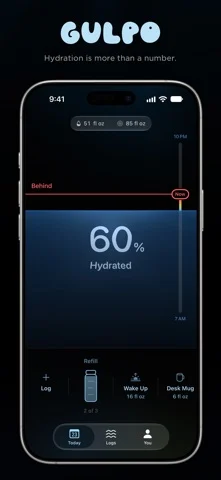
Hydration is more than reaching a number. Gulpo helps you understand the pace behind it. The pace line shows where you could be by now, so you can see at a glance whether you’re on track, ahead, or falling behind. Tap it to see exactly how much.
App Store descriptionWritten by the developer.
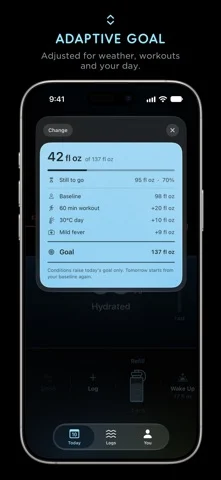
Hydration is more than reaching a number. Gulpo helps you understand the pace behind it. The pace line shows where you could be by now, so you can see at a glance whether you’re on track, ahead, or falling behind. Tap it to see exactly how much. Log the way that feels natural. Manually choose a beverage and amount, say what you drank and how much all at once, or point the camera at your drink. Carry a bottle? It gets even easier. Just tell Gulpo how much of it you finished. Save the drinks you reach for often, from your morning glass to your desk mug, so they’re always close by. However the drink happened, there’s probably a quick way to log it. Now you’ve got one less excuse not to log :) Coffee, tea, milk, juice, smoothies and more all contain water. Gulpo accounts for the water in each drink instead of treating everything as plain water. Some days need more water than others too, so weather, workouts and details you choose to share through Apple Health can help Gulpo adjust your daily goal. There’s no Gulpo account and no sign-up. Your data stays on your devices and can sync through your own iCloud account. Gulpo doesn’t need to know who you are to know how much you drank. Gulpo Reserve is available as a monthly or yearly auto-renewing subscription, or a one-time lifetime purchase. Payment is charged to your Apple Account at confirmation. Subscriptions renew automatically unless cancelled at least 24 hours before the end of the current period, and can be managed or cancelled in your Apple Account settings. Gulpo Terms: https://gulpo.app/terms Privacy Policy: https://gulpo.app/privacy Terms of Use (EULA): https://www.apple.com/legal/internet-services/itunes/dev/stdeula/
Gulpo on iPhone Duo: FAQ
Is Gulpo optimized for iPhone Duo?
The developer or App Store listing mentions iPhone Duo support.
What does Gulpo look like on iPhone Duo?
Duo support is reported in the linked sources. The specific fold interaction and real-device behavior have not been independently verified.
How much does Gulpo cost?
Gulpo is free to download on the App Store.
More Health & Fitness apps
See all ›
Hey everyone! This update brings full iPhone Duo support with a new trick: just place and turn it into tent mode to

A water tracker with two-column layouts on the open iPhone Duo

Recovery, exertion and workout insights from your Apple Watch data

MADE FOR IPHONE DUO

A described Duo layout or interaction is linked in the sources; no independent device test was performed.

BUILT FOR IPHONE DUO