
Sweepr: Swiper Photo Cleaner
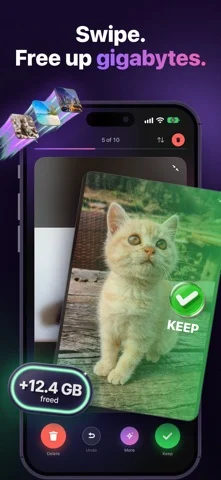
Swipe to delete or keep photos, compress heavy files and trim long videos.
Davyd Hruts · Utilities · Free
iPhone screenshots
What’s New
Version 2.2.2 ·
Fixes and small improvements.
App Store descriptionWritten by the developer.
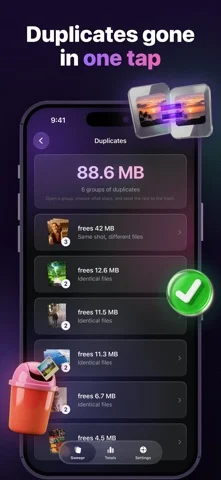
Your phone is full, and everything on it is a memory. Sweepr is a swipe photo cleaner for people who don't want to lose anything: swipe away what you don't want, compress what you want to keep, and free space on your iPhone either way. SWIPE LEFT TO DELETE, RIGHT TO KEEP One photo at a time, full screen. Swipe left to delete, right to keep, and undo the last swipe whenever you change your mind. Left swipes wait in a trash at the top of the deck, so nothing leaves your camera roll until you confirm once. Sweep a day, a month, a whole year, or just the screenshots. Sweepr remembers what you have already reviewed, so you never see the same photo twice. COMPRESS INSTEAD OF DELETING Some shots are too good to delete and too heavy to keep. Compress them instead: the new copy stays at full resolution, with the same date, the same place and the same album, and only the file gets lighter. Video keeps its place in your library at the quality and frame rate you pick. An iPhone records 4K at roughly 350 MB a minute, so the same minute at 1080p is a fraction of that. The heavy original moves to Recently Deleted, where iOS keeps it for 30 days. FIND DUPLICATE PHOTOS Bursts, near-identical frames, the same picture saved twice from a chat. Sweepr groups duplicates and similar shots side by side, so you keep the best one and clear the rest in a single action. TRIM LONG VIDEOS Cut the dead minutes off a long clip and the trimmed copy takes the original's place. Long video is usually the single heaviest thing in a camera roll. FILTER WHAT YOU CLEAN Photos, videos, screen recordings, screenshots, selfies, Live Photos, duplicates, your largest videos, or any album. Start with screenshots for the fastest win: they pile up quietly and almost nobody misses them. SEE WHAT YOU FREED Storage freed, photos kept, photos deleted, videos trimmed, days in a row. Charts and an activity map show where the space actually went. IT KEEPS WORKING WHILE YOU DON'T Compression and trimming carry on in the background, with progress on the home screen, in the Dynamic Island and on the lock screen. BUILT TO BE SAFE Nothing leaves your device. No account, no cloud, no upload of your library. Deleted photos land in Recently Deleted, so iOS keeps them for 30 days and you can bring anything back. Compression always writes the new copy before the original is moved. And to be clear about what Sweepr is not: it does not clean cache, junk files or viruses, it cannot recover photos you deleted before, and it does not edit your pictures. It sorts, deletes, compresses and trims what is already in your library. SWEEPR PRO Free: 200 swipes to start, the full library view, duplicate scanning, photo and video compression (each file uses one swipe), and 3 video trims. Pro: unlimited swipes and trims, and full statistics with charts and streaks. One subscription, no ads, no per-photo fees. Gigabytes back in minutes, without losing a memory. Sweepr speaks 37 languages and works on iPhone with iOS 17 or later. Terms of Use (EULA): https://sweeprapp.com/terms.html Privacy Policy: https://sweeprapp.com/privacy.html
Sweepr: Swiper Photo Cleaner on iPhone Duo: FAQ
Is Sweepr: Swiper Photo Cleaner optimized for iPhone Duo?
The developer or App Store listing mentions iPhone Duo support.
How much does Sweepr: Swiper Photo Cleaner cost?
Sweepr: Swiper Photo Cleaner is free to download on the App Store.
More Utilities apps
See all ›
Measures angles to 0.1° using the iPhone Duo hinge, with target, match, and level tools.

Turns iPhone Duo into a bevel gauge that reads hinge angles, and works as a level on any iPhone.

Turns iPhone Duo into a realistic bi-fold wallet with card slots, cash, pen and receipt.

Turns the iPhone Duo hinge into an angle and reference toolkit, with a free bubble level on other iPhones.

Turns iPhone into a ruler, protractor, level and diameter gauge, and iPhone Duo into a live folding rule.

Measures the iPhone Duo hinge angle live, and serves as a level, protractor, slope meter and camera angle finder.