iPhone Duo Crackgate: Apple’s response and next steps
A source-based look at Apple’s response, iFixit’s hinge hypothesis, misleading failure-rate claims and the practical steps to prepare for service.
Published · 15 min read
On this page
- What Apple has actually acknowledged
- A short timeline, with the evidence attached
- What the teardown shows—and where the inference begins
- Why social-media counts cannot give you a failure rate
- If your inner display has developed a line or crack
- Prepare your data before the service appointment
- If your phone is working normally
- Match each piece of evidence to the question it can answer
- Why folding-cycle videos are difficult to rank
- Treat service preparation as a device migration
- A case-note template you can use
- Make a purchase decision around your interruption cost
- Three follow-up questions to keep separate
- What would materially change the picture
Apple has now responded to reports of cracked iPhone Duo inner displays. Affected owners have a clearer next step: contact AppleCare about a replacement, rather than trying to piece together a service route from forum replies.
That still leaves a harder decision for people buying or keeping a phone. There is no reliable public failure rate, defined affected batch or established common cause. Instead of rebuilding the decision after every alarming image, it helps to identify what has changed and prepare for the practical possibility of being without a primary phone.
Sources were checked on October 27, 2026. We begin with the response and teardown, then work through the records, recovery arrangements and everyday circumstances that matter to an owner.
What Apple has actually acknowledged
On October 26, 9to5Mac published a statement it received from Apple: the company recognizes an inner-display issue affecting a small number of units and tells owners with the problem to contact AppleCare for a replacement. The wording is Apple’s; the report is the publication’s direct account of receiving it.
The most important change is that an affected owner now has a specific service route to cite. The statement does not publish a numerical failure rate, identify a manufacturing batch or announce a recall. “Small number” cannot be converted into a percentage without a count of affected units and a relevant denominator.
It also helps to distinguish AppleCare support from AppleCare+ insurance. The service-contact instruction is not, by itself, a requirement to purchase an insurance plan. Coverage, inspection and the remedy offered for an individual device should be confirmed with Apple in the owner’s region. Neither a social post nor this article can issue that determination.
A short timeline, with the evidence attached
| Date | Evidence | What it adds |
|---|---|---|
| October 23 | Apple’s launch-week developer announcement points to availability that Friday. | The starting context is a newly shipping device, not a year of field data. |
| Launch weekend | Owner reports spread through forums and social media. | Individual symptoms and experiences; no representative sampling frame. |
| October 25 | iFixit’s original teardown examines the display and hinge and models possible stress points. | Physical observations and an engineering hypothesis. |
| October 26 | Apple responds directly to 9to5Mac. | Acknowledgment and a replacement-support route. |
| October 27 | This evidence review. | A dated account of what is known and what remains unanswered. |
Launch, owner reports, teardown and company response: the order is worth remembering. A discussion recorded before the statement may not know the current service direction. A repair document published at launch does not become a newly announced recall simply because it is suddenly being shared widely. Check the date as well as the headline.
What the teardown shows—and where the inference begins
iFixit’s examination identifies the central hinge-support area as a place to investigate. Its model explores how a support that fails to move far enough could concentrate stress near reported damage locations. That is a hypothesis illustrated with teardown and modeling evidence, not an Apple-confirmed root cause.
The missing link is whether the condition in the model occurred in a damaged phone. A teardown can reveal normal movement; a model can explore pressure under a particular assumption. Connecting that assumption to a real failure requires evidence from the affected specimen. The public material has not yet completed that chain.
Notice whether an analysis concerns a normal unit, a failed unit or a model, and whether its author keeps words such as “may.” Headlines tend to lose those details on the next repost. An investigation direction can become an apparently settled verdict after only a few retellings. Reading the original is often less alarming, as well as more informative.
The opposite shortcut is equally weak. A phone surviving one creator’s folding test does not resolve the reports from other units. Both observations can be true if manufacturing variation, a local fault or different conditions matter. Public reporting has not yet quantified those possibilities.
Why social-media counts cannot give you a failure rate
A failure-rate calculation needs more than a numerator. It needs a defined group, a period of observation and a consistent definition of failure. A directory of screenshots provides none of those automatically.
One damaged phone can appear in a Reddit post, a repost on X, a reaction video and several news articles. Counting those as separate devices inflates the numerator. Counting only posts from one community misses owners who went directly to support. Treating every phone sold as an equally observed, equally old device distorts the denominator.
Upvotes add another layer: they measure attention, not the number of broken displays. A highly discussed report is worth investigating; it is not a survey. Silence is ambiguous too. An owner who has no issue may never post, while an owner with an issue may describe it in several places.
The sensible conclusion is narrower than either extreme: the reports warranted a response, and Apple has responded. Public posts do not currently justify a precise forecast of what will happen to your particular phone.
If your inner display has developed a line or crack
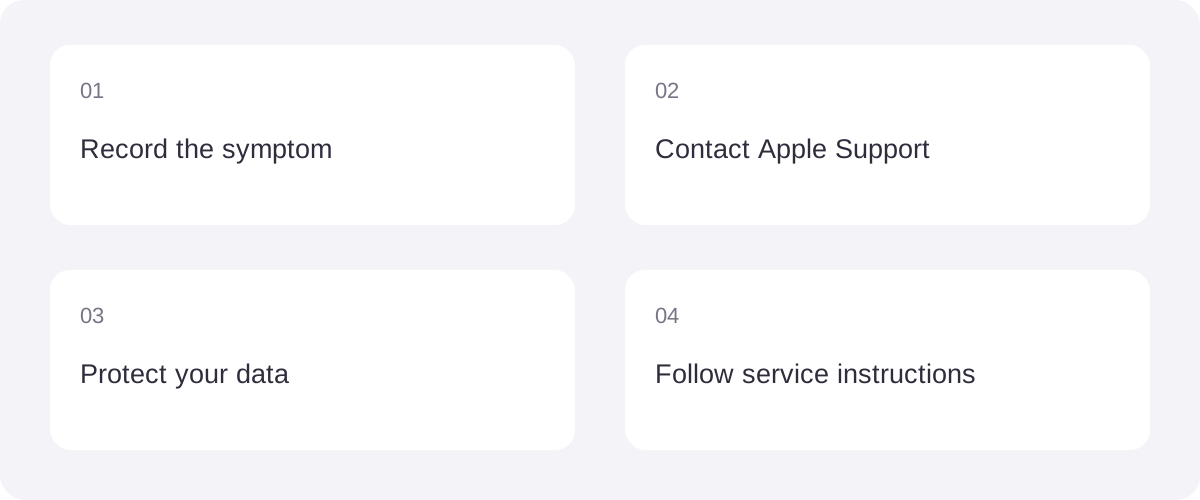
If a line or crack has appeared, avoid repeatedly folding the phone to capture a more dramatic reproduction. What is visible now, when you first noticed it and what you were doing are already useful records. A clear account reduces the amount you later have to reconstruct from memory.
Use another camera to document the display and the outside of the phone. Write down when the symptom appeared, what you were doing, whether you noticed unusual resistance, and whether there was a known impact. Record facts separately from your explanation of them. “A bright line appeared while opening” is more useful than assigning a root cause you cannot inspect.
Start with Apple’s official iPhone service page. Explain that you are reporting an inner-display issue on iPhone Duo, ask how it will be evaluated, and request the next steps in writing or under a case number. Do not assume a viral repair-price screenshot describes your coverage or region.
There is no need to open the hinge or peel a display layer to discover the cause yourself. Preserving the device in its current state makes the next inspection easier. Read a teardown to understand the structure; use the support process for the phone in your hand.
Prepare your data before the service appointment
A replacement phone is useful only if you can get back into your digital life. Start with Apple’s backup instructions, then consider the things a general phone backup does not automatically prove are recoverable.
Check that an actual recent backup exists. Separately review access to your primary email, password manager, authenticator and mobile service. Some apps sync records through their own accounts; others store information locally or offer a separate export. The useful question is “How would I restore this on another device?” rather than simply “Is iCloud turned on?”
For an app you use for work or personal records, open its own sync or export settings while the phone remains usable. Keep any necessary recovery material somewhere accessible without the affected phone. You do not need to send that material to a support representative.
Follow the current Apple service-preparation checklist when the appointment is arranged. It includes version-dependent steps, so an old checklist telling every owner to turn off Find My may not match the current iOS 27 repair-preparation flow. Follow the linked instructions for your software version rather than improvising an account-removal procedure.
Apple also says not to hand over account passwords or the device passcode. If the phone is unresponsive, its checklist explains that owners should complete the steps they can. A failed screen should not force you into guessing at destructive settings just to satisfy an internet checklist.
If your phone is working normally
You do not need to turn everyday use into a home durability trial. Repeatedly forcing the hinge, pressing the crease or copying a teardown experiment adds no reliable information about a population failure rate.
A little time spent finding the receipt and checking recovery arrangements is easier than searching for both while also locating a spare phone. Know where official support begins. A hardware controversy draws attention to this preparation, but any primary phone benefits from it.
For a purchase decision, separate two questions. First, does the larger folding display solve something you actually do? Second, how much inconvenience can you tolerate if a primary device needs inspection or replacement? The second question depends on your backup phone, travel plans and access to service, not just on a headline.
Waiting for more evidence is a reasonable choice if service interruption would be costly. Continuing to use an unaffected device normally is also consistent with the evidence. Neither choice requires pretending that the failure reports are imaginary or that every unit is destined to fail.
Match each piece of evidence to the question it can answer
One crack photograph can be used to argue about three different things: what happened to that phone, which part might be responsible, and whether buying the product is sensible. The first two need different material. The third also depends on the person buying. Knowing which question is under discussion prevents a great deal of talking past one another.
Before changing your mind because of a new post, identify the claim it supports and the missing information.
| Question | Useful evidence | What still needs checking |
|---|---|---|
| Did this device develop a symptom? | Original images and a dated account | Whether the images concern the same device and period |
| Do cases share an observable pattern? | Independent case histories | Duplicate reports, consistent descriptions and observation versus interpretation |
| Could a component cause damage? | A specimen, examination and reproduction | Whether the assumed condition occurred in that specimen |
| How common is the problem? | Data with a defined observation population | Numerator, denominator, period and failure definition |
| What should this owner do? | Current support instructions and an individual assessment | Region, device condition and the next steps offered |
A continuous video may show the moment something went wrong very clearly. Internal movement outside the frame needs other evidence. An owner does not have to perform an engineering experiment to report a problem, and a reader does not need to invent mechanical details that the recording cannot show.
One worthwhile extra step is opening the original post for the follow-up. Whether the owner contacted support, what an inspection found and how the case ended may be more useful than the first photograph. Screenshots travel quickly; corrections and outcomes buried in the replies often do not.
Why folding-cycle videos are difficult to rank
Durability tests travel well because a complex question becomes one memorable number. But two counters in two videos may not measure the same thing. A complete closure, the applied force, the speed, the environment and the stopping condition can all change the interpretation.
Imagine one demonstration ends when the hinge stops moving and another ends at the first abnormal display line. Even if both counters are accurate, their endpoints are different: one concerns mechanical movement, the other concerns display function. Calling both a folding test does not remove that difference.
Before comparing them, look for the number of devices, the apparatus, the definition of one cycle, the failure criterion, other damage during the test and the underlying record. If those details are absent, a number can describe that demonstration. It cannot tell you how many cycles your own phone has left.
This is another reason a long-surviving sample and an early-failing sample can coexist. They concern different devices and potentially different conditions. Connecting them requires evidence about samples and conditions, not selecting the video that best matches your expectations.
Repairability also belongs on a different axis from reliability. A part being accessible may make work after a failure more straightforward; it does not, by itself, make that part less likely to fail. Conversely, a difficult repair cannot establish how often a fault occurs. A single score should not quietly stand in for both questions.
Treat service preparation as a device migration
The practical rehearsal is not simply how to hand over a phone. It is whether you could continue the next day with an empty replacement. Think in four layers: connectivity, accounts, records and work access.
Connectivity: establish how your phone number would move. Calls, texts and verification messages may all depend on that one line. Apple’s eSIM setup instructions and carrier directory describe carrier-dependent options. Do not assume another person’s transfer method applies to your provider. Asking before the old device becomes unusable can simplify the conversation.
Accounts: understand how you would sign in somewhere else. Email, a password manager and an authenticator can depend on one another. The awkward case is a login requiring a code that only the affected phone can supply. Review the services’ own recovery routes rather than improvising by disabling protection. You only need to establish the route; secret recovery material does not belong in a public report or support case description.
Records: distinguish sync, backup and export. Seeing a file in the cloud does not prove that every app setting, attachment or history can be restored. For important local material, find out whether a separate export exists, where it goes and what opens it. Producing a file is not the same as checking that it can be recovered.
Work access: identify requirements outside a personal backup. If the device carries company accounts, enterprise verification or managed work material, ask the relevant administrator how replacement works. Some access conditions depend on the organization’s setup. Put that on a separate list rather than discovering it after the phone has changed.
Preparation is not an instruction to erase a usable device immediately. Investigate, back up and confirm the route first. Carry out account or device-state changes according to the service instructions. If a broken display prevents a step, explain the limitation instead of confirming a setting you cannot inspect.
A case-note template you can use
A few notes are enough for the first conversation. Use these headings to help the next person identify the device, the symptom and the contact already made, without writing a long narrative.
- Device and purchase: model, purchase date and channel, and where you keep the receipt. A public account does not need your serial number or order details.
- First observation: approximate time, what you were doing, which display was in use and whether the symptom appeared suddenly or was noticed gradually.
- Direct observations: location of lines or damage, whether touch still works, and any unusual resistance or sound you actually observed.
- Known events: accurately state impacts, foreign material or other events you know about. Mark uncertain details as uncertain rather than filling them in.
- Existing material: where the original photos or short recording are stored, and any support case number. Do not apply more force just to complete the record.
- Questions for support: inspection process, what to bring, whether you need another device and where to follow up.
A useful record does not need a dramatic title or a mechanical explanation attached to every image. It should help the next person understand the symptom, sequence and conversations already completed.
If you share the experience publicly, updating one original post makes the history easier to follow. Distinguish contacting support, an inspection and the final outcome. Three unrelated posts for three stages make it harder for other readers to recognize that they concern one phone.
Make a purchase decision around your interruption cost
Being without a primary phone has very different costs. Someone with a ready spare may mainly need to restore accounts; someone about to travel with every verification method on one device has more to arrange. Put those circumstances on the page before borrowing another person’s buying decision.
| Your situation | What to establish first |
|---|---|
| A spare phone is ready | Whether important records and accounts can move, not just whether the spare powers on |
| This is your only phone | How communication, work verification and records remain available during service |
| Travel is approaching | Service access, available time and access to your number and travel material |
| You want a long-term work tool | Whether the larger view repeatedly helps real tasks, with an alternative for interruptions |
If the main benefit is occasional novelty but losing access even briefly would be very disruptive, waiting may suit your circumstances. If the use case is clear and recovery preparations are sound, you can keep observing new evidence without rebuilding your whole decision after every post.
How much inconvenience someone else accepts for novelty has little to do with your calendar. Access to a spare, number recovery and work authentication are more useful inputs than a comment section that has settled on either excitement or disappointment.
Three follow-up questions to keep separate
Does normal operation for a while rule out the problem? Public information does not establish a time after which a unit is guaranteed unaffected. A symptom-free period describes the device so far. Normal use and keeping recoverable records can coexist.
Does receiving a replacement prove there is revised hardware? Not without traceable documentation or an identifiable change. A service outcome and a manufacturing revision are different facts. Record them separately.
Should every new teardown or release note reset the conclusion? First ask what it adds: a new specimen, method, cause or service scope may change a specific judgment. A new title on the same material does not create new evidence.
What would materially change the picture
The next useful information would include an official explanation of the cause, a clearly defined affected batch, a documented hardware revision, a formal service program, or reliability data with a stated method and denominator. A new angle on an old photo is not the same kind of update.
Software updates belong in a separate evidence track. A new iOS release may change interface behavior, but its release does not establish that a reported physical display fault has been resolved. Look for an explicit statement identifying the problem addressed and the scope of the remedy before connecting the two stories.
If symptoms appear, take a clear record to support. If the phone is working, establish how you would recover data and account access. Then watch for meaningful new information about the cause, scope and remedy. Our eight-app design roundup looks at the other side of the decision: what people hope to gain by unfolding this new phone.
Sources & references
- 9to5Mac — Apple response, October 26 ↗
- iFixit — original iPhone Duo teardown, October 25 ↗
- Apple — iPhone service and repair ↗
- Apple — Back up iPhone ↗
- Apple — Prepare your iPhone or iPad for service ↗
- Apple — launch-week developer announcement ↗
- Apple — Set up eSIM on iPhone ↗
- Apple — Supported eSIM carriers ↗