
HoldSay - Recorder & AI Notes
講義や会議を録音し端末上で文字起こし、スライド写真を該当箇所に挿入。
LIGHT WITHIN LIFE PTE. LTD. · 仕事効率化 · 無料
iPhone スクリーンショット
新機能
バージョン 1.0.26 ·
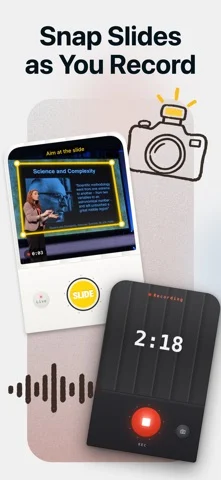
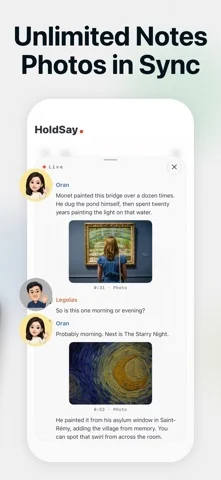
New: snap slides while you record. Each photo lands in the transcript right where it was said, and you get illustrated notes at the end. • Snap slides right from the recording screen; crooked shots are straightened automatically • Turn on live transcription to see words as you speak; stopping saves right away • Speakers are recognized; name someone once and HoldSay knows them next time • Summaries keep running in the background, even if you leave the page • Redesigned home, history and settings • Speech models download when needed, so setup is faster
開発者はこの内容を日本語化していません。
App Store の説明開発者による説明です。
Snap slides while you record. Each photo lands in the transcript right where it was said, so when the class or meeting ends you already have illustrated notes. Recording and transcription happen on your iPhone, and your audio is never uploaded. GREAT FOR • Lectures and online classes: snap the slides as you listen, and later every photo sits next to what was said about it • Meetings and trainings: record as long as you need and get a full transcript and notes at the end • Interviews: speakers are recognized; name someone once and HoldSay knows them next time • Audio and video you already have: import it and transcribe WHY HOLDSAY • No length limit, even for long recordings • Slides are detected automatically, and crooked shots are straightened • Live transcription: see words as you speak; stopping saves right away • Never lose a recording: audio is written to disk as you speak, so calls, crashes, even force-quit can't take it away • Apple Watch: record on your wrist, it lands on your iPhone • Action Button, Control Center, Home Screen and Lock Screen widgets start recording in one press • Export audio and text whenever you want HOLDSAY PRO New users can try every feature for free first. After the trial, recording stays free and transcription needs Pro: a weekly plan or a one-time lifetime purchase. Prices are shown in the app. PRIVACY Your voice is processed by the speech model on your phone, and recordings are stored only on your iPhone. Privacy policy: https://holdsay.com/privacy
iPhone Duo での HoldSay - Recorder & AI Notes:よくある質問
HoldSay - Recorder & AI Notes は iPhone Duo に最適化されていますか?
開発者またはストアに iPhone Duo 対応の記載があります。
HoldSay - Recorder & AI Notes の価格は?
HoldSay - Recorder & AI Notes は App Store で無料でダウンロードできます。
その他の仕事効率化アプリ
すべて見る ›
所要時間でタスクを分ける、落ち着いた ToDo リスト兼ペーパー風プランナー

iPhone Duo の両ディスプレイ向けレイアウトを備えたタスク・プロジェクト管理

展開するとメッセージと受信ボックスを並べて表示できる、Readdle の統合受信ボックス

iPhone Duo のあらゆる姿勢に合わせて形を変える、Cultured Code のタスク管理アプリ

iPhone Duo を開くとノートが開く、手書き風のプライベートノートブック

ブックとテーブルトップの姿勢向けの集中タイマーを備えた、ビジュアルタイムライン式の 1 日プランナー