
HoldSay - Recorder & AI Notes
Duo support is reported in the linked sources. The specific fold interaction and real-device behavior have not been independently verified.
LIGHT WITHIN LIFE PTE. LTD. · Productivity · Free
iPhone screenshots
How it uses iPhone Duo
Duo support is reported in the linked sources. The specific fold interaction and real-device behavior have not been independently verified.
What’s New
Version 1.0.26 ·
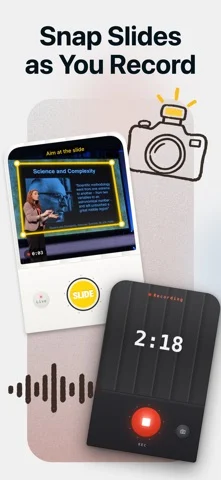
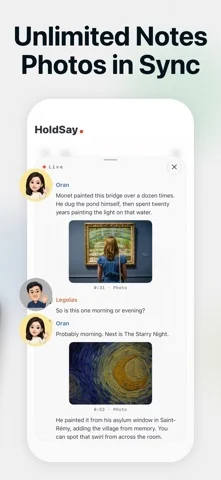
New: snap slides while you record. Each photo lands in the transcript right where it was said, and you get illustrated notes at the end. • Snap slides right from the recording screen; crooked shots are straightened automatically • Turn on live transcription to see words as you speak; stopping saves right away • Speakers are recognized; name someone once and HoldSay knows them next time • Summaries keep running in the background, even if you leave the page • Redesigned home, history and settings • Speech models download when needed, so setup is faster
About this app
Snap slides while you record. Each photo lands in the transcript right where it was said, so when the class or meeting ends you already have illustrated notes. Recording and transcription happen on your iPhone, and your audio is never uploaded.
App Store descriptionWritten by the developer.
Snap slides while you record. Each photo lands in the transcript right where it was said, so when the class or meeting ends you already have illustrated notes. Recording and transcription happen on your iPhone, and your audio is never uploaded. GREAT FOR • Lectures and online classes: snap the slides as you listen, and later every photo sits next to what was said about it • Meetings and trainings: record as long as you need and get a full transcript and notes at the end • Interviews: speakers are recognized; name someone once and HoldSay knows them next time • Audio and video you already have: import it and transcribe WHY HOLDSAY • No length limit, even for long recordings • Slides are detected automatically, and crooked shots are straightened • Live transcription: see words as you speak; stopping saves right away • Never lose a recording: audio is written to disk as you speak, so calls, crashes, even force-quit can't take it away • Apple Watch: record on your wrist, it lands on your iPhone • Action Button, Control Center, Home Screen and Lock Screen widgets start recording in one press • Export audio and text whenever you want HOLDSAY PRO New users can try every feature for free first. After the trial, recording stays free and transcription needs Pro: a weekly plan or a one-time lifetime purchase. Prices are shown in the app. PRIVACY Your voice is processed by the speech model on your phone, and recordings are stored only on your iPhone. Privacy policy: https://holdsay.com/privacy
HoldSay - Recorder & AI Notes on iPhone Duo: FAQ
Is HoldSay - Recorder & AI Notes optimized for iPhone Duo?
The developer or App Store listing mentions iPhone Duo support.
What does HoldSay - Recorder & AI Notes look like on iPhone Duo?
Duo support is reported in the linked sources. The specific fold interaction and real-device behavior have not been independently verified.
How much does HoldSay - Recorder & AI Notes cost?
HoldSay - Recorder & AI Notes is free to download on the App Store.
More Productivity apps
See all ›
Calm to-do list and paper-style planner that sorts tasks by how long they take

Task and project management with layouts for both iPhone Duo displays

Unified inbox from Readdle with message and inbox side by side when unfolded

Task manager from Cultured Code, reshaped for every iPhone Duo pose

A private handwriting-style notebook that opens when you unfold iPhone Duo

Visual timeline day planner with a Focus Timer for book and tabletop poses