
HoldSay - Recorder & AI Notes
Duo 지원 상태는 출처 확인이 필요하며 실제 기기 동작은 미검증입니다.
LIGHT WITHIN LIFE PTE. LTD. · 생산성 · 무료
iPhone 스크린샷
iPhone Duo 활용 방식
Duo support is reported in the linked sources. The specific fold interaction and real-device behavior have not been independently verified.
새로운 기능
버전 1.0.26 ·
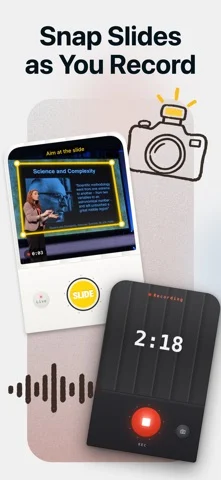
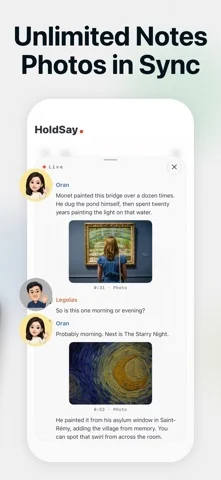
New: snap slides while you record. Each photo lands in the transcript right where it was said, and you get illustrated notes at the end. • Snap slides right from the recording screen; crooked shots are straightened automatically • Turn on live transcription to see words as you speak; stopping saves right away • Speakers are recognized; name someone once and HoldSay knows them next time • Summaries keep running in the background, even if you leave the page • Redesigned home, history and settings • Speech models download when needed, so setup is faster
개발자가 이 내용을 한국어로 제공하지 않았습니다.
앱 소개
Duo support is reported in the linked sources. The specific fold interaction and real-device behavior have not been independently verified.
영어 원문을 번역한 내용입니다.
App Store 설명개발자가 작성한 내용입니다.
Snap slides while you record. Each photo lands in the transcript right where it was said, so when the class or meeting ends you already have illustrated notes. Recording and transcription happen on your iPhone, and your audio is never uploaded. GREAT FOR • Lectures and online classes: snap the slides as you listen, and later every photo sits next to what was said about it • Meetings and trainings: record as long as you need and get a full transcript and notes at the end • Interviews: speakers are recognized; name someone once and HoldSay knows them next time • Audio and video you already have: import it and transcribe WHY HOLDSAY • No length limit, even for long recordings • Slides are detected automatically, and crooked shots are straightened • Live transcription: see words as you speak; stopping saves right away • Never lose a recording: audio is written to disk as you speak, so calls, crashes, even force-quit can't take it away • Apple Watch: record on your wrist, it lands on your iPhone • Action Button, Control Center, Home Screen and Lock Screen widgets start recording in one press • Export audio and text whenever you want HOLDSAY PRO New users can try every feature for free first. After the trial, recording stays free and transcription needs Pro: a weekly plan or a one-time lifetime purchase. Prices are shown in the app. PRIVACY Your voice is processed by the speech model on your phone, and recordings are stored only on your iPhone. Privacy policy: https://holdsay.com/privacy
iPhone Duo에서의 HoldSay - Recorder & AI Notes: 자주 묻는 질문
HoldSay - Recorder & AI Notes은(는) iPhone Duo에 최적화되어 있나요?
개발자 또는 스토어가 iPhone Duo 지원을 안내합니다.
iPhone Duo에서 HoldSay - Recorder & AI Notes은(는) 어떻게 보이나요?
Duo support is reported in the linked sources. The specific fold interaction and real-device behavior have not been independently verified.
HoldSay - Recorder & AI Notes의 가격은 얼마인가요?
HoldSay - Recorder & AI Notes은(는) App Store에서 무료로 다운로드할 수 있습니다.
다른 생산성 앱
모두 보기 ›
걸리는 시간별로 할 일을 분류하는 차분한 할 일 목록 겸 종이 스타일 플래너

iPhone Duo의 두 디스플레이에 맞춘 레이아웃을 갖춘 작업·프로젝트 관리 앱

펼치면 메시지와 받은 편지함을 나란히 보여 주는 Readdle의 통합 받은 편지함

Cultured Code의 작업 관리 앱, iPhone Duo의 모든 자세에 맞게 재구성

iPhone Duo를 펼치면 열리는, 손글씨 느낌의 프라이빗 노트

북 자세와 탁상 자세에 맞춘 집중 타이머를 갖춘 시각적 타임라인 일일 플래너