
iPhone スクリーンショット
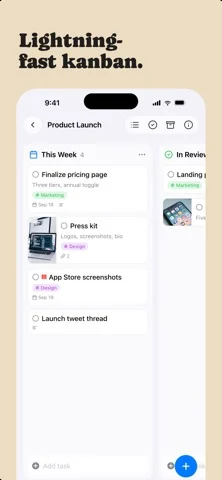
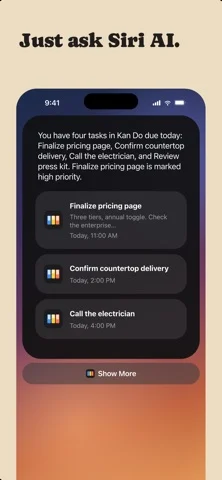
iPhone Duo での活用
Duo support is reported in the linked sources. The specific fold interaction and real-device behavior have not been independently verified.
新機能
バージョン 1.6.6 ·
iPhone Duo - Kan Do is Made for iPhone Duo. Open it flat for the full iPad layout, or hold it like a book for a column on each page - With a task open while the Duo is held like a book, the bar keeps the board's name; it showed a pair of stray marks instead - Opening and closing iPhone Duo softens the screen while the hinge is moving, the way the Home Screen does, instead of cutting between the closed and open layouts Sync and new devices - Installing Kan Do on a second device no longer leaves you with two of everything. A fresh install now waits for iCloud to bring down your existing boards before it adds the sample Work space, and it asks iCloud directly instead of relying on iCloud Drive, so a Mac with iCloud Drive turned off waits too (tester) - If a duplicate sample board, Ideas tag, or Inbox card did slip in, the copy you have been using is the one that stays, and the untouched copy is removed on its own. That cleanup now runs for a month after an install instead of a week (tester)
開発者はこの内容を日本語化していません。
このアプリについて
Duo support is reported in the linked sources. The specific fold interaction and real-device behavior have not been independently verified.
英語版の掲載内容を翻訳しています。
App Store の説明開発者による説明です。
Organize your work into Spaces and Projects, then move tasks across the columns you define. Every card shows what matters at a glance: a cover image, subtitle, tags, priority, and due date. Open any task and you get a full markdown notes editor with headings, lists, checkboxes, images, and file attachments. ORGANIZE YOUR WAY • Kanban boards with drag-and-drop cards, columns, and dividers • A list view for every project, with drag to reorder • Spaces group your projects; tags cut across them • Smart lists for Inbox, Today, Upcoming, and Flagged • Archive completed work, or keep it crossed out on the board CAPTURE THE DETAILS • Rich notes on every task: headings, bold, lists, to-do checkboxes, quotes, and code • Attach images and files right in the note • Cover images, subtitles, priorities, flags, links, and due dates with reminders EVERYWHERE YOU WORK • Native on Mac, iPhone, iPad, and Apple Vision Pro • iCloud sync keeps every device up to date • Spotlight search and Shortcuts actions! • Multi-select to move, complete, or delete tasks in bulk • Light and Dark appearance, color themes, adjustable typography No accounts. No subscriptions to manage your own tasks. Your data lives in your iCloud.
iPhone Duo での Kan Do: Project Management:よくある質問
Kan Do: Project Management は iPhone Duo に最適化されていますか?
開発者またはストアに iPhone Duo 対応の記載があります。
iPhone Duo での Kan Do: Project Management はどう見えますか?
Duo support is reported in the linked sources. The specific fold interaction and real-device behavior have not been independently verified.
Kan Do: Project Management の価格は?
Kan Do: Project Management は App Store で $2.99 です。
その他の仕事効率化アプリ
すべて見る ›
所要時間でタスクを分ける、落ち着いた ToDo リスト兼ペーパー風プランナー

iPhone Duo の両ディスプレイ向けレイアウトを備えたタスク・プロジェクト管理

展開するとメッセージと受信ボックスを並べて表示できる、Readdle の統合受信ボックス

iPhone Duo のあらゆる姿勢に合わせて形を変える、Cultured Code のタスク管理アプリ

iPhone Duo を開くとノートが開く、手書き風のプライベートノートブック

ブックとテーブルトップの姿勢向けの集中タイマーを備えた、ビジュアルタイムライン式の 1 日プランナー