
Kan Do: Project Management
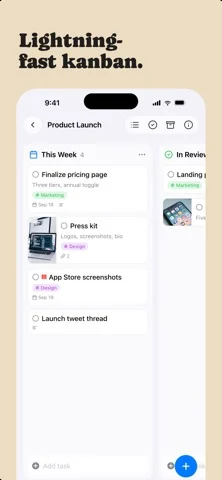
Organizes tasks on kanban boards with rich notes, synced via iCloud.
Stephen Robles · Productivity · $2.99
iPhone screenshots
What’s New
Version 1.6.6 ·
iPhone Duo - Kan Do is Made for iPhone Duo. Open it flat for the full iPad layout, or hold it like a book for a column on each page - With a task open while the Duo is held like a book, the bar keeps the board's name; it showed a pair of stray marks instead - Opening and closing iPhone Duo softens the screen while the hinge is moving, the way the Home Screen does, instead of cutting between the closed and open layouts Sync and new devices - Installing Kan Do on a second device no longer leaves you with two of everything. A fresh install now waits for iCloud to bring down your existing boards before it adds the sample Work space, and it asks iCloud directly instead of relying on iCloud Drive, so a Mac with iCloud Drive turned off waits too (tester) - If a duplicate sample board, Ideas tag, or Inbox card did slip in, the copy you have been using is the one that stays, and the untouched copy is removed on its own. That cleanup now runs for a month after an install instead of a week (tester)
App Store descriptionWritten by the developer.
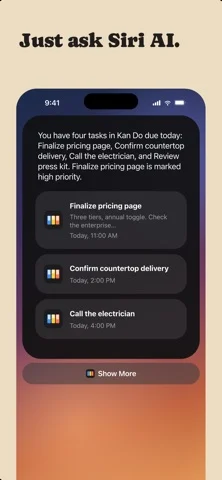
Organize your work into Spaces and Projects, then move tasks across the columns you define. Every card shows what matters at a glance: a cover image, subtitle, tags, priority, and due date. Open any task and you get a full markdown notes editor with headings, lists, checkboxes, images, and file attachments. ORGANIZE YOUR WAY • Kanban boards with drag-and-drop cards, columns, and dividers • A list view for every project, with drag to reorder • Spaces group your projects; tags cut across them • Smart lists for Inbox, Today, Upcoming, and Flagged • Archive completed work, or keep it crossed out on the board CAPTURE THE DETAILS • Rich notes on every task: headings, bold, lists, to-do checkboxes, quotes, and code • Attach images and files right in the note • Cover images, subtitles, priorities, flags, links, and due dates with reminders EVERYWHERE YOU WORK • Native on Mac, iPhone, iPad, and Apple Vision Pro • iCloud sync keeps every device up to date • Spotlight search and Shortcuts actions! • Multi-select to move, complete, or delete tasks in bulk • Light and Dark appearance, color themes, adjustable typography No accounts. No subscriptions to manage your own tasks. Your data lives in your iCloud.
Kan Do: Project Management on iPhone Duo: FAQ
Is Kan Do: Project Management optimized for iPhone Duo?
The developer or App Store listing mentions iPhone Duo support.
How much does Kan Do: Project Management cost?
Kan Do: Project Management costs $2.99 on the App Store.
More Productivity apps
See all ›
Calm to-do list and paper-style planner that sorts tasks by how long they take

Task and project management with layouts for both iPhone Duo displays

Unified inbox from Readdle with message and inbox side by side when unfolded

Task manager from Cultured Code, reshaped for every iPhone Duo pose

A private handwriting-style notebook that opens when you unfold iPhone Duo

Visual timeline day planner with a Focus Timer for book and tabletop poses