
Kan Do: Project Management
Duo 지원 상태는 출처 확인이 필요하며 실제 기기 동작은 미검증입니다.
Stephen Robles · 생산성 · $2.99
iPhone 스크린샷
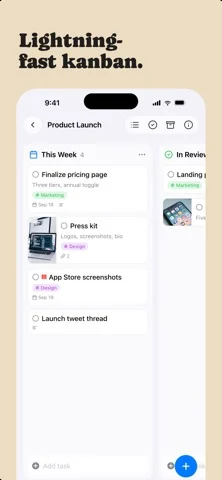
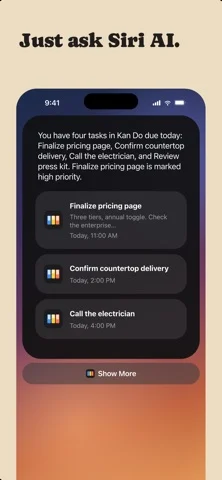
iPhone Duo 활용 방식
Duo support is reported in the linked sources. The specific fold interaction and real-device behavior have not been independently verified.
새로운 기능
버전 1.6.6 ·
iPhone Duo - Kan Do is Made for iPhone Duo. Open it flat for the full iPad layout, or hold it like a book for a column on each page - With a task open while the Duo is held like a book, the bar keeps the board's name; it showed a pair of stray marks instead - Opening and closing iPhone Duo softens the screen while the hinge is moving, the way the Home Screen does, instead of cutting between the closed and open layouts Sync and new devices - Installing Kan Do on a second device no longer leaves you with two of everything. A fresh install now waits for iCloud to bring down your existing boards before it adds the sample Work space, and it asks iCloud directly instead of relying on iCloud Drive, so a Mac with iCloud Drive turned off waits too (tester) - If a duplicate sample board, Ideas tag, or Inbox card did slip in, the copy you have been using is the one that stays, and the untouched copy is removed on its own. That cleanup now runs for a month after an install instead of a week (tester)
개발자가 이 내용을 한국어로 제공하지 않았습니다.
앱 소개
Duo support is reported in the linked sources. The specific fold interaction and real-device behavior have not been independently verified.
영어 원문을 번역한 내용입니다.
App Store 설명개발자가 작성한 내용입니다.
Organize your work into Spaces and Projects, then move tasks across the columns you define. Every card shows what matters at a glance: a cover image, subtitle, tags, priority, and due date. Open any task and you get a full markdown notes editor with headings, lists, checkboxes, images, and file attachments. ORGANIZE YOUR WAY • Kanban boards with drag-and-drop cards, columns, and dividers • A list view for every project, with drag to reorder • Spaces group your projects; tags cut across them • Smart lists for Inbox, Today, Upcoming, and Flagged • Archive completed work, or keep it crossed out on the board CAPTURE THE DETAILS • Rich notes on every task: headings, bold, lists, to-do checkboxes, quotes, and code • Attach images and files right in the note • Cover images, subtitles, priorities, flags, links, and due dates with reminders EVERYWHERE YOU WORK • Native on Mac, iPhone, iPad, and Apple Vision Pro • iCloud sync keeps every device up to date • Spotlight search and Shortcuts actions! • Multi-select to move, complete, or delete tasks in bulk • Light and Dark appearance, color themes, adjustable typography No accounts. No subscriptions to manage your own tasks. Your data lives in your iCloud.
iPhone Duo에서의 Kan Do: Project Management: 자주 묻는 질문
Kan Do: Project Management은(는) iPhone Duo에 최적화되어 있나요?
개발자 또는 스토어가 iPhone Duo 지원을 안내합니다.
iPhone Duo에서 Kan Do: Project Management은(는) 어떻게 보이나요?
Duo support is reported in the linked sources. The specific fold interaction and real-device behavior have not been independently verified.
Kan Do: Project Management의 가격은 얼마인가요?
Kan Do: Project Management은(는) App Store에서 $2.99입니다.
다른 생산성 앱
모두 보기 ›
걸리는 시간별로 할 일을 분류하는 차분한 할 일 목록 겸 종이 스타일 플래너

iPhone Duo의 두 디스플레이에 맞춘 레이아웃을 갖춘 작업·프로젝트 관리 앱

펼치면 메시지와 받은 편지함을 나란히 보여 주는 Readdle의 통합 받은 편지함

Cultured Code의 작업 관리 앱, iPhone Duo의 모든 자세에 맞게 재구성

iPhone Duo를 펼치면 열리는, 손글씨 느낌의 프라이빗 노트

북 자세와 탁상 자세에 맞춘 집중 타이머를 갖춘 시각적 타임라인 일일 플래너