
iPhone スクリーンショット
新機能
バージョン 2.0 ·
NoteWorthy 2.0 comes to the Mac. A native Mac app that lives on the edge of your screen: every label is a flap, and pulling one slides its notes out. Capture a note without leaving what you are working on, keep a sticky on your desk, reach recent notes from the menu bar, and put a NoteWorthy widget on your desktop. AI Format and AI Organize run right on your Mac. One download covers iPhone, iPad and Mac. Also in this update: - A new Work label joins Tasks, Ideas, Info and Personal. - An open note is saved when you switch away from the app, so a half-finished thought is never lost. - A deleted note now disappears from Spotlight too. - A label you pick for a note stays picked. - To-dos show their formatting on cards, lists, search and the widget. - A note keeps its first line when the AI title leaves out its numbers. - An opened note arrives in its own color, and the keyboard waits until the note is open. - Counts read "1 note" and "1 result" in every language. - A Rate NoteWorthy row in Settings.
開発者はこの内容を日本語化していません。
App Store の説明開発者による説明です。
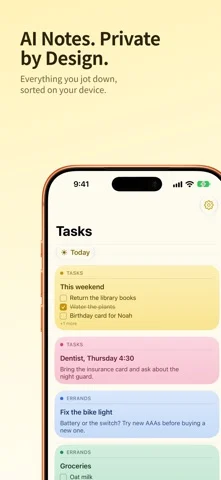
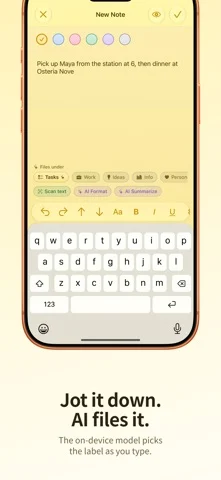
Smart notes that never leave your device. NoteWorthy writes your titles, summarizes your notes, cleans up your formatting and files everything in the right place. All of it runs on your iPhone, iPad or Mac. There is no account to create, no server to trust and no internet connection required, because the app makes no network requests at all. NOW ON THE MAC NoteWorthy 2.0 is a native Mac app. It sits on the edge of your screen as a notebook of flaps, one per label: pull a flap and its notes slide out. Capture a note without leaving what you are doing, keep a sticky on the desk beside your work, and reach your recent notes from the menu bar. AI Format and AI Organize run on your Mac, not on a server. WRITE Rich text with real Markdown underneath. Checkboxes, headings, bold and italic, tables and images. Pick from six paper colors. Scan text straight out of a photo. LET IT ORGANIZE Every note gets a title and lands in Tasks, Work, Ideas, Info or Personal on its own. Make your own labels and pin the ones you use most. One tap on AI Organize tidies the whole library, and running it twice changes nothing, because filing reads what is already stored rather than asking a model to guess again. AI FORMAT AND AI SUMMARIZE Jot something down messily and let it become a proper structured note, with lists, checkboxes and headings, and your wording untouched. Or pull a long note down to a sentence or two. Preview both before anything is applied. EVERYWHERE YOU ALREADY ARE Add to NoteWorthy from any share sheet, including Safari selections. Five Shortcuts actions for Siri, the Action button and automations, including Summarize and Format, which work on text from any app. Widgets for your Home Screen and your Mac desktop, with checkboxes you can tick without opening the app. Spotlight finds your notes. JOINED UP Dates become calendar events. People link to your contacts. Addresses open in Maps. Set a reminder before a deadline. YOURS ALONE Lock the app with Face ID or Touch ID. Notes are written to disk with file protection. Export any note as Markdown and take it with you. Each device keeps its own notes: nothing is copied to a cloud. One download for iPhone, iPad and Mac, in 11 languages. Note: on-device intelligence needs an Apple Intelligence-capable device. Elsewhere NoteWorthy falls back to fast built-in heuristics and works just as well for writing, filing and search.
iPhone Duo での NoteWorthy: Smart Notes:よくある質問
NoteWorthy: Smart Notes は iPhone Duo に最適化されていますか?
開発者またはストアに iPhone Duo 対応の記載があります。
NoteWorthy: Smart Notes の価格は?
NoteWorthy: Smart Notes は App Store で無料でダウンロードできます。
その他の仕事効率化アプリ
すべて見る ›
所要時間でタスクを分ける、落ち着いた ToDo リスト兼ペーパー風プランナー

iPhone Duo の両ディスプレイ向けレイアウトを備えたタスク・プロジェクト管理

展開するとメッセージと受信ボックスを並べて表示できる、Readdle の統合受信ボックス

iPhone Duo のあらゆる姿勢に合わせて形を変える、Cultured Code のタスク管理アプリ

iPhone Duo を開くとノートが開く、手書き風のプライベートノートブック

ブックとテーブルトップの姿勢向けの集中タイマーを備えた、ビジュアルタイムライン式の 1 日プランナー