
iPhone 스크린샷
새로운 기능
버전 2.0 ·
NoteWorthy 2.0 comes to the Mac. A native Mac app that lives on the edge of your screen: every label is a flap, and pulling one slides its notes out. Capture a note without leaving what you are working on, keep a sticky on your desk, reach recent notes from the menu bar, and put a NoteWorthy widget on your desktop. AI Format and AI Organize run right on your Mac. One download covers iPhone, iPad and Mac. Also in this update: - A new Work label joins Tasks, Ideas, Info and Personal. - An open note is saved when you switch away from the app, so a half-finished thought is never lost. - A deleted note now disappears from Spotlight too. - A label you pick for a note stays picked. - To-dos show their formatting on cards, lists, search and the widget. - A note keeps its first line when the AI title leaves out its numbers. - An opened note arrives in its own color, and the keyboard waits until the note is open. - Counts read "1 note" and "1 result" in every language. - A Rate NoteWorthy row in Settings.
개발자가 이 내용을 한국어로 제공하지 않았습니다.
App Store 설명개발자가 작성한 내용입니다.
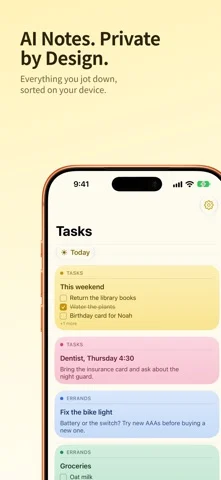
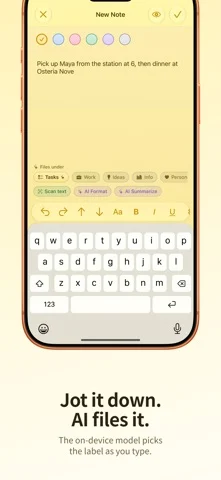
Smart notes that never leave your device. NoteWorthy writes your titles, summarizes your notes, cleans up your formatting and files everything in the right place. All of it runs on your iPhone, iPad or Mac. There is no account to create, no server to trust and no internet connection required, because the app makes no network requests at all. NOW ON THE MAC NoteWorthy 2.0 is a native Mac app. It sits on the edge of your screen as a notebook of flaps, one per label: pull a flap and its notes slide out. Capture a note without leaving what you are doing, keep a sticky on the desk beside your work, and reach your recent notes from the menu bar. AI Format and AI Organize run on your Mac, not on a server. WRITE Rich text with real Markdown underneath. Checkboxes, headings, bold and italic, tables and images. Pick from six paper colors. Scan text straight out of a photo. LET IT ORGANIZE Every note gets a title and lands in Tasks, Work, Ideas, Info or Personal on its own. Make your own labels and pin the ones you use most. One tap on AI Organize tidies the whole library, and running it twice changes nothing, because filing reads what is already stored rather than asking a model to guess again. AI FORMAT AND AI SUMMARIZE Jot something down messily and let it become a proper structured note, with lists, checkboxes and headings, and your wording untouched. Or pull a long note down to a sentence or two. Preview both before anything is applied. EVERYWHERE YOU ALREADY ARE Add to NoteWorthy from any share sheet, including Safari selections. Five Shortcuts actions for Siri, the Action button and automations, including Summarize and Format, which work on text from any app. Widgets for your Home Screen and your Mac desktop, with checkboxes you can tick without opening the app. Spotlight finds your notes. JOINED UP Dates become calendar events. People link to your contacts. Addresses open in Maps. Set a reminder before a deadline. YOURS ALONE Lock the app with Face ID or Touch ID. Notes are written to disk with file protection. Export any note as Markdown and take it with you. Each device keeps its own notes: nothing is copied to a cloud. One download for iPhone, iPad and Mac, in 11 languages. Note: on-device intelligence needs an Apple Intelligence-capable device. Elsewhere NoteWorthy falls back to fast built-in heuristics and works just as well for writing, filing and search.
iPhone Duo에서의 NoteWorthy: Smart Notes: 자주 묻는 질문
NoteWorthy: Smart Notes은(는) iPhone Duo에 최적화되어 있나요?
개발자 또는 스토어가 iPhone Duo 지원을 안내합니다.
NoteWorthy: Smart Notes의 가격은 얼마인가요?
NoteWorthy: Smart Notes은(는) App Store에서 무료로 다운로드할 수 있습니다.
다른 생산성 앱
모두 보기 ›
걸리는 시간별로 할 일을 분류하는 차분한 할 일 목록 겸 종이 스타일 플래너

iPhone Duo의 두 디스플레이에 맞춘 레이아웃을 갖춘 작업·프로젝트 관리 앱

펼치면 메시지와 받은 편지함을 나란히 보여 주는 Readdle의 통합 받은 편지함

Cultured Code의 작업 관리 앱, iPhone Duo의 모든 자세에 맞게 재구성

iPhone Duo를 펼치면 열리는, 손글씨 느낌의 프라이빗 노트

북 자세와 탁상 자세에 맞춘 집중 타이머를 갖춘 시각적 타임라인 일일 플래너