
iPhone 截图
新功能
版本 2.0 ·
NoteWorthy 2.0 comes to the Mac. A native Mac app that lives on the edge of your screen: every label is a flap, and pulling one slides its notes out. Capture a note without leaving what you are working on, keep a sticky on your desk, reach recent notes from the menu bar, and put a NoteWorthy widget on your desktop. AI Format and AI Organize run right on your Mac. One download covers iPhone, iPad and Mac. Also in this update: - A new Work label joins Tasks, Ideas, Info and Personal. - An open note is saved when you switch away from the app, so a half-finished thought is never lost. - A deleted note now disappears from Spotlight too. - A label you pick for a note stays picked. - To-dos show their formatting on cards, lists, search and the widget. - A note keeps its first line when the AI title leaves out its numbers. - An opened note arrives in its own color, and the keyboard waits until the note is open. - Counts read "1 note" and "1 result" in every language. - A Rate NoteWorthy row in Settings.
开发者尚未提供此内容的中文版本。
App Store 简介由开发者撰写。
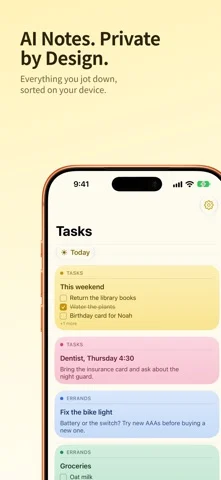
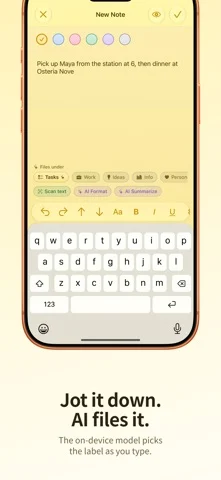
Smart notes that never leave your device. NoteWorthy writes your titles, summarizes your notes, cleans up your formatting and files everything in the right place. All of it runs on your iPhone, iPad or Mac. There is no account to create, no server to trust and no internet connection required, because the app makes no network requests at all. NOW ON THE MAC NoteWorthy 2.0 is a native Mac app. It sits on the edge of your screen as a notebook of flaps, one per label: pull a flap and its notes slide out. Capture a note without leaving what you are doing, keep a sticky on the desk beside your work, and reach your recent notes from the menu bar. AI Format and AI Organize run on your Mac, not on a server. WRITE Rich text with real Markdown underneath. Checkboxes, headings, bold and italic, tables and images. Pick from six paper colors. Scan text straight out of a photo. LET IT ORGANIZE Every note gets a title and lands in Tasks, Work, Ideas, Info or Personal on its own. Make your own labels and pin the ones you use most. One tap on AI Organize tidies the whole library, and running it twice changes nothing, because filing reads what is already stored rather than asking a model to guess again. AI FORMAT AND AI SUMMARIZE Jot something down messily and let it become a proper structured note, with lists, checkboxes and headings, and your wording untouched. Or pull a long note down to a sentence or two. Preview both before anything is applied. EVERYWHERE YOU ALREADY ARE Add to NoteWorthy from any share sheet, including Safari selections. Five Shortcuts actions for Siri, the Action button and automations, including Summarize and Format, which work on text from any app. Widgets for your Home Screen and your Mac desktop, with checkboxes you can tick without opening the app. Spotlight finds your notes. JOINED UP Dates become calendar events. People link to your contacts. Addresses open in Maps. Set a reminder before a deadline. YOURS ALONE Lock the app with Face ID or Touch ID. Notes are written to disk with file protection. Export any note as Markdown and take it with you. Each device keeps its own notes: nothing is copied to a cloud. One download for iPhone, iPad and Mac, in 11 languages. Note: on-device intelligence needs an Apple Intelligence-capable device. Elsewhere NoteWorthy falls back to fast built-in heuristics and works just as well for writing, filing and search.
NoteWorthy: Smart Notes 在 iPhone Duo 上:常见问题
NoteWorthy: Smart Notes 针对 iPhone Duo 优化了吗?
开发者或商店资料已标明支持 iPhone Duo。
NoteWorthy: Smart Notes 多少钱?
NoteWorthy: Smart Notes 可在 App Store 免费下载。
更多效率应用
查看全部 ›
安静的待办清单与纸质风格计划本,按所需时长给任务分类

任务与项目管理,为 iPhone Duo 的两块屏幕分别优化布局

Readdle 的统一收件箱邮件应用,展开后收件箱与邮件并排显示

Cultured Code 的任务管理器,针对 iPhone Duo 每种姿态重新调整布局

展开 iPhone Duo 即可打开的私密手写风格笔记本

可视化时间线日程规划应用,专门为书本和桌面姿态设计了专注计时器