
Essayist: Academic Writing App
서식, 인용, 참고문헌, 각주, 페이지 설정을 처리해 학술 글쓰기를 간소화한다.
Essayist Software Inc. · 생산성 · 무료
iPhone 스크린샷
새로운 기능
버전 2.2.0 ·
Essay writing just got easier! Made for iPhone Duo: Write on the closed display or unfold for the full page. Half open, your essay sits on one half and the inspector on the other. Quotes from Researchist: Copy or drag a highlight out of Researchist and drop it into your essay — it lands as a direct quote with the citation and reference added for you. Refined iPhone editor: Essayist on iPhone received some user interface refinements. Researchist: Check out Researchist - Your Academic Reading Companion for Essayist: www.researchist.app Have feedback or found an issue? Email us. We usually respond quickly, and your feedback helps us make Essayist even better.
개발자가 이 내용을 한국어로 제공하지 않았습니다.
App Store 설명개발자가 작성한 내용입니다.
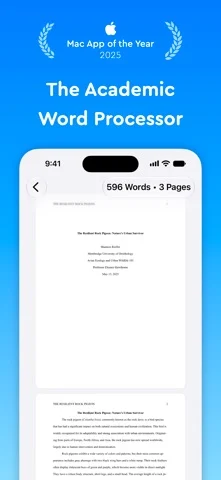
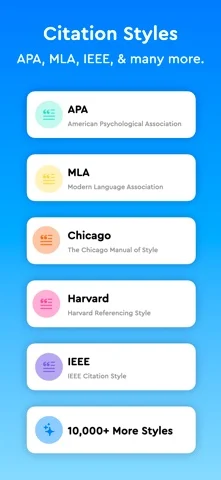
Try Essayist for free today! "Mac App of the Year 2025" — Apple "App of the Day" — Apple "Editors' Choice" — Apple "A-Plus Apps for Students" — Apple "Mac Essentials" — Apple No more fighting margins, hanging indents, or citation formatting. Essayist streamlines academic writing so you can concentrate on your ideas while it takes care of formatting, citations, references, footnotes, page setup, and more. AUTOMATIC FORMATTING Essayist automatically formats margins, fonts, spacing, headings, page numbers, references, citations, footnotes, figures, tables, and other essential elements. UNIVERSAL REFERENCE MANAGER Store and organize references with iCloud, then use them across multiple essays. Add sources through built-in search, Google Scholar, URLs, BibTeX, or manual entry. Essayist formats each source and adds it to your references or works cited list automatically. ZOTERO IMPORT Import your Zotero references and start using them in Essayist. CITATIONS Quickly insert in-text citations, footnotes, and endnotes with the click of a button. CITATION STYLES Choose from APA, MLA, Chicago/Turabian, Harvard, IEEE, AMA, Vancouver, and more than 10,000 other styles. EQUATIONS Add equations using LaTeX. FIGURES & TABLES Insert fully formatted figures and tables with captions, numbering, titles, and notes. Cross-reference them throughout your essay. ABSTRACT, APPENDICES & TABLE OF CONTENTS Easily add an abstract, appendices, and an automatically generated table of contents. WRITE ANYWHERE, STAY IN SYNC Your essays and references sync across iPhone, iPad, and Mac with iCloud, so you can start on one device and finish on another — even offline. YOUR WORK IS YOURS No ads, no selling your data, no lock-in — export anytime as PDF or Word. EXPORT Export your essays as PDF or Word documents. MINIMAL INTERFACE Write in a clean, distraction-free workspace with customizable themes, backgrounds, and dark mode. MORE • Available on iPhone, iPad, and Mac with universal purchase • US Letter and A4 paper sizes • Times New Roman and Arial fonts • Word and page counts • Spell check, auto-completion, and auto-capitalization • Accessibility support REGULAR UPDATES Have a feature request or found an issue? Contact us at contact@essayist.app. PRICING Essayist is free to download and includes a free trial of Essayist Pro. Pro is available as a monthly or yearly subscription. Terms of Use: https://www.iubenda.com/terms-and-conditions/82031685 Privacy Policy: https://www.iubenda.com/privacy-policy/82031685
iPhone Duo에서의 Essayist: Academic Writing App: 자주 묻는 질문
Essayist: Academic Writing App은(는) iPhone Duo에 최적화되어 있나요?
개발자 또는 스토어가 iPhone Duo 지원을 안내합니다.
Essayist: Academic Writing App의 가격은 얼마인가요?
Essayist: Academic Writing App은(는) App Store에서 무료로 다운로드할 수 있습니다.
다른 생산성 앱
모두 보기 ›
걸리는 시간별로 할 일을 분류하는 차분한 할 일 목록 겸 종이 스타일 플래너

iPhone Duo의 두 디스플레이에 맞춘 레이아웃을 갖춘 작업·프로젝트 관리 앱

펼치면 메시지와 받은 편지함을 나란히 보여 주는 Readdle의 통합 받은 편지함

Cultured Code의 작업 관리 앱, iPhone Duo의 모든 자세에 맞게 재구성

iPhone Duo를 펼치면 열리는, 손글씨 느낌의 프라이빗 노트

북 자세와 탁상 자세에 맞춘 집중 타이머를 갖춘 시각적 타임라인 일일 플래너