
Essayist: Academic Writing App
通过自动处理格式、引用、参考文献、脚注和页面设置,简化学术写作。
Essayist Software Inc. · 效率 · 免费
iPhone 截图
新功能
版本 2.2.0 ·
Essay writing just got easier! Made for iPhone Duo: Write on the closed display or unfold for the full page. Half open, your essay sits on one half and the inspector on the other. Quotes from Researchist: Copy or drag a highlight out of Researchist and drop it into your essay — it lands as a direct quote with the citation and reference added for you. Refined iPhone editor: Essayist on iPhone received some user interface refinements. Researchist: Check out Researchist - Your Academic Reading Companion for Essayist: www.researchist.app Have feedback or found an issue? Email us. We usually respond quickly, and your feedback helps us make Essayist even better.
开发者尚未提供此内容的中文版本。
App Store 简介由开发者撰写。
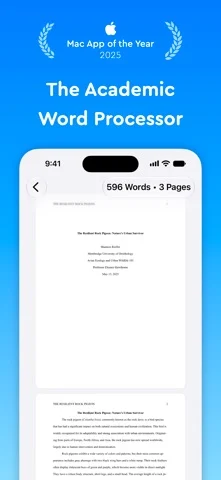
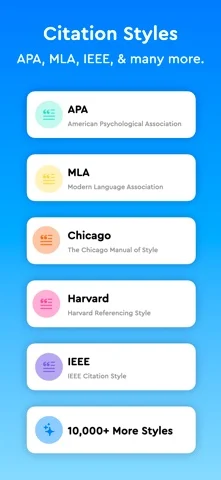
Try Essayist for free today! "Mac App of the Year 2025" — Apple "App of the Day" — Apple "Editors' Choice" — Apple "A-Plus Apps for Students" — Apple "Mac Essentials" — Apple No more fighting margins, hanging indents, or citation formatting. Essayist streamlines academic writing so you can concentrate on your ideas while it takes care of formatting, citations, references, footnotes, page setup, and more. AUTOMATIC FORMATTING Essayist automatically formats margins, fonts, spacing, headings, page numbers, references, citations, footnotes, figures, tables, and other essential elements. UNIVERSAL REFERENCE MANAGER Store and organize references with iCloud, then use them across multiple essays. Add sources through built-in search, Google Scholar, URLs, BibTeX, or manual entry. Essayist formats each source and adds it to your references or works cited list automatically. ZOTERO IMPORT Import your Zotero references and start using them in Essayist. CITATIONS Quickly insert in-text citations, footnotes, and endnotes with the click of a button. CITATION STYLES Choose from APA, MLA, Chicago/Turabian, Harvard, IEEE, AMA, Vancouver, and more than 10,000 other styles. EQUATIONS Add equations using LaTeX. FIGURES & TABLES Insert fully formatted figures and tables with captions, numbering, titles, and notes. Cross-reference them throughout your essay. ABSTRACT, APPENDICES & TABLE OF CONTENTS Easily add an abstract, appendices, and an automatically generated table of contents. WRITE ANYWHERE, STAY IN SYNC Your essays and references sync across iPhone, iPad, and Mac with iCloud, so you can start on one device and finish on another — even offline. YOUR WORK IS YOURS No ads, no selling your data, no lock-in — export anytime as PDF or Word. EXPORT Export your essays as PDF or Word documents. MINIMAL INTERFACE Write in a clean, distraction-free workspace with customizable themes, backgrounds, and dark mode. MORE • Available on iPhone, iPad, and Mac with universal purchase • US Letter and A4 paper sizes • Times New Roman and Arial fonts • Word and page counts • Spell check, auto-completion, and auto-capitalization • Accessibility support REGULAR UPDATES Have a feature request or found an issue? Contact us at contact@essayist.app. PRICING Essayist is free to download and includes a free trial of Essayist Pro. Pro is available as a monthly or yearly subscription. Terms of Use: https://www.iubenda.com/terms-and-conditions/82031685 Privacy Policy: https://www.iubenda.com/privacy-policy/82031685
Essayist: Academic Writing App 在 iPhone Duo 上:常见问题
Essayist: Academic Writing App 针对 iPhone Duo 优化了吗?
开发者或商店资料已标明支持 iPhone Duo。
Essayist: Academic Writing App 多少钱?
Essayist: Academic Writing App 可在 App Store 免费下载。
更多效率应用
查看全部 ›
安静的待办清单与纸质风格计划本,按所需时长给任务分类

任务与项目管理,为 iPhone Duo 的两块屏幕分别优化布局

Readdle 的统一收件箱邮件应用,展开后收件箱与邮件并排显示

Cultured Code 的任务管理器,针对 iPhone Duo 每种姿态重新调整布局

展开 iPhone Duo 即可打开的私密手写风格笔记本

可视化时间线日程规划应用,专门为书本和桌面姿态设计了专注计时器