
iPhone 스크린샷
iPhone Duo 활용 방식
• On iPad, Mac and the open iPhone Duo, articles read in a comfortable column.
새로운 기능
버전 1.3 ·
Flit 1.3 is lighter and smoother. • Much easier on battery and data: Flit asks each site whether its feed changed and skips the ones that didn't. • Smoother swiping, and smoother scrolling in articles, Search and source pages. • Tap a picture in an article to see it full screen, zoom in, or save it to Photos. • Mark All as Read on a source's or a folder's page. • Each source's icon beside its name (you can turn them off in Settings › Reading). • Settings › Widgets shows every widget on the Home Screen, the Lock Screen and in StandBy. • Notifications have their own page in Settings. • Settings › Data shows how much space the cache takes, and Clear Cache frees it. • Articles: lists stay line by line, links show in Flit's blue, and more pictures load. • The Siri AI summary uses the article's text size and language, and says how much of a long article it covers. • On iPad, Mac and the open iPhone Duo, articles read in a comfortable column. • Fixes, including a crash at launch on iOS 27.2 betas.
개발자가 이 내용을 한국어로 제공하지 않았습니다.
App Store 설명개발자가 작성한 내용입니다.
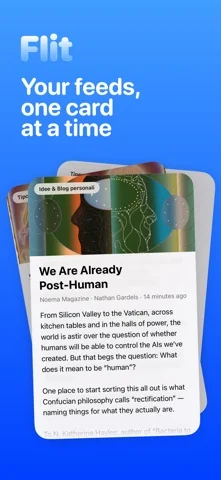
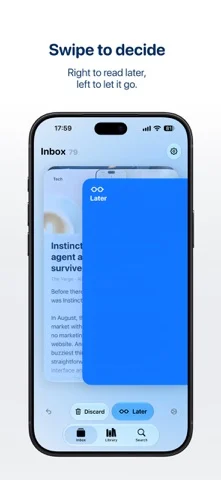
Flit is a calm way to keep up with the sites you love. New articles arrive as a small deck of cards, and you go through them one at a time. Swipe right to keep one for later, swipe left to let it go, or tap to read it right away. Changed your mind? Undo is always one tap away. When the deck is empty, you're caught up. There's no algorithm deciding what you see. Flit works with RSS, the open format behind most blogs, news sites and magazines, so you follow exactly the sources you choose. FIND YOUR SOURCES Search for a site by name or topic, paste any web address, or bring all your subscriptions from another reader with an OPML file. You can export them again whenever you like. READ WITHOUT THE CLUTTER Articles open in a clean reader with the text size you prefer. Everything you saved waits in your Library, sorted into Unread, Later and Read, and you can search all of it. WIDGETS Keep the latest headlines or your Read Later list on the Home Screen and Lock Screen, in every size, including the new tall widget. QUICK SUMMARIES On supported devices, Flit can give you a short summary of an article, generated on the device. PRIVATE BY DESIGN No account, no ads, no tracking. Your subscriptions and reading stay on your iPhone, and Flit doesn't collect any data.
iPhone Duo에서의 Flit - Easy Feed: 자주 묻는 질문
Flit - Easy Feed은(는) iPhone Duo에 최적화되어 있나요?
네. Flit - Easy Feed은(는) Duo 전용 설계 앱으로, 폴딩, Split View 또는 외부 디스플레이를 활용합니다. 2026년 10월 25일 확인(App Store 설명).
iPhone Duo에서 Flit - Easy Feed은(는) 어떻게 보이나요?
• On iPad, Mac and the open iPhone Duo, articles read in a comfortable column.
Flit - Easy Feed의 가격은 얼마인가요?
Flit - Easy Feed은(는) App Store에서 무료로 다운로드할 수 있습니다.
다른 독서 및 뉴스 앱
모두 보기 ›
실제 종이접기를 시뮬레이션해 접는 선을 자유롭게 끌거나 단계별 안내로 학, 비행기, 병아리를 접습니다.

답을 얼마나 드러냈는지로 카드 복습 시점을 정하고 난이도는 평가하지 않는다.

iPhone Duo를 접고 펼칠 때마다 화면이 바뀌는, 요약 기능을 갖춘 RSS 리더

접고 펼치는 데 맞춰 레이아웃이 바뀌는 RSS·뉴스 리더

26권의 고전을 읽고 낭독하며 각 페이지 옆에 이야기 세계를 보여줍니다.

도감 항목을 음성으로 읽어 주고 카메라로 장난감이나 그림을 스캔해 인식합니다.