
Gradient Wallpapers: Meshing
Duo 지원 상태는 출처 확인이 필요하며 실제 기기 동작은 미검증입니다.
Rudrank Riyam · 크리에이티브 · 무료
iPhone 스크린샷
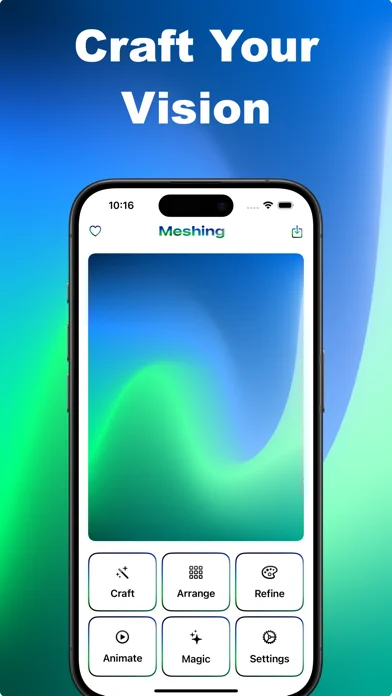
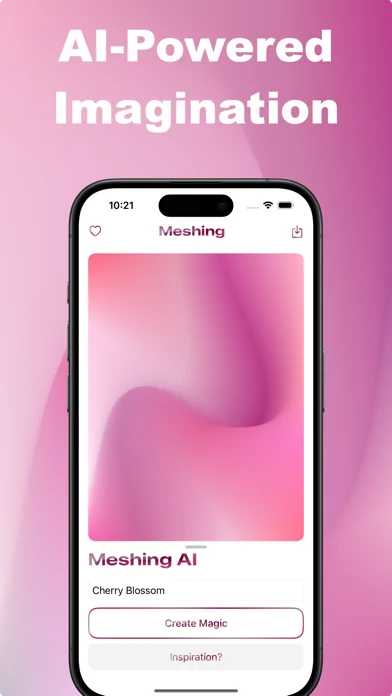
iPhone Duo 활용 방식
Duo support is reported in the linked sources. The specific fold interaction and real-device behavior have not been independently verified.
새로운 기능
버전 3.0.0 ·
What's New in Meshing 3.0 *Create across every layout* - A compact editor for smaller iPhone displays and a split workspace on iPad and the expanded iPhone Duo display. - Resize or rotate your window while keeping your gradient and editing tools together. - Browse Craft templates directly in the editor. *Meshing AI is back* - Describe a scene, mood or colour palette and create a mesh gradient with the new AI model. - Keep the smooth, rounded gradients you love, with support for 2×2, 3×3 and 4×4 generations. - Continue refining the result with point controls, colours, animation and export.
개발자가 이 내용을 한국어로 제공하지 않았습니다.
앱 소개
Duo support is reported in the linked sources. The specific fold interaction and real-device behavior have not been independently verified.
영어 원문을 번역한 내용입니다.
App Store 설명개발자가 작성한 내용입니다.
Meshing lets you quickly and easily transform your ideas into beautiful colour gradients. Perfect for creating wallpapers, designing websites and app backgrounds, or just playing with colours. What makes Meshing special: INTUITIVE DESIGN - Tap and swipe to craft amazing gradients - Choose from 2x2 to 5x5 grids for precise control - See your changes in real-time as you create DESCRIBE AND CREATE - Tell what you want, and make it happen with Meshing AI - Get unique gradients based on your descriptions - No design skills needed; just your imagination PHOTO TO GRADIENT - Turn any image into a unique gradient - Extract colour schemes from your favourite photos - Instantly create gradients that match your style STUNNING VISUALS - Add blur effects for a dreamy look - Switch to the wireframe view for a unique, structural perspective - Bring your gradients to life with smooth animations - Experiment with gradients on text, images, and buttons TEMPLATES AND FAVORITES • Get inspired with pre-made designs • Save your favourite gradients for future use • Build a personal library of inspiring colour schemes EXPORT AND SHARE • Save your work as high-quality images • Export gradients as ready-to-use code • Use your creations in any project I made Meshing because I believe everyone should be able to create beautiful designs, even if you are not a professional artist. Give the magic of Meshing a try and create amazing gradients! Terms of Use (EULA): https://www.apple.com/legal/internet-services/itunes/dev/stdeula/
iPhone Duo에서의 Gradient Wallpapers: Meshing: 자주 묻는 질문
Gradient Wallpapers: Meshing은(는) iPhone Duo에 최적화되어 있나요?
개발자 또는 스토어가 iPhone Duo 지원을 안내합니다.
iPhone Duo에서 Gradient Wallpapers: Meshing은(는) 어떻게 보이나요?
Duo support is reported in the linked sources. The specific fold interaction and real-device behavior have not been independently verified.
Gradient Wallpapers: Meshing의 가격은 얼마인가요?
Gradient Wallpapers: Meshing은(는) App Store에서 무료로 다운로드할 수 있습니다.
다른 크리에이티브 앱
모두 보기 ›
Duo 인터랙션에 관한 출처가 있습니다. 실제 기기 동작은 별도로 검증하지 않았습니다.

Duo 인터랙션에 관한 출처가 있습니다. 실제 기기 동작은 별도로 검증하지 않았습니다.

Duo 인터랙션에 관한 출처가 있습니다. 실제 기기 동작은 별도로 검증하지 않았습니다.

Duo 인터랙션에 관한 출처가 있습니다. 실제 기기 동작은 별도로 검증하지 않았습니다.

사용자 지정 브러시와 무제한 레이어를 갖춘 드로잉·페인팅 앱

전면·후면 카메라로 동시에 녹화