
iPhone 스크린샷
새로운 기능
버전 4.6.0 ·
Made for iPhone Duo. Unfold it and a group opens as a mosaic of up to eight photos, so you compare them all at once. Folded, the photo you are looking at stays large. On iPhone Duo, the review buttons move to the side bar as native controls, with their colors and counts, right where your thumb rests. Sheets redesigned for half height: explanations, the button guide and the reminder fit whole, without covering your photos. The cleanup result, the date picker and the plans screen scroll on short screens, with their button always in view. As always, every photo is analyzed on your device. Nothing leaves it.
개발자가 이 내용을 한국어로 제공하지 않았습니다.
App Store 설명개발자가 작성한 내용입니다.
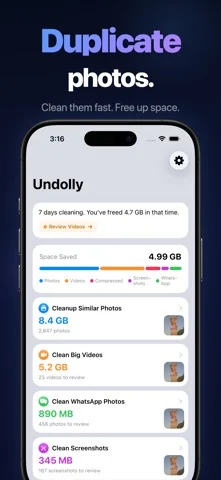
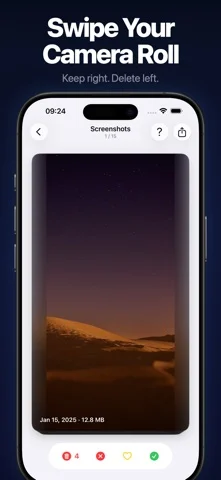
Undolly — completely redesigned. Swipe through videos and screenshots like a dating app. Compare duplicate photos side by side with AI quality scoring. Right to keep, left to delete. HOW IT WORKS Open the app. The smart home screen shows you what to clean first. Pick a mode. For duplicates, compare photos side by side — AI highlights the best shot. For everything else, swipe through cards one by one. Review your choices. Delete. Done. 13 CLEANUP MODES Similar Photos See groups of near-identical shots. AI scores each photo on 10+ quality attributes — sharpness, expression, composition, and more. Select what to keep and what to delete. Albums Clean one album at a time. Search a single album for similar photos, or swipe through everything in it. Big Videos Your largest videos as swipe cards with size and compression info. Spot videos wasting space and free up gigabytes with one swipe. Screenshots · WhatsApp · Telegram · Screen Recordings Swipe through old screenshots and chat media. Card by card — quick, satisfying cleanup sessions. Panoramas · Portraits · Timelapse · Hidden · RAW · Animated Six more dedicated modes for the media types that quietly eat your storage. NARROW ANY CLEANUP Long-press a cleanup card to filter it by date range. Or clean a single day, month or album, and choose whether to find similar photos or go through everything. VIDEO COMPRESSION Detect which videos can be compressed. Queue them up and batch compress in the background. See exactly how much space you save per video. SMART HOME SCREEN Your home screen learns what needs cleaning. 20+ smart suggestion cards — photos from this day last year, videos ready for compression, recent duplicates, and more. Milestones and streaks keep you motivated. AI PHOTO ANALYSIS 10+ quality attributes per photo: sharpness, expression quality, eye detection, face cropping, subject composition, favorite status, edit history. The best shot is highlighted automatically. PRIVACY & SAFETY - 100% on-device. Nothing uploaded anywhere. - Review every selection before deleting. - Undo up to 100 actions. - No ads. No data collection. Subscription Information: - Monthly: $3.99/month - Annual: $14.99/year - Lifetime: $39.99 one-time purchase - Payment charged to iTunes account at purchase confirmation - Auto-renews unless turned off 24 hours before period ends - Manage at https://support.apple.com/en-us/HT202039 Privacy Policy: https://undolly.app/privacy-policy Terms of Use: https://undolly.app/terms-of-use
iPhone Duo에서의 Undolly Photo Cleaner: 자주 묻는 질문
Undolly Photo Cleaner은(는) iPhone Duo에 최적화되어 있나요?
개발자 또는 스토어가 iPhone Duo 지원을 안내합니다.
Undolly Photo Cleaner의 가격은 얼마인가요?
Undolly Photo Cleaner은(는) App Store에서 무료로 다운로드할 수 있습니다.
다른 크리에이티브 앱
모두 보기 ›
iPhone이나 iPad를 영화 슬레이트로 바꿔 클랩, 동기화, 테이크 기록을 합니다.

Duo 화면 절반에 그린 뒤 접었다 펴면 대칭 그림이 나타나는 드로잉 앱.

스포이트와 접기, 문지르기로 접힌 잉크 그림을 만들고 저장하거나 공유합니다.

iPhone을 즉석 카메라로 바꿔 흰 테두리 사진을 찍고 글귀를 붙여 보관한다.

사용자 지정 브러시와 무제한 레이어를 갖춘 드로잉·페인팅 앱

전면·후면 카메라로 동시에 녹화