
Undolly Photo Cleaner
Swipe to delete photos and videos, with AI scoring to pick the best duplicate.
David Collado Sela · Creative · Free
iPhone screenshots
What’s New
Version 4.6.0 ·
Made for iPhone Duo. Unfold it and a group opens as a mosaic of up to eight photos, so you compare them all at once. Folded, the photo you are looking at stays large. On iPhone Duo, the review buttons move to the side bar as native controls, with their colors and counts, right where your thumb rests. Sheets redesigned for half height: explanations, the button guide and the reminder fit whole, without covering your photos. The cleanup result, the date picker and the plans screen scroll on short screens, with their button always in view. As always, every photo is analyzed on your device. Nothing leaves it.
App Store descriptionWritten by the developer.
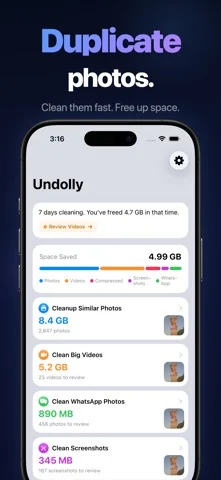
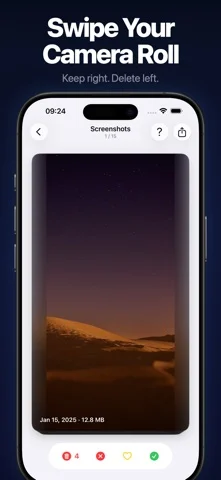
Undolly — completely redesigned. Swipe through videos and screenshots like a dating app. Compare duplicate photos side by side with AI quality scoring. Right to keep, left to delete. HOW IT WORKS Open the app. The smart home screen shows you what to clean first. Pick a mode. For duplicates, compare photos side by side — AI highlights the best shot. For everything else, swipe through cards one by one. Review your choices. Delete. Done. 13 CLEANUP MODES Similar Photos See groups of near-identical shots. AI scores each photo on 10+ quality attributes — sharpness, expression, composition, and more. Select what to keep and what to delete. Albums Clean one album at a time. Search a single album for similar photos, or swipe through everything in it. Big Videos Your largest videos as swipe cards with size and compression info. Spot videos wasting space and free up gigabytes with one swipe. Screenshots · WhatsApp · Telegram · Screen Recordings Swipe through old screenshots and chat media. Card by card — quick, satisfying cleanup sessions. Panoramas · Portraits · Timelapse · Hidden · RAW · Animated Six more dedicated modes for the media types that quietly eat your storage. NARROW ANY CLEANUP Long-press a cleanup card to filter it by date range. Or clean a single day, month or album, and choose whether to find similar photos or go through everything. VIDEO COMPRESSION Detect which videos can be compressed. Queue them up and batch compress in the background. See exactly how much space you save per video. SMART HOME SCREEN Your home screen learns what needs cleaning. 20+ smart suggestion cards — photos from this day last year, videos ready for compression, recent duplicates, and more. Milestones and streaks keep you motivated. AI PHOTO ANALYSIS 10+ quality attributes per photo: sharpness, expression quality, eye detection, face cropping, subject composition, favorite status, edit history. The best shot is highlighted automatically. PRIVACY & SAFETY - 100% on-device. Nothing uploaded anywhere. - Review every selection before deleting. - Undo up to 100 actions. - No ads. No data collection. Subscription Information: - Monthly: $3.99/month - Annual: $14.99/year - Lifetime: $39.99 one-time purchase - Payment charged to iTunes account at purchase confirmation - Auto-renews unless turned off 24 hours before period ends - Manage at https://support.apple.com/en-us/HT202039 Privacy Policy: https://undolly.app/privacy-policy Terms of Use: https://undolly.app/terms-of-use
Undolly Photo Cleaner on iPhone Duo: FAQ
Is Undolly Photo Cleaner optimized for iPhone Duo?
The developer or App Store listing mentions iPhone Duo support.
How much does Undolly Photo Cleaner cost?
Undolly Photo Cleaner is free to download on the App Store.
More Creative apps
See all ›
Turns iPhone or iPad into a film slate that claps, syncs, and logs takes.

Draw on one half of the Duo, fold it shut, then reopen to reveal a mirrored picture.

Make folded inkblot prints with droppers, folding and rubbing, then save or share each print.

Turns your iPhone into an instant camera that prints framed photos you can caption and keep.

Drawing and painting app with custom brushes and unlimited layers

Record with the front and back cameras at the same time