
Voice Recorder AI: ThinkScribe
기기에서 녹음과 받아쓰기를 하고 실시간 번역과 AI 요약을 제공합니다.
Sejalben Bahadursingh Bihola · 생산성 · 무료
iPhone 스크린샷
새로운 기능
버전 1.9 ·
More accurate transcripts on more iPhones and iPads, and summaries that keep going. • On iPhone 13, iPhone SE and other iPhones and iPads with less memory, turn on the speech model in ThinkScribe Settings > Advanced for more accurate transcripts in most European languages. • A summary you start keeps going when you close the recording, and automatic summaries now arrive on more iPhones. • The voice keyboard picks the right speech recognition for the language you dictate in. Also smoother on iPhone Duo, quicker to start after an update, and clearer when something needs you. Thanks for every note that shaped this update.
개발자가 이 내용을 한국어로 제공하지 않았습니다.
App Store 설명개발자가 작성한 내용입니다.
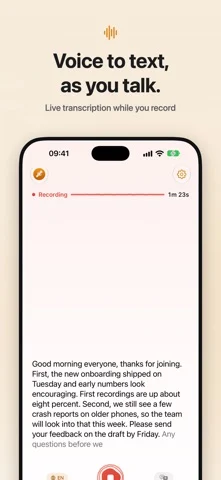
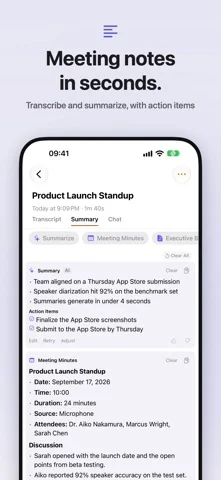
See your words appear as you speak, translate them live, and turn every recording into a summary, notes and answers. Free to try. No account needed. ThinkScribe records and transcribes meetings, lectures, calls and ideas on iPhone, iPhone Duo, iPad, Mac and Apple Watch, and adds a voice keyboard to every app. Recording and transcription happen on your device and work offline. --- WHAT YOU CAN DO Live Text Your words appear while you record, sentence by sentence, on your device and offline. Turn on Your name and ThinkScribe marks it whenever someone says it. Translate Live See each sentence translated under the original while you record. Translate a finished transcript too, and export subtitles in both languages. Translation is provided by Apple. AI for Your Recordings Summary, Meeting Minutes, Executive Brief, Mind Map, Clean Transcript and Translate, one tap each. Chat with a recording or a whole collection and get answers that point to the moment in the transcript and the audio. Ask, in its own tab, is a general assistant. ThinkScribe AI runs on your device; Apple Intelligence is provided by Apple. A Summary When You Stop With Pro, each new recording gets its summary as soon as it is transcribed. Its key moments show up as dots on the player. Voice Keyboard: Type Anywhere Switch to the ThinkScribe keyboard and dictate in any app: Messages, Mail, Notes, WhatsApp, Safari. Your speech is transcribed on your iPhone, even with no connection. Word suggestions and autocorrect follow your language, and with Apple Intelligence you can tidy rough speech with one tap. Record and Transcribe - Record meetings, lectures and ideas with your microphone - Import audio from Voice Memos, WhatsApp, Telegram or any app through the share sheet - Transcription in 90+ languages - Word-synced playback: tap any word to hear that moment Know Who Said What Speaker detection gives every voice its own color. Name a voice once and ThinkScribe can recognize that person in later recordings. Mind Maps, Drawn as a Map Topics branch out from the title. Tap one to jump to where it was said. Mind maps need iPhone 15 Pro or newer, or an iPad with 8 GB of memory or more. Export and Share TXT, SRT, VTT, JSON, Markdown and PDF. Optional iCloud sync keeps your transcripts on all your devices. App Lock ThinkScribe can ask for Face ID, Touch ID or your passcode when it opens. Recording and voice typing keep working while it is locked. --- ON ALL YOUR DEVICES Works with iPhone Duo Closed or open, it fits: the same recordings on both displays. Open iPhone Duo, hold it sideways and choose Side by Side to read a transcript beside its summary. The voice typing keyboard works on iPhone Duo too. iPad On iPad, your Library sits beside the open transcript, with keyboard shortcuts and drag and drop. Apple Watch Record from your wrist. Recordings go to your iPhone for transcription. --- PRICING Free to download. Try the Pro features for free, then choose ThinkScribe Pro: monthly, yearly, or a one-time Lifetime purchase. One purchase covers all your devices. Requires iOS 26 or iPadOS 26 or later. Best on iPhone 12 or newer. --- No account. Your recordings and transcripts are never sent to us. Terms of Use (EULA): https://thinkscribe.ai/en/terms Privacy Policy: https://thinkscribe.ai/en/privacy
iPhone Duo에서의 Voice Recorder AI: ThinkScribe: 자주 묻는 질문
Voice Recorder AI: ThinkScribe은(는) iPhone Duo에 최적화되어 있나요?
개발자 또는 스토어가 iPhone Duo 지원을 안내합니다.
Voice Recorder AI: ThinkScribe의 가격은 얼마인가요?
Voice Recorder AI: ThinkScribe은(는) App Store에서 무료로 다운로드할 수 있습니다.
다른 생산성 앱
모두 보기 ›
걸리는 시간별로 할 일을 분류하는 차분한 할 일 목록 겸 종이 스타일 플래너

iPhone Duo의 두 디스플레이에 맞춘 레이아웃을 갖춘 작업·프로젝트 관리 앱

펼치면 메시지와 받은 편지함을 나란히 보여 주는 Readdle의 통합 받은 편지함

Cultured Code의 작업 관리 앱, iPhone Duo의 모든 자세에 맞게 재구성

iPhone Duo를 펼치면 열리는, 손글씨 느낌의 프라이빗 노트

북 자세와 탁상 자세에 맞춘 집중 타이머를 갖춘 시각적 타임라인 일일 플래너