
iPhone 截图
新功能
版本 1.9 ·
More accurate transcripts on more iPhones and iPads, and summaries that keep going. • On iPhone 13, iPhone SE and other iPhones and iPads with less memory, turn on the speech model in ThinkScribe Settings > Advanced for more accurate transcripts in most European languages. • A summary you start keeps going when you close the recording, and automatic summaries now arrive on more iPhones. • The voice keyboard picks the right speech recognition for the language you dictate in. Also smoother on iPhone Duo, quicker to start after an update, and clearer when something needs you. Thanks for every note that shaped this update.
开发者尚未提供此内容的中文版本。
App Store 简介由开发者撰写。
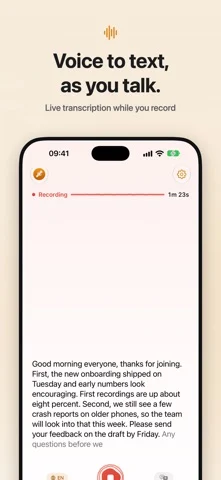
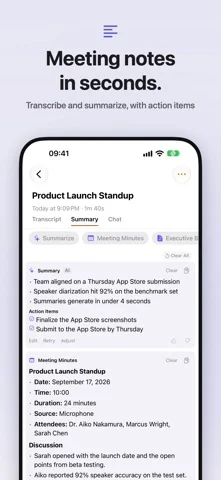
See your words appear as you speak, translate them live, and turn every recording into a summary, notes and answers. Free to try. No account needed. ThinkScribe records and transcribes meetings, lectures, calls and ideas on iPhone, iPhone Duo, iPad, Mac and Apple Watch, and adds a voice keyboard to every app. Recording and transcription happen on your device and work offline. --- WHAT YOU CAN DO Live Text Your words appear while you record, sentence by sentence, on your device and offline. Turn on Your name and ThinkScribe marks it whenever someone says it. Translate Live See each sentence translated under the original while you record. Translate a finished transcript too, and export subtitles in both languages. Translation is provided by Apple. AI for Your Recordings Summary, Meeting Minutes, Executive Brief, Mind Map, Clean Transcript and Translate, one tap each. Chat with a recording or a whole collection and get answers that point to the moment in the transcript and the audio. Ask, in its own tab, is a general assistant. ThinkScribe AI runs on your device; Apple Intelligence is provided by Apple. A Summary When You Stop With Pro, each new recording gets its summary as soon as it is transcribed. Its key moments show up as dots on the player. Voice Keyboard: Type Anywhere Switch to the ThinkScribe keyboard and dictate in any app: Messages, Mail, Notes, WhatsApp, Safari. Your speech is transcribed on your iPhone, even with no connection. Word suggestions and autocorrect follow your language, and with Apple Intelligence you can tidy rough speech with one tap. Record and Transcribe - Record meetings, lectures and ideas with your microphone - Import audio from Voice Memos, WhatsApp, Telegram or any app through the share sheet - Transcription in 90+ languages - Word-synced playback: tap any word to hear that moment Know Who Said What Speaker detection gives every voice its own color. Name a voice once and ThinkScribe can recognize that person in later recordings. Mind Maps, Drawn as a Map Topics branch out from the title. Tap one to jump to where it was said. Mind maps need iPhone 15 Pro or newer, or an iPad with 8 GB of memory or more. Export and Share TXT, SRT, VTT, JSON, Markdown and PDF. Optional iCloud sync keeps your transcripts on all your devices. App Lock ThinkScribe can ask for Face ID, Touch ID or your passcode when it opens. Recording and voice typing keep working while it is locked. --- ON ALL YOUR DEVICES Works with iPhone Duo Closed or open, it fits: the same recordings on both displays. Open iPhone Duo, hold it sideways and choose Side by Side to read a transcript beside its summary. The voice typing keyboard works on iPhone Duo too. iPad On iPad, your Library sits beside the open transcript, with keyboard shortcuts and drag and drop. Apple Watch Record from your wrist. Recordings go to your iPhone for transcription. --- PRICING Free to download. Try the Pro features for free, then choose ThinkScribe Pro: monthly, yearly, or a one-time Lifetime purchase. One purchase covers all your devices. Requires iOS 26 or iPadOS 26 or later. Best on iPhone 12 or newer. --- No account. Your recordings and transcripts are never sent to us. Terms of Use (EULA): https://thinkscribe.ai/en/terms Privacy Policy: https://thinkscribe.ai/en/privacy
Voice Recorder AI: ThinkScribe 在 iPhone Duo 上:常见问题
Voice Recorder AI: ThinkScribe 针对 iPhone Duo 优化了吗?
开发者或商店资料已标明支持 iPhone Duo。
Voice Recorder AI: ThinkScribe 多少钱?
Voice Recorder AI: ThinkScribe 可在 App Store 免费下载。
更多效率应用
查看全部 ›
安静的待办清单与纸质风格计划本,按所需时长给任务分类

任务与项目管理,为 iPhone Duo 的两块屏幕分别优化布局

Readdle 的统一收件箱邮件应用,展开后收件箱与邮件并排显示

Cultured Code 的任务管理器,针对 iPhone Duo 每种姿态重新调整布局

展开 iPhone Duo 即可打开的私密手写风格笔记本

可视化时间线日程规划应用,专门为书本和桌面姿态设计了专注计时器