
Xarra: Text to Speech Reader
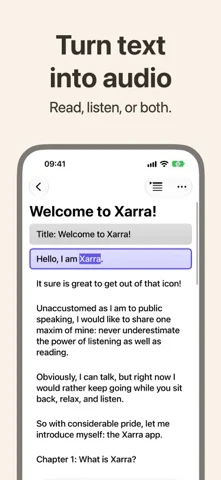
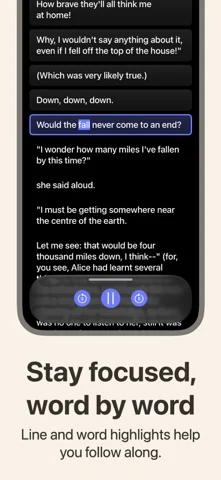
문서와 기사를 음성으로 읽어주고 줄과 단어를 동기화해 강조한다.
Daniel Devesa Derksen-Staats · 생산성 · 무료
iPhone 스크린샷
새로운 기능
버전 2.1 ·
Find the reading you're looking for. • Xarra is ready for iPhone Duo. Your library and playback controls adapt as the available space changes. • On iOS 27, iPadOS 27, macOS 27, and visionOS 27, Xarra 2.1 lets you ask Siri to search your library. Matching documents appear in Xarra's familiar search, ready to read or hear. We've also clarified where to download higher-quality system voices on iPhone, iPad, Mac, and Apple Vision Pro. Thank you for your support, and happy reading! In previous updates: Xarra added library search, Spotlight discovery, four Shortcuts, and automatic voice selection that prefers the best installed voice for a document’s language. Earlier releases brought native Apple Vision Pro support with Focus Mode, Markdown import, and DAISY 3 support.
개발자가 이 내용을 한국어로 제공하지 않았습니다.
App Store 설명개발자가 작성한 내용입니다.
Xarra uses on-device text-to-speech with natural voices, so you can listen to pretty much any text, or read along with synced line and optional word highlighting, and stay focused. Featured in Create with Swift, Weekly Newsletter #101 (Indie App of the Week): "The app developed by Daniel is well integrated into the system. (...) Accessibility runs through the whole experience rather than sitting on top of it." Bring your content in: • Import PDF, EPUB, Markdown, DAISY, plain text, RTF, and more, or browse Project Gutenberg in the app. • Share web articles, blog posts, and documents from Safari and other apps. • Paste text or add a URL. Listen your way: • Optional word highlighting in background or underline styles. • Adjust playback speed and pick a voice for each language. • Choose reading fonts including OpenDyslexic, Atkinson Hyperlegible, and Lexend. Accessibility front and center: • VoiceOver-friendly navigation, Dynamic Type as a design principle, Bold Text, and Increase Contrast support, and more. • Respects your device assistive technology voice and speed settings. Private, lightweight, and offline-friendly: no account, no analytics, no tracking. Your documents stay on your device and sync through your private iCloud when enabled. Terms & Conditions for Xarra: https://accessibilityupto11.com/apps/xarra/terms/ Privacy Policy: https://accessibilityupto11.com/apps/xarra/privacy/
iPhone Duo에서의 Xarra: Text to Speech Reader: 자주 묻는 질문
Xarra: Text to Speech Reader은(는) iPhone Duo에 최적화되어 있나요?
개발자 또는 스토어가 iPhone Duo 지원을 안내합니다.
Xarra: Text to Speech Reader의 가격은 얼마인가요?
Xarra: Text to Speech Reader은(는) App Store에서 무료로 다운로드할 수 있습니다.
다른 생산성 앱
모두 보기 ›
걸리는 시간별로 할 일을 분류하는 차분한 할 일 목록 겸 종이 스타일 플래너

iPhone Duo의 두 디스플레이에 맞춘 레이아웃을 갖춘 작업·프로젝트 관리 앱

펼치면 메시지와 받은 편지함을 나란히 보여 주는 Readdle의 통합 받은 편지함

Cultured Code의 작업 관리 앱, iPhone Duo의 모든 자세에 맞게 재구성

iPhone Duo를 펼치면 열리는, 손글씨 느낌의 프라이빗 노트

북 자세와 탁상 자세에 맞춘 집중 타이머를 갖춘 시각적 타임라인 일일 플래너