
Xarra: Text to Speech Reader
Duo support is reported in the linked sources. The specific fold interaction and real-device behavior have not been independently verified.
Daniel Devesa Derksen-Staats · Productivity · Free
iPhone screenshots
How it uses iPhone Duo
Duo support is reported in the linked sources. The specific fold interaction and real-device behavior have not been independently verified.
What’s New
Version 2.1 ·
Find the reading you're looking for. • Xarra is ready for iPhone Duo. Your library and playback controls adapt as the available space changes. • On iOS 27, iPadOS 27, macOS 27, and visionOS 27, Xarra 2.1 lets you ask Siri to search your library. Matching documents appear in Xarra's familiar search, ready to read or hear. We've also clarified where to download higher-quality system voices on iPhone, iPad, Mac, and Apple Vision Pro. Thank you for your support, and happy reading! In previous updates: Xarra added library search, Spotlight discovery, four Shortcuts, and automatic voice selection that prefers the best installed voice for a document’s language. Earlier releases brought native Apple Vision Pro support with Focus Mode, Markdown import, and DAISY 3 support.
About this app
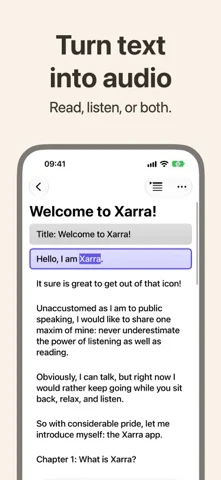
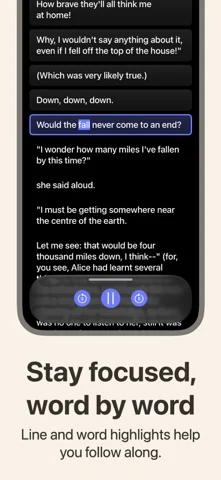
Xarra uses on-device text-to-speech with natural voices, so you can listen to pretty much any text, or read along with synced line and optional word highlighting, and stay focused.
App Store descriptionWritten by the developer.
Xarra uses on-device text-to-speech with natural voices, so you can listen to pretty much any text, or read along with synced line and optional word highlighting, and stay focused. Featured in Create with Swift, Weekly Newsletter #101 (Indie App of the Week): "The app developed by Daniel is well integrated into the system. (...) Accessibility runs through the whole experience rather than sitting on top of it." Bring your content in: • Import PDF, EPUB, Markdown, DAISY, plain text, RTF, and more, or browse Project Gutenberg in the app. • Share web articles, blog posts, and documents from Safari and other apps. • Paste text or add a URL. Listen your way: • Optional word highlighting in background or underline styles. • Adjust playback speed and pick a voice for each language. • Choose reading fonts including OpenDyslexic, Atkinson Hyperlegible, and Lexend. Accessibility front and center: • VoiceOver-friendly navigation, Dynamic Type as a design principle, Bold Text, and Increase Contrast support, and more. • Respects your device assistive technology voice and speed settings. Private, lightweight, and offline-friendly: no account, no analytics, no tracking. Your documents stay on your device and sync through your private iCloud when enabled. Terms & Conditions for Xarra: https://accessibilityupto11.com/apps/xarra/terms/ Privacy Policy: https://accessibilityupto11.com/apps/xarra/privacy/
Xarra: Text to Speech Reader on iPhone Duo: FAQ
Is Xarra: Text to Speech Reader optimized for iPhone Duo?
The developer or App Store listing mentions iPhone Duo support.
What does Xarra: Text to Speech Reader look like on iPhone Duo?
Duo support is reported in the linked sources. The specific fold interaction and real-device behavior have not been independently verified.
How much does Xarra: Text to Speech Reader cost?
Xarra: Text to Speech Reader is free to download on the App Store.
More Productivity apps
See all ›
Calm to-do list and paper-style planner that sorts tasks by how long they take

Task and project management with layouts for both iPhone Duo displays

Unified inbox from Readdle with message and inbox side by side when unfolded

Task manager from Cultured Code, reshaped for every iPhone Duo pose

A private handwriting-style notebook that opens when you unfold iPhone Duo

Visual timeline day planner with a Focus Timer for book and tabletop poses