
markdown notes - Smolpad
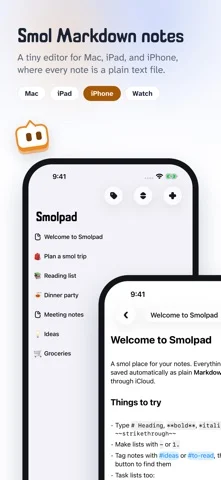
轻量 Markdown 笔记应用,每条笔记都是纯 .md 文件,通过自己的 iCloud Drive 同步。
BaconWorks, LLC · 效率 · 免费
iPhone 截图
新功能
版本 1.3.9 ·
NEW • A Trash for deleted notes. A deleted note goes to the Trash, under your folders. Touch and hold it there (right-click on the Mac) to Restore it or Delete Now; Empty Trash clears it all. The Trash is a folder inside your notes folder, so it syncs, and its notes don't count toward the free plan's ten. • Note history. Smolpad keeps earlier versions of every note, so words lost to a sync, a slip or a change of mind can come back. Choose History on a note to see its versions by date and time and Restore one. A version is kept when you come back to a note, before a large deletion, when the note goes to the Trash, and just before a sync from another device replaces what you wrote. Versions are plain text files in a hidden folder inside your notes folder, so they sync too. History is free. • Home Screen widgets (Pro). Open Note, on iPhone, shows a note of your choice. On iPhone and iPad, Quick Actions is four tiles, New Note, Search, Daily Note and Save Clipboard, and Recently Edited lists the notes you touched last. • Tiny5, a pixel font, in Settings > Editor > Font: every letter on a grid five pixels tall, with its own bold and italic. • Check for changes yourself. Pull the note list down on iPhone and iPad, or click the bubble in the Mac's footer (Command-R), and Smolpad asks your storage for anything new. • Select several notes. On the Mac, Command-click and Shift-click, then right-click to move, pin, archive, export or trash them together. On iPhone and iPad, Select Notes in the Sort menu puts a circle on every row, with Move, Export and Delete at the foot. • Clippings can carry their source (Mac). With Include the page title and link on (Settings > General > Shortcut), text taken from a web page lands in today's note as a quote with a link to the page. • Export a note as Markdown (Pro), beside PDF, HTML and rich text, to keep a copy wherever you like; a selection exports the same way. • Hold Command-Q to quit (Mac). A quick Command-Q puts the panel away; holding it quits. Settings > General > Popup has the switch. • iPhone Duo. Unfolded, the note list sits beside the note as on iPad; folded, Smolpad is the iPhone it always was. Where iOS keeps a bar along the edge, the buttons move into it, Search nearest your thumb. • Anonymous usage statistics. Once a day, Smolpad counts which settings and features are in use, so we can tell what to improve. It never sends your notes or anything you type, and Settings > General > Share anonymous usage statistics turns it off. CHANGED • The panel torn off into a window has the Mac's own window buttons, Minimize, Zoom and Enter Full Screen in its menus, and the formatting bar floating over the note, as on iPad. FIXED • A note edited on another device updates on an iPhone or iPad that is already open (iCloud); it used to wait for a relaunch. • A note's pictures go with it to another folder, to the Trash, and back. • A note you move or rename stays on Dropbox, pCloud and Google Drive the whole time, and hidden folders there, like Obsidian's, are left alone. • Add to Today's Note in the Services menu leaves you in the app you were in (Mac). • Also: Backspace at the start of a task removes its checkbox, a shared web page links to the right address even with parentheses or spaces in it, and the note list's dates keep up.
开发者尚未提供此内容的中文版本。
App Store 简介由开发者撰写。
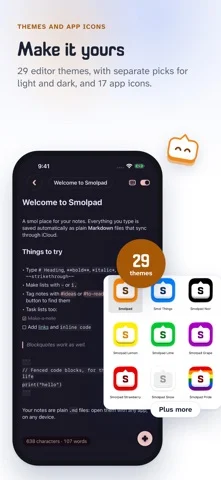
Smolpad is a smol Markdown editor with respect for your files. Every note is a plain .md file you can open with any app, on any device, forever. Your files are your own. No database. No lock-in. No bloat. Just a tiny, fast home for your notes on Mac, iPhone, and iPad. WRITE IN MARKDOWN, BEAUTIFULLY • Syntax dims as you type, or hides away entirely with one tap • Task lists become real checkboxes. Checkboxes that check. • Headings, bold, italic, code, quotes, and tables, styled as you write • A formatting bar for common touches, plus full keyboard shortcuts • Pictures too: drag or paste one in, resize it by its corner, and it lives as a plain file beside the note YOUR FILES, ANYWHERE • Notes sync through your own iCloud Drive, included free • Open your notes folder in Finder or Files any time • Organize with folders, pins, and instant search • A Trash for deleted notes, and a history of every note's earlier versions • Find notes in Spotlight, and open them with Siri or Shortcuts • Your notes never leave your devices except to your own cloud SMOL ON PURPOSE • On the Mac, Smolpad lives in your menu bar, one hotkey away • Tear off a note into its own window when you want to stay a while • On iPhone and iPad, it opens fast and stays out of your way • Eight hand-picked fonts and a clean, quiet interface MAKE IT YOURS WITH SMOLPAD PRO • Unlimited notes (the free tier includes ten) • Dropbox, pCloud, or Google Drive sync, in a folder that belongs to you • Export to PDF, HTML, or rich text, and print • Home Screen widgets on iPhone and iPad, Lock Screen widgets on iPhone, and Smolpad on Apple Watch • Twenty-nine editor themes, from Tokyo Night to Catppuccin • Seventeen app icons and the full menu bar icon set Smolpad Pro is available as a monthly or yearly subscription, or a one-time lifetime purchase. The free tier is a real notes app, not a trial. Made by a smol team that believes plain text outlives everything. Terms of Use: https://www.apple.com/legal/internet-services/itunes/dev/stdeula/ Privacy Policy: https://smolpad.com/privacy
markdown notes - Smolpad 在 iPhone Duo 上:常见问题
markdown notes - Smolpad 针对 iPhone Duo 优化了吗?
开发者或商店资料已标明支持 iPhone Duo。
markdown notes - Smolpad 多少钱?
markdown notes - Smolpad 可在 App Store 免费下载。
更多效率应用
查看全部 ›
安静的待办清单与纸质风格计划本,按所需时长给任务分类

任务与项目管理,为 iPhone Duo 的两块屏幕分别优化布局

Readdle 的统一收件箱邮件应用,展开后收件箱与邮件并排显示

Cultured Code 的任务管理器,针对 iPhone Duo 每种姿态重新调整布局

展开 iPhone Duo 即可打开的私密手写风格笔记本

可视化时间线日程规划应用,专门为书本和桌面姿态设计了专注计时器