
markdown notes - Smolpad
Duo support is reported in the linked sources. The specific fold interaction and real-device behavior have not been independently verified.
BaconWorks, LLC · Productivity · Free
iPhone screenshots
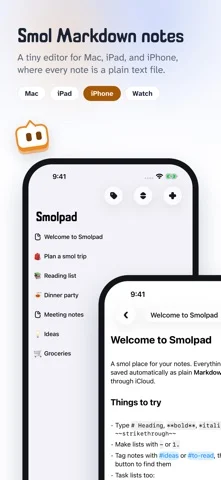
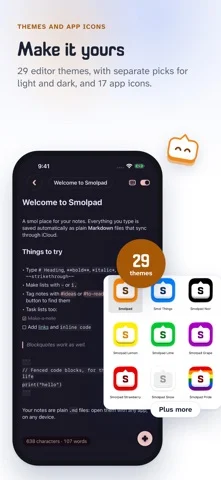
How it uses iPhone Duo
Duo support is reported in the linked sources. The specific fold interaction and real-device behavior have not been independently verified.
What’s New
Version 1.3.9 ·
NEW • A Trash for deleted notes. A deleted note goes to the Trash, under your folders. Touch and hold it there (right-click on the Mac) to Restore it or Delete Now; Empty Trash clears it all. The Trash is a folder inside your notes folder, so it syncs, and its notes don't count toward the free plan's ten. • Note history. Smolpad keeps earlier versions of every note, so words lost to a sync, a slip or a change of mind can come back. Choose History on a note to see its versions by date and time and Restore one. A version is kept when you come back to a note, before a large deletion, when the note goes to the Trash, and just before a sync from another device replaces what you wrote. Versions are plain text files in a hidden folder inside your notes folder, so they sync too. History is free. • Home Screen widgets (Pro). Open Note, on iPhone, shows a note of your choice. On iPhone and iPad, Quick Actions is four tiles, New Note, Search, Daily Note and Save Clipboard, and Recently Edited lists the notes you touched last. • Tiny5, a pixel font, in Settings > Editor > Font: every letter on a grid five pixels tall, with its own bold and italic. • Check for changes yourself. Pull the note list down on iPhone and iPad, or click the bubble in the Mac's footer (Command-R), and Smolpad asks your storage for anything new. • Select several notes. On the Mac, Command-click and Shift-click, then right-click to move, pin, archive, export or trash them together. On iPhone and iPad, Select Notes in the Sort menu puts a circle on every row, with Move, Export and Delete at the foot. • Clippings can carry their source (Mac). With Include the page title and link on (Settings > General > Shortcut), text taken from a web page lands in today's note as a quote with a link to the page. • Export a note as Markdown (Pro), beside PDF, HTML and rich text, to keep a copy wherever you like; a selection exports the same way. • Hold Command-Q to quit (Mac). A quick Command-Q puts the panel away; holding it quits. Settings > General > Popup has the switch. • iPhone Duo. Unfolded, the note list sits beside the note as on iPad; folded, Smolpad is the iPhone it always was. Where iOS keeps a bar along the edge, the buttons move into it, Search nearest your thumb. • Anonymous usage statistics. Once a day, Smolpad counts which settings and features are in use, so we can tell what to improve. It never sends your notes or anything you type, and Settings > General > Share anonymous usage statistics turns it off. CHANGED • The panel torn off into a window has the Mac's own window buttons, Minimize, Zoom and Enter Full Screen in its menus, and the formatting bar floating over the note, as on iPad. FIXED • A note edited on another device updates on an iPhone or iPad that is already open (iCloud); it used to wait for a relaunch. • A note's pictures go with it to another folder, to the Trash, and back. • A note you move or rename stays on Dropbox, pCloud and Google Drive the whole time, and hidden folders there, like Obsidian's, are left alone. • Add to Today's Note in the Services menu leaves you in the app you were in (Mac). • Also: Backspace at the start of a task removes its checkbox, a shared web page links to the right address even with parentheses or spaces in it, and the note list's dates keep up.
About this app
Smolpad is a smol Markdown editor with respect for your files. Every note is a plain .md file you can open with any app, on any device, forever. Your files are your own.
App Store descriptionWritten by the developer.
Smolpad is a smol Markdown editor with respect for your files. Every note is a plain .md file you can open with any app, on any device, forever. Your files are your own. No database. No lock-in. No bloat. Just a tiny, fast home for your notes on Mac, iPhone, and iPad. WRITE IN MARKDOWN, BEAUTIFULLY • Syntax dims as you type, or hides away entirely with one tap • Task lists become real checkboxes. Checkboxes that check. • Headings, bold, italic, code, quotes, and tables, styled as you write • A formatting bar for common touches, plus full keyboard shortcuts • Pictures too: drag or paste one in, resize it by its corner, and it lives as a plain file beside the note YOUR FILES, ANYWHERE • Notes sync through your own iCloud Drive, included free • Open your notes folder in Finder or Files any time • Organize with folders, pins, and instant search • A Trash for deleted notes, and a history of every note's earlier versions • Find notes in Spotlight, and open them with Siri or Shortcuts • Your notes never leave your devices except to your own cloud SMOL ON PURPOSE • On the Mac, Smolpad lives in your menu bar, one hotkey away • Tear off a note into its own window when you want to stay a while • On iPhone and iPad, it opens fast and stays out of your way • Eight hand-picked fonts and a clean, quiet interface MAKE IT YOURS WITH SMOLPAD PRO • Unlimited notes (the free tier includes ten) • Dropbox, pCloud, or Google Drive sync, in a folder that belongs to you • Export to PDF, HTML, or rich text, and print • Home Screen widgets on iPhone and iPad, Lock Screen widgets on iPhone, and Smolpad on Apple Watch • Twenty-nine editor themes, from Tokyo Night to Catppuccin • Seventeen app icons and the full menu bar icon set Smolpad Pro is available as a monthly or yearly subscription, or a one-time lifetime purchase. The free tier is a real notes app, not a trial. Made by a smol team that believes plain text outlives everything. Terms of Use: https://www.apple.com/legal/internet-services/itunes/dev/stdeula/ Privacy Policy: https://smolpad.com/privacy
markdown notes - Smolpad on iPhone Duo: FAQ
Is markdown notes - Smolpad optimized for iPhone Duo?
The developer or App Store listing mentions iPhone Duo support.
What does markdown notes - Smolpad look like on iPhone Duo?
Duo support is reported in the linked sources. The specific fold interaction and real-device behavior have not been independently verified.
How much does markdown notes - Smolpad cost?
markdown notes - Smolpad is free to download on the App Store.
More Productivity apps
See all ›
Calm to-do list and paper-style planner that sorts tasks by how long they take

Task and project management with layouts for both iPhone Duo displays

Unified inbox from Readdle with message and inbox side by side when unfolded

Task manager from Cultured Code, reshaped for every iPhone Duo pose

A private handwriting-style notebook that opens when you unfold iPhone Duo

Visual timeline day planner with a Focus Timer for book and tabletop poses