
Nashville Trainer
Learn the Nashville Number System with drills, ear training and number charts for any key.
Anthem Visuals KC LLC · Reading & News · Free
iPhone screenshots
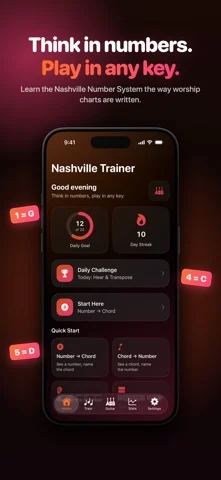
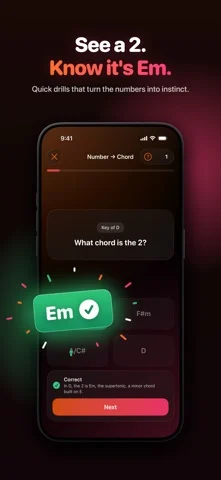
What’s New
Version 3.0.3 ·
Share your progress, free for everyone. Animated cards for today's Daily Challenge, your streak, your week, your keys, your personal bests and your newest badge, straight to your Instagram or Facebook story, X, Photos or anywhere else. 30 badges to earn, 14 of them new: from a 3-day streak to a perfect Daily Challenge and 80% in all 12 keys. Stats, redesigned. Today up top, then your last 7 days, Leaderboards and badges, personal bests, all-time figures and a practice calendar. Real instruments. Questions play on a recorded grand piano, electric piano or acoustic guitar. Practice that stays fresh. Fewer repeats, misses come back a few questions later, and some questions are asked a new way. Battle Ready. Get a notification when someone's looking for a Battle, or race a ghost when nobody is. Leaderboards are one tap from Home and rank everyone who played in the last 7 days. A cleaner look throughout, plus bug fixes and improvements.
App Store descriptionWritten by the developer.
Play any song in any key. Nashville Trainer teaches the Nashville Number System, the language worship teams and session musicians use to call chords as numbers. Instead of memorizing chords for every key, you learn to think in numbers. Once it clicks, you can read a number chart, follow the band, transpose on the fly when the leader changes key, and play by ear with confidence. WHAT YOU GET • Visual drills that connect numbers to chords and back • Ear training to recognize chords and progressions by sound, with a Slower button when you need it • Song Mode (beta): chart your songs as numbers with the words, paste a chord sheet, or open a ChordPro file, then read it in any key and share it with your band • Setlists: put Sunday's songs in order, each in the key you'll play it that day, practice the whole set at once, and share it with your team in one link • Stage view: the chart big and easy to read on your music stand, a page at a time or the whole song, with a Bluetooth page turner if you have one • A capo helper that turns the letters into the shapes you'll play, with a chord box for each one • Battle (Pro to start, free to join): race up to three friends live through the same questions over Game Center • A Daily Challenge that's the same for everyone, plus in-app leaderboards with a podium for the top three • 16 achievements to earn, from your first session to a 100-day streak • Practice Plans: guided day-by-day paths with a clear goal • Review My Misses: a session of just the questions you've been getting wrong • An interactive fretboard and keyboard to see the numbers in any key • MD Mode, which simulates a music director calling changes on a Sunday morning, with an optional Beat the Clock timer • Expert Mode, where you build every chord by hand with no multiple choice • Extended Qualities: sus, maj7, m7, and the other color chords worship runs on • Progress tracking with accuracy, streaks, and focus areas • Widgets for your Home Screen and Lock Screen, practice reminders, and Siri: ask it to practice a song, review your misses, or check your streak • iCloud sync, so a new iPhone picks up right where you left off • Made for iPhone Duo: open it and a chart reads like two pages of a book • In English, Spanish, Portuguese, and German • Multiple instrument sounds and color themes BUILT FOR WORSHIP MUSICIANS The app uses the real conventions worship teams rely on, including the 5/7 walk-up that players use in place of the diminished 7. Guitar, keys and bass players all practice the same numbers on their own instrument. Your setlist, your keys, your capo, all ready for Sunday. FREE TO START Six core practice modes are free forever, along with the Daily Challenge and its leaderboard, achievements, your first song in Song Mode (with stage view, the capo helper, and ChordPro), the starter Practice Plan, widgets, and iCloud sync. Upgrade to Pro once (no subscription) to unlock all twelve keys, Keys and Bass modes, Intermediate, Advanced, and Master difficulty, MD and Expert modes, Extended Qualities, unlimited songs, setlists, Review My Misses, every Practice Plan, Key Practice, the full stats dashboard, progress sharing, and every theme. No ads. No account to create. Your practice, songs and settings stay on your iPhone and in your own iCloud, where only you can see them. Your lyrics go to someone else only when you choose to share them.
Nashville Trainer on iPhone Duo: FAQ
Is Nashville Trainer optimized for iPhone Duo?
The developer or App Store listing mentions iPhone Duo support.
How much does Nashville Trainer cost?
Nashville Trainer is free to download on the App Store.
More Reading & News apps
See all ›
Simulates real paper folding: drag fold lines freely or follow guided steps to fold a crane, plane and chick.

Schedules flashcards by how much of the answer you revealed, without rating difficulty.

An RSS reader with built-in summaries that reshapes as the iPhone Duo folds

RSS and news reader that switches layouts as you fold and unfold

Reads and narrates 26 classic books with a story world shown beside each page.

A talking creature dex that reads entries aloud and scans toys with the camera.