
NewsNinja: feeds dashboard
Combines RSS, YouTube, Reddit, podcasts and social feeds into one personalized reader.
Timelabs Ltd · Reading & News · Free
iPhone screenshots
What’s New
Version 3.2.1 ·
Newsninja 3.2 is here! • Email support: read your inbox right inside Newsninja, in read-only mode. IMAP accounts are supported today, with Gmail coming soon. • Inline translation: translate articles as you read. Choose your preferred language in Settings. • On-device AI: on supported devices, summaries and translations of articles and emails can run entirely on your device for extra privacy. • Plus lots of improvements and fixes all around. For the full list of what's new in Newsninja 3, read our blog post: ainews.ninja/blog/introducing-newsninja-3
App Store descriptionWritten by the developer.
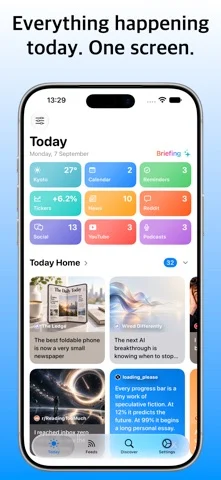
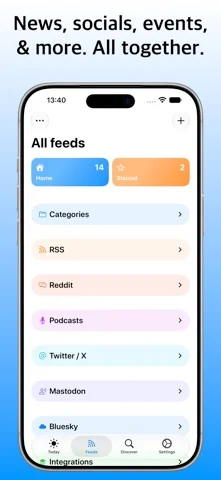
Your news, podcasts, videos, and social feeds. One app, your way. NewsNinja brings RSS feeds, YouTube channels, Reddit, podcasts, X (Twitter), Mastodon, Bluesky, Substack, Medium, and Hacker News together in a personalized news reader. Catch up on the stories you care about, listen to your favorite shows, and save time with AI summaries. No ads. No account required. Just the sources you choose, with the freedom to make your feed your own. YOUR DAY AT A GLANCE Make Today your personal dashboard, with the latest news, videos, podcasts, and social posts alongside your calendar events, due and overdue reminders, weather forecasts, and crypto prices. Track your favorite coins with two years of price history. Choose your sections, change their order, and pick the layouts that work for you. ALL YOUR SOURCES, TOGETHER Follow websites and blogs through RSS, watch YouTube channels, browse subreddits, and keep up with Hacker News. Follow accounts on X, Mastodon, and Bluesky without signing in to those networks. Read their posts alongside your other feeds, without needing to post or participate. PODCASTS, WITH MORE WAYS TO CATCH UP Listen to episodes with a built-in player that stays within reach as you browse. Download podcasts for offline listening, generate transcripts, search within an episode, or read along without audio. Get the main points with AI summaries. LESS TIME CATCHING UP Summarize articles, YouTube videos, podcasts, and Reddit discussions with AI. Choose from three summary styles to suit how much detail you want. Translate articles and news into your preferred language. FACT CHECKING & LEARN MORE Explore the claims behind a headline with AI-assisted fact checking for articles, YouTube videos, and Reddit threads. Use Learn More to explore a topic further and add context to what you're reading. READ WITHOUT THE CLUTTER Reader Mode removes distracting page elements for a clean reading experience. Adjust fonts, text size, reader styles, and themes to make long articles comfortable to read. ONE STORY, FEWER REPEATS Intelligent grouping brings articles about the same story together, helping you spot overlapping coverage and avoid reading the same news repeatedly. Choose between grouping algorithms to suit your feeds. FOLLOW THE CONVERSATION Browse Reddit links, images, and videos, read full comment threads, and catch up on Hacker News discussions. Summarize lengthy Reddit conversations to get the key points faster. A FEED THAT FEELS LIKE YOURS Organize sources into categories, customize your sidebar, and choose from card and list layouts. Mute unwanted topics with keyword filters and star articles to read later. DAILY BRIEFING & NEWS OVERVIEW Get a personalized daily briefing that brings together your calendar events, weather, financial updates, reminders, and news in one concise summary. Catch up on the stories across your feeds with News Overview, so you can see the bigger picture without opening every article. DISCOVER SOMETHING WORTH FOLLOWING Search for RSS feeds, subreddits, podcasts, YouTube channels, and Substack publications in one place. Explore curated feeds by topic and country, or import your existing subscriptions with OPML. Guided setup helps you get started with your feeds and integrations. STAY IN THE LOOP Get notifications about noteworthy stories, so you can catch up even when you're away from your feed. AT HOME ON YOUR APPLE DEVICES Read on iPhone, iPad, and Mac, with iCloud sync to keep your experience connected across devices. Privacy policy: https://ainews.ninja/privacypolicy Terms and conditions: https://ainews.ninja/terms
NewsNinja: feeds dashboard on iPhone Duo: FAQ
Is NewsNinja: feeds dashboard optimized for iPhone Duo?
The developer or App Store listing mentions iPhone Duo support.
How much does NewsNinja: feeds dashboard cost?
NewsNinja: feeds dashboard is free to download on the App Store.
More Reading & News apps
See all ›
Simulates real paper folding: drag fold lines freely or follow guided steps to fold a crane, plane and chick.

Schedules flashcards by how much of the answer you revealed, without rating difficulty.

An RSS reader with built-in summaries that reshapes as the iPhone Duo folds

RSS and news reader that switches layouts as you fold and unfold

Reads and narrates 26 classic books with a story world shown beside each page.

A talking creature dex that reads entries aloud and scans toys with the camera.