
SignDict
Dictionary and translation app comparing Japanese and American Sign Language with lessons and offline access.
Antonio Chavez · Reading & News · $9.99
iPhone screenshots
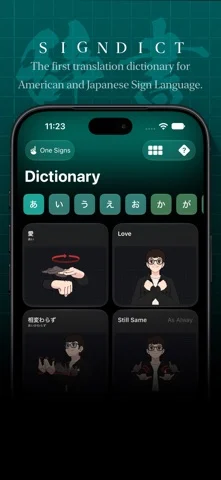
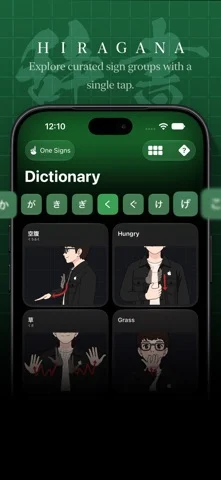
What’s New
Version 2.0.0 ·
- Redesigned the entire あ section with smaller images. - Added 2 previously missing kanji to the あ section. - Added 23 new signs to the dictionary. - Improved and corrected 38 signs in the あ section. - Fixed an issue that caused the navigation bar's segmented control to freeze on both iPhone DUO and standard iPhone layouts. - Added iPhone DUO support.
App Store descriptionWritten by the developer.
The world’s first Japanese Sign Language (JSL) and American Sign Language (ASL) dictionary and translation app. Discover a faster, easier way to learn and compare Japanese Sign Language and American Sign Language. Whether you’re a student, educator, interpreter, traveler, or simply interested in sign language, SignDict provides a modern learning experience designed exclusively for Apple platforms. Built entirely with SwiftUI, SignDict features a beautiful native interface, powerful search, offline access, and cross-platform support for iPhone, iPad, Mac, and Apple Vision Pro. Features • JSL ⇄ ASL Dictionary & Translation Explore thousands of signs with side-by-side translations between Japanese Sign Language and American Sign Language. • Fast Search Search instantly using English, Hiragana, Kanji, or Katakana to quickly find the sign you’re looking for. • Interactive Learning Learn through structured lessons, practice sessions, quizzes, Hiragana charts, Dakuon, Yōon, and more. • Compare Signs Side by Side Understand the differences between American and Japanese Sign Language with an easy-to-read comparison interface. • Offline Access Study anywhere—even without an internet connection. Perfect for travel, flights, classrooms, and everyday learning. • Designed for Apple Platforms Built entirely with SwiftUI and featuring Apple’s native Liquid Glass design for a fast, responsive, and beautiful experience across iPhone, iPad, Mac, and Apple Vision Pro. • Privacy First No accounts. No advertisements. Your learning stays private. • Active Development SignDict is continuously updated with new signs, improved illustrations, enhanced translations, and new learning features. Community Feedback Sign language evolves through its community. If you’d like to request a new sign or report a correction, you can submit feedback directly within the app by going to Settings → Feedback. Many improvements to the Japanese Sign Language dictionary have been made thanks to feedback from members of the Deaf community, helping SignDict become more accurate with every update. Thank you for helping make SignDict better.
SignDict on iPhone Duo: FAQ
Is SignDict optimized for iPhone Duo?
The developer or App Store listing mentions iPhone Duo support.
How much does SignDict cost?
SignDict costs $9.99 on the App Store.
More Reading & News apps
See all ›
Simulates real paper folding: drag fold lines freely or follow guided steps to fold a crane, plane and chick.

Schedules flashcards by how much of the answer you revealed, without rating difficulty.

An RSS reader with built-in summaries that reshapes as the iPhone Duo folds

RSS and news reader that switches layouts as you fold and unfold

Reads and narrates 26 classic books with a story world shown beside each page.

A talking creature dex that reads entries aloud and scans toys with the camera.